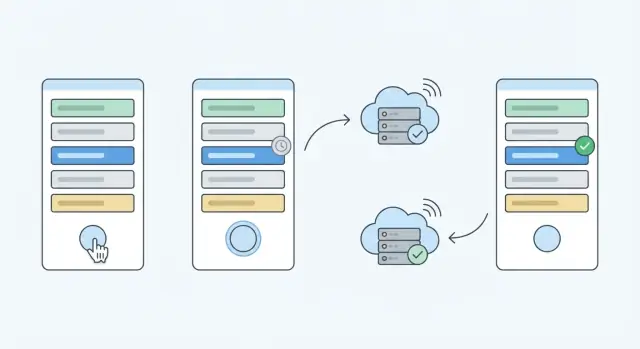
What optimistic UI means and why data drift happens
Optimistic UI in React means you update the screen as if a change already succeeded, before the server confirms it. Someone clicks Like, the count jumps right away, and the request runs in the background.
That instant feedback makes an app feel fast. On a slow network, it’s often the difference between “snappy” and “did it work?”
The tradeoff is data drift: what the user sees can slowly stop matching what’s true on the server. Drift usually shows up as small, frustrating inconsistencies that depend on timing and are hard to reproduce.
Users tend to notice drift when things “change their mind” later: a counter jumps and then snaps back, an item appears and disappears after refresh, an edit seems to stick until you revisit the page, or two tabs show different values.
This happens because the UI is making a guess, and the server may respond with different truth. Validation rules, deduping, permission checks, rate limits, or another device changing the same record can all change the final result. Another common cause is overlapping requests: an older response arrives last and overwrites the user’s newer action.
Example: you rename a project to “Q1 Plan” and show it immediately in the header. The server trims whitespace, rejects characters, or generates a slug. If you never replace the optimistic value with the server’s final value, the UI looks correct until the next refresh, when it “mysteriously” changes.
Optimistic UI isn’t always the right choice. Be cautious (or avoid it) for money and billing, irreversible actions, role and permission changes, workflows with complex server rules, or anything with side effects the user must explicitly confirm.
Used well, optimistic updates make an app feel immediate, but only if you plan for reconciliation, ordering, and failure handling.
Pick the source of truth for each piece of data
Optimistic UI works best when you separate two kinds of state:
- Server state: what the backend ultimately decides.
- Local UI state: what the user is doing right now on this screen.
Most drift starts when a local guess gets treated like confirmed truth.
A simple rule: if a value has business meaning outside the current screen, the server is the source of truth. If it only affects how the screen behaves (open or closed, focused input, draft text), keep it local.
In practice, keep server truth for things like permissions, prices, balances, inventory, computed or validated fields, and anything that can change elsewhere (another tab, another user). Keep local UI state for drafts, “is editing” flags, temporary filters, expanded rows, and animation toggles.
Some actions are “safe to guess” because the server almost always accepts them and they’re easy to reverse, like starring an item or toggling a simple preference.
When a field isn’t safe to guess, you can still make the app feel fast without pretending the change is final. Keep the last confirmed value, and add a clear pending signal.
For example, on a CRM screen where you click “Mark as paid,” the server might reject it (permissions, validation, already refunded). Instead of instantly rewriting every derived number, update the status with a subtle “Saving…” label, keep totals unchanged, and only update totals after confirmation.
Showing “pending” without confusing users
Good patterns are simple and consistent: a small “Saving…” badge near the changed item, temporarily disabling the action (or turning it into Undo) until the request settles, or visually marking the optimistic value as temporary (lighter text or a small spinner).
Refetch after mutation or patch locally?
If the server response can affect many places (totals, sorting, computed fields, permissions), refetching is usually safer than trying to patch everything. If it’s a small, isolated change (rename a note, toggle a flag), patching locally is often fine.
A useful rule: patch the one thing the user changed, then refetch any data that’s derived, aggregated, or shared across screens.
Model your data so optimistic updates stay safe
Optimistic UI works when your data model keeps track of what’s confirmed versus what’s still a guess. If you model that gap explicitly, “why did this change back?” moments become rare.
Give each item a stable identity (even before the server does)
For newly created items, assign a temporary client ID (like temp_12345 or a UUID), then swap it for the real server ID when the response arrives. That lets lists, selection, and editing state reconcile cleanly.
Example: a user adds a task. You render it immediately with id: "temp_a1". When the server responds with id: 981, you replace the ID in one place, and anything keyed by ID keeps working.
Track “pending vs confirmed” per item, not globally
A single screen-level loading flag is too blunt. Track status on the item (or even the field) that’s changing. That way you can show subtle pending UI, retry only what failed, and avoid blocking unrelated actions.
A practical item shape:
id: real or temporarystatus: pending | confirmed | failedoptimisticPatch: what you changed locally (small and specific)serverValue: last confirmed data (or a confirmedAt timestamp)rollbackSnapshot: the previous confirmed value you can restore
Prefer tiny patches over whole-object replacement
Optimistic updates are safest when you touch only what the user actually changed (for example, toggling completed) instead of replacing the entire object with a guessed “new version.” Whole-object replacement makes it easy to wipe out newer edits, server-added fields, or concurrent changes.
Step by step: a reliable optimistic mutation flow
A good optimistic update feels instant, but still ends up matching what the server says. Treat the optimistic change as temporary, and keep enough bookkeeping to confirm or undo it safely.
Example: a user edits a task title in a list. You want the title to update right away, but you also need to handle validation errors and server-side formatting.
-
Apply the optimistic change immediately in local state. Store a small patch (or snapshot) so you can revert.
-
Send the request with a request ID (an incrementing number or random ID). This is how you match responses to the action that triggered them.
-
Mark the item as pending. Pending doesn’t have to block the UI. It can be a small spinner, faded text, or “Saving…”. The key is that the user understands it isn’t confirmed yet.
-
On success, replace temporary client data with the server version. If the server adjusted anything (trimmed whitespace, changed casing, updated timestamps), update local state to match.
-
On failure, revert only what this request changed and show a clear, local error. Avoid rolling back unrelated parts of the screen.
Here’s a small shape you can follow (library-agnostic):
const requestId = crypto.randomUUID();
applyOptimistic({ id, title: nextTitle, pending: requestId });

try {
  const serverItem = await api.updateTask({ id, title: nextTitle, requestId });
  confirmSuccess({ id, requestId, serverItem });
} catch (err) {
  rollback({ id, requestId });
  showError("Could not save. Your change was undone.");
}
Two details prevent many bugs: store the request ID on the item while it’s pending, and only confirm or roll back if the IDs match. That stops older responses from overwriting newer edits.
Stop stale responses from overwriting newer user actions
Optimistic UI breaks down when the network answers out of order. A classic failure: the user edits a title, edits it again immediately, and the first request finishes last. If you apply that late response, the UI snaps back to an older value.
The fix is to treat every response as “maybe relevant” and apply it only if it matches the latest user intent.
Guard against out-of-order responses
One practical pattern is a client request ID (a counter) attached to each optimistic change. Store the latest ID per record. When a response arrives, compare IDs. If the response is older than the latest, ignore it.
Version checks also help. If your server returns updatedAt, version, or an etag, only accept responses that are newer than what the UI already shows.
Other options you can combine:
- Cancel in-flight requests when a new edit starts.
- Queue edits per item so only one request runs at a time.
- Pause background refetching so it doesn’t overwrite optimistic state mid-edit.
Example (request ID guard):
let nextId = 1;
const latestByItem = new Map();
async function saveTitle(itemId, title) {
const requestId = nextId++;
latestByItem.set(itemId, requestId);
setItems(prev => prev.map(i => i.id === itemId ? { ...i, title } : i));
const res = await api.updateItem(itemId, { title, requestId });
if (latestByItem.get(itemId) !== requestId) return;
setItems(prev => prev.map(i => i.id === itemId ? { ...i, ...res.item } : i));
}
If users can type quickly (notes, titles, search), consider canceling or delaying saves until they pause typing. It reduces server load and lowers the chance of late responses causing visible snaps.
Handling failures without confusing rollbacks
Failures are where optimistic UI can lose trust. The worst experience is a sudden rollback with no explanation.
A good default for edits is: keep the user’s value on screen, mark it as not saved, and show an inline error right where they edited. If someone renames a project from “Alpha” to “Q1 Launch,” don’t snap it back to “Alpha” unless you have to. Keep “Q1 Launch,” add “Not saved. Name already taken,” and let them fix it.
Prefer inline errors over global rollbacks
Inline feedback stays attached to the exact field or row that failed. It avoids the “what just happened?” moment where a toast appears but the UI quietly changes back.
Reliable cues include “Saving…” while in flight, “Not saved” on failure, a subtle highlight on the affected row, and a short message that tells the user what to do next.
Offer retry and undo, but only when they match intent
Retry is almost always helpful. Undo is best for quick actions someone might regret (like archive), but it can be confusing for edits where the user clearly wants the new value.
When a mutation fails:
- Keep the optimistic value visible.
- Disable only what must be disabled (often just the Save action).
- Put Retry near the inline error.
- If you roll back, make it explicit (“Revert change”).
If you must roll back (for example, permissions changed and the user can’t edit anymore), explain it and restore server truth: “Couldn’t save. You no longer have access to edit this.”
Reconciling with server truth after the response
Treat the server response as the receipt, not just a success flag. After the request completes, reconcile: keep what the user meant, and accept what the server knows better.
Refetch vs merge: pick the safer option
A full refetch is safest when the server might have changed more than your local guess. It’s also easier to reason about.
Refetch is usually the better choice when the mutation affects many records (moving items between lists), when permissions or workflow rules can change the result, when the server returns partial data, or when other clients update the same view often.
If the server returns the updated entity (or enough fields), merging can be a better experience: the UI stays stable while still accepting server truth.
Merge server fields you did not edit
Drift often comes from overwriting server-owned fields with an optimistic object. Think counters, computed values, timestamps, and normalized formatting.
Example: you optimistically set likedByMe=true and increment likeCount. The server may dedupe double-likes and return a different likeCount, plus refreshed updatedAt.
A simple merge approach:
- Start from the latest client version (which may include newer edits).
- Patch in server-owned fields (counters, computed values, timestamps).
- Keep user-edited fields if the user changed them after the request started.
Conflict rules: be explicit
When there’s a conflict, decide ahead of time. “Last write wins” is fine for toggles. Field-level merge is better for forms.
Tracking a per-field “dirty since request” flag (or a local version number) lets you ignore server values for fields the user changed after the mutation began, while still accepting server truth for everything else.
Use server validation errors to guide the UI
If the server rejects the mutation, prefer specific, lightweight errors over a surprise rollback. Keep the user’s input, highlight the field, and show the message. Save rollbacks for cases where the action truly can’t stand (for example, you optimistically removed an item the server refused to delete).
Lists, pagination, and other tricky UI cases
Lists are where optimistic UI feels great and breaks easily. One item changing can affect ordering, totals, filters, and multiple pages.
For creates, show the new item immediately but mark it as pending, with a temporary ID. Keep its position stable so it doesn’t jump around.
For deletes, a safe pattern is to hide the item right away but keep a short-lived “ghost” record in memory until the server confirms. That supports undo and makes failures easier to handle.
Reordering is tricky because it touches many items. If you optimistically reorder, store the previous order so you can restore it if needed.
With pagination or infinite scroll, decide where optimistic inserts belong. In feeds, new items usually go to the top. In server-ranked catalogs, local insertion can mislead because the server may place the item elsewhere. A practical compromise is to insert into the visible list with a pending badge, then be ready to move it after the server response if the final sort key differs.
When a temporary ID becomes a real ID, dedupe by a stable key. If you only match by ID, you can show the same item twice (temp and confirmed). Keep a tempId-to-realId mapping and replace in place so scroll position and selection don’t reset.
Counts and filters are also list state. Update counts optimistically only when you’re confident the server will agree. Otherwise, mark them as refreshing and reconcile after the response.
Common mistakes that cause drift and bugs
Most optimistic-update bugs aren’t really about React. They come from treating an optimistic change as “the new truth” instead of a temporary guess.
Updating too much, too soon
Optimistically updating a whole object or screen when only one field changed widens the blast radius. Later server corrections can overwrite unrelated edits.
Example: a profile form replaces the whole user object when you toggle a setting. While the request is in flight, the user edits their name. When the response arrives, your replace can put the old name back.
Keep optimistic patches small and focused.
Leaving “pending” state behind
Another drift source is forgetting to clear pending flags after success or error. The UI stays half-loading, and later logic may treat it as still optimistic.
If you track pending state per item, clear it using the same key you used to set it. Temporary IDs often cause “ghost pending” items when the real ID isn’t mapped everywhere.
Rolling back to the wrong value
Rollback bugs happen when the snapshot is stored too late or scoped too broadly.
If a user makes two quick edits, you can end up rolling back edit #2 using the snapshot from before edit #1. The UI jumps to a state the user never saw.
Fix: snapshot the exact slice you’ll restore, and scope it to a specific mutation attempt (often using the request ID).
Ignoring partial failures and server rewrites
Real saves are often multi-step. If step 2 fails (for example, image upload), don’t silently undo step 1. Show what saved, what didn’t, and what the user can do next.
Also, don’t assume the server will echo back exactly what you sent. Servers normalize text, apply permissions, set timestamps, assign IDs, and drop fields. Always reconcile from the response (or refetch) instead of trusting the optimistic patch forever.
Quick checklist and practical next steps
Optimistic UI works when it’s predictable. Treat each optimistic change like a mini transaction: it has an ID, a visible pending state, a clear success swap, and a failure path that doesn’t surprise people.
Checklist to review before shipping:
- Show a clear pending indicator on the exact thing that changed.
- Give every mutation a unique request ID, and only let the matching response confirm or roll back that change.
- On success, replace temporary client data with the server response (IDs, timestamps, computed fields), then clear pending state.
- On failure, make recovery obvious: restore the previous value when that won’t confuse the user, or keep the edit visible with an inline error and Retry.
- Keep an escape hatch: an easy “force refetch” when you’re not sure the client state is trustworthy.
If you’re prototyping quickly, keep the first version small: one screen, one mutation, one list update. Tools like Koder.ai (koder.ai) can help you sketch the UI and API faster, but the same rule still applies: model pending vs confirmed state so the client never loses track of what the server actually accepted.