

Aug 23, 2025·8 min
What Is Kubernetes, and Why It’s Overkill for Most Projects
Kubernetes is powerful, but it adds real complexity. Learn what it is, when it helps, and simpler options most teams can use instead.
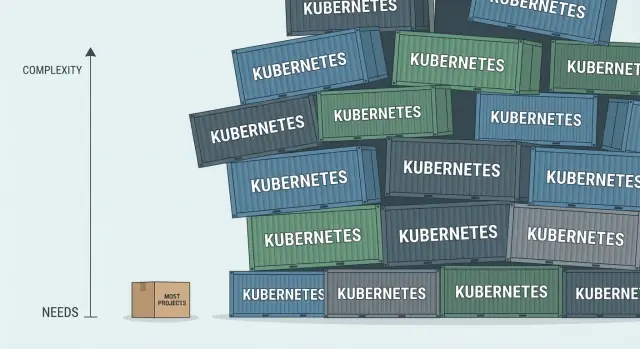
Kubernetes is powerful, but it adds real complexity. Learn what it is, when it helps, and simpler options most teams can use instead.
“Do we really need Kubernetes?” is one of the most common questions teams ask when they start containerizing an app or moving to the cloud.
It’s a fair question. Kubernetes is real engineering: it can make deployments more reliable, scale services up and down, and help teams run many workloads consistently. But it’s also an operating model—not just a tool you “add on.” For a lot of projects, the work required to adopt it outweighs the benefits.
Kubernetes shines when you have multiple services, frequent releases, and clear operational needs (autoscaling, rollouts, self-healing, multi-team ownership). If you don’t have those pressures yet, Kubernetes can quietly become a distraction: time spent learning the platform, debugging cluster issues, and maintaining infrastructure instead of improving the product.
This article isn’t “Kubernetes is bad.” It’s “Kubernetes is powerful—and power has a price.”
By the end, you’ll be able to:
If your goal is “ship reliably with minimal overhead,” this question matters because Kubernetes is one possible answer—not the automatic one.
Kubernetes (often shortened to “K8s”) is software that runs and manages containers across one or many machines. If your app is packaged as containers (for example, with Docker), Kubernetes helps keep those containers running reliably, even as servers fail, traffic spikes, or you roll out new versions.
You’ll hear Kubernetes described as container orchestration. In plain terms, that means it can:
Kubernetes is not a web framework, a programming language, or a magic performance booster. It won’t make an app “good” by itself—it mostly manages how your already-built app runs.
It’s also not required for Docker. You can run Docker containers on a single server (or a few servers) without Kubernetes. Many projects do exactly that and are perfectly fine.
Think of containers as workers.
Kubernetes is that factory manager—valuable at scale, but often more management than a small shop needs.
Kubernetes can feel like a new vocabulary exam. The good news: you don’t need to memorize everything to follow the conversation. These are the objects you’ll hear in almost every Kubernetes discussion, and what they mean in plain English.
If you’ve used Docker, think of a Pod as “a container instance,” and a Deployment as “the system that keeps N instances alive and replaces them during upgrades.”
Kubernetes separates “running the app” from “routing users to it.” Typically, external traffic enters through an Ingress, which contains rules like “requests for /api go to the API Service.” An Ingress Controller (a component you install) enforces those rules, often backed by a cloud load balancer that accepts traffic from the internet and forwards it into the cluster.
Your app code shouldn’t contain environment-specific settings. Kubernetes stores these separately:
Apps read them as environment variables or mounted files.
A Namespace is a boundary inside a cluster. Teams often use them to separate environments (dev/staging/prod) or ownership (team-a vs team-b), so names don’t collide and access can be controlled more cleanly.
Kubernetes shines when you have many moving parts and need a system that keeps them running reliably without constant hands-on babysitting. It’s not magic, but it is very good at a few specific jobs.
If a container crashes, Kubernetes can automatically restart it. If a whole machine (node) fails, it can reschedule that workload onto a healthy node. This matters when you’re running services that must stay up even when individual pieces break.
Kubernetes can run more (or fewer) copies of a service based on load. When traffic spikes, you can add replicas so the system keeps responding. When traffic drops, you can scale back to save capacity.
Updating a service doesn’t have to mean taking it offline. Kubernetes supports gradual rollouts (for example, replacing a few instances at a time). If the new version causes errors, you can roll back to the previous version quickly.
As you add more components, services need to find and talk to each other. Kubernetes provides built-in service discovery and stable networking patterns so components can communicate even as containers move around.
When you’re operating dozens of microservices across multiple teams, Kubernetes provides a shared control plane: consistent deployment patterns, standard ways to define resources, and one place to manage access, policies, and environments.
Kubernetes can feel “free” because it’s open source. But the real price is paid in attention: the time your team spends learning, configuring, and operating it before customers see any benefit.
Even for experienced developers, Kubernetes introduces a pile of new concepts—Pods, Deployments, Services, Ingress, ConfigMaps, Namespaces, and more. Most of it is expressed as YAML configuration, which is easy to copy-paste but hard to truly understand. Small changes can have surprising side effects, and “working” configs can be fragile without strong conventions.
Running Kubernetes means owning a cluster. That includes upgrades, node maintenance, autoscaling behavior, storage integration, backups, and day-2 reliability work. You also need solid observability (logs, metrics, traces) and alerting that accounts for both your app and the cluster itself. Managed Kubernetes reduces some chores, but it doesn’t remove the need to understand what’s happening.
When something breaks, the cause could be your code, the container image, networking rules, DNS, a failing node, or an overloaded control plane component. The “where do we even look?” factor is real—and it slows down incident response.
Kubernetes adds new security decisions: RBAC permissions, secrets handling, admission policies, and network policies. Misconfigurations are common, and defaults may not match your compliance needs.
Teams often spend weeks building the “platform” before shipping product improvements. If your project doesn’t truly need orchestration at this level, that’s momentum you may never get back.
Kubernetes shines when you’re coordinating lots of moving parts. If your product is still small—or changing weekly—the “platform” can become the project.
If the same person building features is also expected to debug networking, certificates, deployments, and node issues at 2 a.m., Kubernetes can drain momentum. Even “managed Kubernetes” still leaves you with cluster-level decisions and failures.
A single API plus a worker, or a web app plus a database, usually doesn’t need container orchestration. A VM with a process manager, or a simple container setup, can be easier to run and easier to reason about.
When architecture and requirements are in flux, Kubernetes encourages early standardization: Helm charts, manifests, ingress rules, resource limits, namespaces, and CI/CD plumbing. That’s time not spent validating the product.
If vertical scaling (a bigger machine) or basic horizontal scaling (a few replicas behind a load balancer) covers your needs, Kubernetes adds coordination overhead without delivering much value.
Clusters fail in unfamiliar ways: misconfigured DNS, image pull errors, disrupted nodes, noisy neighbors, or an update that behaves differently than expected. If nobody can reliably own that operational layer, it’s a sign to keep deployments simpler—for now.
Kubernetes shines when you truly need a cluster. But many teams can get 80–90% of the benefit with far less operational work by choosing a simpler deployment model first. The goal is boring reliability: predictable deploys, easy rollbacks, and minimal “platform maintenance.”
For a small product, one good VM can be surprisingly durable. You run your app in Docker, let systemd keep it alive, and use a reverse proxy (like Nginx or Caddy) for HTTPS and routing.
This setup is easy to understand, cheap, and quick to debug because there’s only one place your app can be. When something breaks, you SSH in, check logs, restart the service, and move on.
If you have a web app plus a worker, database, and cache, Docker Compose is often enough. It gives you a repeatable way to run multiple services together, define environment variables, and manage basic networking.
It won’t handle complex autoscaling or multi-node scheduling—but most early-stage products don’t need that. Compose also makes local development closer to production without introducing a full orchestration platform.
If you want to spend less time on servers entirely, a PaaS can be the fastest path to “deployed and stable.” You typically push code (or a container), set environment variables, and let the platform handle routing, TLS, restarts, and many scaling concerns.
This is especially attractive when you don’t have a dedicated ops/platform engineer.
For background jobs, scheduled tasks, webhooks, and bursty traffic, serverless can reduce cost and operational overhead. You usually pay only for execution, and scaling is handled automatically.
It’s not ideal for every workload (long-running processes and certain latency-sensitive systems can be tricky), but it can remove a lot of infrastructure decisions early on.
Some cloud offerings let you run containers with built-in scaling and load balancing—without managing a cluster, nodes, or Kubernetes upgrades. You keep the container model, but skip much of the platform engineering burden.
If your main reason for Kubernetes is “we want containers,” this is often the simpler answer.
If the real goal is shipping a working web/API/mobile product without turning infrastructure into the main project, Koder.ai can help you get to a deployable baseline faster. It’s a vibe-coding platform where you build applications through chat, with common stacks like React for web, Go + PostgreSQL for backend/data, and Flutter for mobile.
The practical advantage in the Kubernetes conversation is that you can:
In other words: you can delay Kubernetes until it’s justified, without delaying product delivery.
The common thread across alternatives: start with the smallest tool that reliably ships. You can always graduate to Kubernetes later—when complexity is justified by real needs, not fear of future growth.
Kubernetes earns its complexity when you’re operating more like a platform than a single app. If your project is already feeling “bigger than one server,” Kubernetes can give you a standard way to run and manage many moving parts.
If you have several APIs, background workers, cron jobs, and supporting components (and they all need the same deployment, health checks, and rollback behavior), Kubernetes helps you avoid inventing a different process for each service.
When uptime matters and deployments happen daily (or multiple times a day), Kubernetes is useful because it’s built around replacing unhealthy instances automatically and rolling out changes gradually. That reduces the risk of a release taking everything down.
If you can’t predict demand—marketing spikes, seasonal traffic, or B2B workloads that surge at specific hours—Kubernetes can scale workloads up and down in a controlled way, instead of relying on manual “add more servers” moments.
Once several teams are shipping independently, you need shared tooling with guardrails: standard resource limits, access control, secrets management, and reusable templates. Kubernetes supports that kind of platform-style setup.
If you must run across multiple machines (or eventually multiple regions) with consistent networking, service discovery, and policy controls, Kubernetes provides a common set of primitives.
If this sounds like you, consider starting with managed Kubernetes so you’re not also taking on the burden of running the control plane yourself.
Kubernetes isn’t just “a way to run containers.” It’s a commitment to operating a small platform—whether you host it yourself or use managed Kubernetes. The hard part is everything around your app that makes it reliable, observable, and safe.
Even a simple cluster needs working logging, metrics, tracing, and alerting. Without it, outages turn into guesswork. Decide early:
Kubernetes expects an automation pipeline that can reliably:
If your current process is “SSH to a server and restart,” you’ll need to replace it with repeatable deployments.
At minimum, you’ll handle:
Kubernetes doesn’t magically protect your data. You must decide where state lives (databases, volumes, external services) and how you restore:
Finally: who runs this? Someone must own upgrades, capacity, incidents, and being paged at 2 a.m. If that “someone” is unclear, Kubernetes will amplify the pain rather than reduce it.
You don’t have to “choose Kubernetes” on day one. A better approach is to build good habits that work everywhere, then add Kubernetes only when the pressure is real.
Start by packaging your app as a container and getting consistent configuration in place (environment variables, secrets handling, and a clear way to set dev vs. prod settings). This makes deployments predictable even before you touch Kubernetes.
Ship the first production version on something straightforward: a single VM, Docker Compose, or a managed platform (like a container service or app hosting). You’ll learn what your app truly needs—without building a whole platform.
Before scaling, make your system observable and your releases boring. Add basic metrics and logs, set up alerts, and automate deployments (build → test → deploy). Many “we need Kubernetes” moments are actually “we need better deployments.”
If you’re hitting limits, try managed Kubernetes first. It reduces operational burden and helps you evaluate whether Kubernetes solves your problem—or just adds new ones.
Move one service at a time, starting with the most isolated component. Keep rollback paths. This keeps risk low and lets the team learn gradually.
The goal isn’t to avoid Kubernetes forever—it’s to earn it.
Before you commit to Kubernetes, run through this checklist and answer honestly. The goal isn’t to “earn” Kubernetes—it’s to pick the simplest deployment approach that still meets your requirements.
If traffic is steady and modest, Kubernetes often adds more overhead than benefit.
Ask:
If you don’t have clear ownership, you’re buying complexity with no operator.
Kubernetes can reduce certain downtime risks, but it also introduces new failure modes. If your app can tolerate simple restarts and short maintenance windows, prefer simpler tools.
If you can’t point to a clear “must-have” requirement that Kubernetes uniquely satisfies, choose the simplest option that meets today’s needs—and leave room to upgrade later.
Kubernetes is powerful, but many teams reach for it based on assumptions that don’t hold up in day-to-day work. Here are the most common myths—and what’s usually true instead.
Kubernetes can restart crashed containers and spread workloads across machines, but reliability still depends on fundamentals: good monitoring, clear runbooks, safe deployments, backups, and well-tested changes. If your app is fragile, Kubernetes may simply restart it faster—without fixing the root cause.
Microservices are not a requirement for growth. A well-structured monolith can scale surprisingly far, especially if you invest in performance, caching, and a clean deployment pipeline. Microservices also add coordination overhead (network calls, versioning, distributed debugging) that Kubernetes doesn’t remove.
Managed Kubernetes reduces some infrastructure chores (control plane, some node lifecycle, some upgrades), but you still own plenty: cluster configuration, deployments, security policies, secrets, networking, observability, incident response, and cost control. “Managed” typically means fewer sharp edges—not no sharp edges.
Kubernetes is common in larger organizations with dedicated platform engineering teams and complex requirements. Many smaller products succeed with simpler deployment options and add Kubernetes only when scale or compliance truly demands it.
Kubernetes is powerful—but it isn’t “free.” You don’t just adopt a tool; you adopt a set of responsibilities: operating a platform, learning new abstractions, maintaining security policies, handling upgrades, and debugging failures that can be hard to see from the outside. For teams without dedicated platform time, that effort often becomes the real cost.
For most projects, the best starting point is the smallest system that reliably ships your app:
These options can be easier to understand, cheaper to run, and faster to change—especially while your product is still finding its shape.
If you’re unsure, treat this like any other engineering decision:
If you’re building a new product and want to keep the delivery loop tight, consider using a platform like Koder.ai to get from idea → running app quickly, then “graduate” your deployment approach as your real operational needs become clear. When you’re ready, you can export the source code and adopt Kubernetes only if the checklists and pressures truly justify it.
The goal isn’t to avoid Kubernetes forever. It’s to avoid paying the complexity tax before you’re getting real value from it. Start simple, build confidence, and add power only when the problem demands it.
Kubernetes is a system for running and managing containers across one or many machines. It handles scheduling, health checks, restarts, networking between services, and safer deployments so you can operate multiple workloads consistently.
Kubernetes is often overkill when you have a small number of services, predictable traffic, and no dedicated capacity to run a platform.
Common signals include:
Kubernetes typically earns its cost when you truly need cluster-level capabilities, such as:
“Orchestration” is Kubernetes coordinating containers for you. Practically, it means Kubernetes can:
The hidden costs are mostly time and operational complexity, not licensing fees.
Typical costs include:
It reduces some chores, but it doesn’t eliminate operations.
Even with managed Kubernetes, you still own:
It can if you already have the fundamentals in place, but it won’t magically fix a fragile system.
Kubernetes helps with:
You still need fundamentals like monitoring, safe deploy practices, runbooks, backups, and well-tested changes to achieve real reliability.
Good alternatives that often cover most needs with much less overhead include:
A practical evaluation focuses on your real constraints, not hype.
Ask:
A low-risk approach is to build portable habits first, then adopt Kubernetes only when pressure is real: