

Jan 20, 2026·8 min
Volunteer Hours Log for Students: Approvals and Exports
Volunteer hours log for students made simple: what to track, how supervisors approve entries, and how to export totals cleanly for school credit.
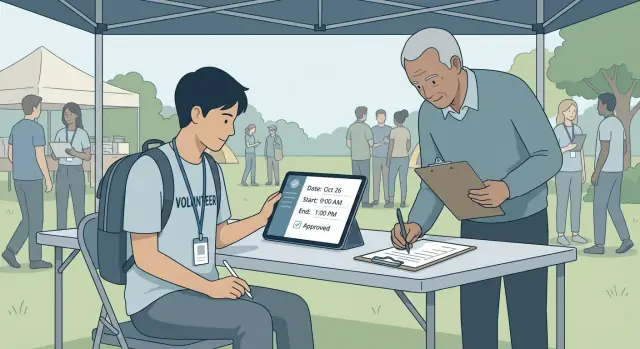
Volunteer hours log for students made simple: what to track, how supervisors approve entries, and how to export totals cleanly for school credit.
A volunteer hours log is a record of the time you spend doing unpaid service for an organization or community project. For students, it works like a timesheet: you note what you did, when you did it, and how long it took.
“Volunteer hours” usually means unpaid work that benefits others. That can include serving at a food pantry, helping at a library event, cleaning up a park, supporting a charity fundraiser, or tutoring younger students through an approved program. It usually does not include chores for your own household, paid internships, or activities done mainly for personal profit.
Schools ask for a volunteer hours log because they need a fair, consistent way to confirm service. Hours can count toward course credit, graduation requirements, service-learning programs, club recognition, scholarships, or awards like honor societies. A clean log also protects everyone if questions come up later.
Most schools also require supervisor sign-off. That’s the adult who can confirm you were there and that the work counted as service (for example, a volunteer coordinator, teacher, coach, or site manager). Without that approval, schools often treat the hours as unverified, even if the work was real.
At minimum, schools expect each entry to show the organization or event name, the date and time (or total hours), a brief description of what you did, and the supervisor’s name and contact info, plus a signature or approval.
When hours are missing details or approval, they’re easy to reject. Common outcomes include being asked to redo the form, having to track down a supervisor weeks later, or losing hours because the time or activity can’t be confirmed. Clean entries from day one save a lot of stress at submission time.
Example: If you help at a Saturday shelter shift, “3 hours” isn’t enough by itself. “Jan 13, 9:00-12:00, sorted donations and stocked shelves, supervised by Maria Lopez” is the kind of entry schools can approve quickly.
A good volunteer hours log for students is boring in the best way: clear, complete, and easy to verify. Someone who has never met you should still understand where you volunteered, what you did, and how the total was calculated.
Start with the details that prove time and place: the date, the organization name (and location if there are multiple sites), your role, your start and end times, and your total hours for that shift. Add your name (and student ID if your school uses one). Then list one supervisor who can verify the shift, including their title and a phone number or email.
Be consistent about what counts as “hours.” Schools differ, and supervisors may assume different rules than your school does.
If your shift is 3:00-6:00 but you took a 15-minute break, note whether the break is included or subtracted. Travel time is also tricky: many schools don’t count driving time to the site, even if you’re transporting supplies. If your school allows travel time, label it clearly as “travel” instead of mixing it into service time.
Add a short description of what you did. One or two sentences is enough. It helps when a counselor reviews your log months later and can’t tell what “Shift #4” means.
Special cases are where logs often get rejected, so leave room for a quick note when something is different. Common examples include group events (name the event and the supervising adult), recurring weekly shifts (still record each date), fundraisers (separate planning hours from event-day hours), training or orientation (label it as training), and make-up hours (explain why they were added).
Example: If you volunteer at a library every Tuesday, an entry could read, “Shelved returns, helped set up children’s reading corner, cleaned tables.” If one week you stayed late for an event, add a note like, “Extra 30 minutes for book sale closing tasks, approved by Ms. Chen, Youth Services Librarian.”
A volunteer hours log can be as simple as a printed sheet or as structured as an app with approvals and exports. The best choice is the one you’ll use consistently all term, without losing signatures or details.
Paper logs are easy to start: print, write, sign. They work well when hours are few and a single adult can sign the same day. The downsides show up later: pages get lost, handwriting is unclear, and totaling hours takes time (with mistakes being common).
Spreadsheets are flexible because you can sort, total, and copy results quickly. They’re also good for extra fields like location, contact info, or service category. The weak spot is verification: a cell can be edited later, and it’s hard to show who approved what unless you have a separate sign-off process.
Apps and online forms are often the easiest when approvals matter. Supervisors can confirm hours quickly, and you can export totals in a format schools accept. The tradeoff is setup: you need clear rules for who can approve, what proof is needed, and how edits are handled.
As a simple rule: use paper if it’s one student, one site, and same-day signatures; use a spreadsheet if you mainly need totals and your school accepts a separate verification step; use an app or form system if you have multiple supervisors, a bigger group, or a school that audits hours. If your school is strict, prioritize an audit trail (date, approver name, and a record of changes).
Decide early whether everyone will use one shared system or keep personal logs. A shared template reduces “format fights” at submission time. For example, if 25 students in a service club all track hours differently, the advisor ends up chasing missing phone numbers, unclear dates, and mismatched totals.
A volunteer hours log works best when everyone knows their role and the timing. Think of it as a three-person handshake: the student records what happened, the supervisor confirms it, and the school coordinator checks that it matches school rules.
The student should create entries right after each shift (or at least weekly). The supervisor approves only shifts they personally oversaw. The school coordinator doesn’t verify every hour on site, but checks that the log is complete, readable, and eligible for credit.
A workflow most schools accept looks like this:
Timing matters more than people expect. If entries sit for a month, supervisors forget details, staff changes happen, and approvals get delayed. Weekly submission keeps memory fresh and makes errors easier to fix.
Set rules for edits after approval and stick to them. A common approach is: students can edit unapproved entries freely, but after approval the supervisor must re-approve any changes. If a supervisor is unavailable, name a backup approver. Any change should include a short reason note.
Multiple supervisors and sites are common. If you volunteer at two different organizations, keep entries separate by site and have each supervisor approve only their shifts. If your school requires one combined total, merge totals at the end, not during approvals.
Example: Maya volunteers at two places. She logs each shift the same day, submits on Sundays, and each supervisor approves by Wednesday. When the school coordinator reviews her hours, everything is already verified.
Treat your log like a receipt: record it while it’s fresh, then get a quick sign-off before anyone forgets.
Create a new entry right after you finish (or at least the same day). Waiting a week makes it easy to lose exact times, mix up dates, or forget what you did.
Write the start and end time you were scheduled for, then adjust to the real times you worked. If you took a break, note it clearly so your total makes sense.
Before you send anything for approval, make sure the entry includes what your school requires. Most rejections happen because one small detail is missing.
Include the date and times (plus break time if relevant), the organization name and location, a short description of your tasks, the supervisor’s name and title with a phone number or email, and your name or student ID if needed.
Keep the description simple and specific. “Sorted donations and restocked shelves” is better than “Helped out.”
Ask for approval soon after the shift, ideally within 24-48 hours. Use whatever method the organization prefers: paper signature, email confirmation, or an app.
If your school needs a specific form, share it early. Don’t show up at the end of the semester with a stack of signatures.
Supervisors may correct times, ask you to clarify what you did, or reject an entry that doesn’t count for credit. If they request a change, update the entry and resend it the same day.
After approval, keep proof. For paper logs, take a clear photo. For digital approvals, save the confirmation message.
Keep one folder (paper or digital) per semester. If you edit anything after approval, make sure the final total matches what the supervisor approved and note why it changed.
Example: If you logged 3.0 hours but your supervisor approved 2.5 because of a 30-minute break, your record should show the corrected total and the reason.
When it’s time to submit, your goal is to make it easy for a school office to verify hours quickly. A strong log doesn’t just show a number. It shows where the hours came from, when they happened, and who approved them.
Start by deciding how you need to total the hours. Many schools accept one grand total, but it helps to also total by date range (this semester or school year) and by organization. These quick breakdowns can also catch mistakes like duplicate entries.
Schools usually want two things: totals and signed confirmation. Confirmation might be a supervisor’s signature on a form, a letter, or an approval record in an app that clearly shows the supervisor’s name.
Choose an export that fits how your school reviews paperwork:
Whatever you export, include an audit trail. Each entry should show who approved it and when, plus any notes. If approvals are verbal, ask the supervisor to sign the final summary so there’s still one clear point of verification.
Put the summary first, then the details. A clean package usually includes a one-page summary (your name, term, grand total, and supervisor contact), a short breakdown by organization and date range, the detailed log entries, and proof of approval (signature or approval history). Add any required school form, filled out exactly as requested.
Example: If Maya volunteers at two places, she submits a PDF summary showing 42 total hours for the fall term, with 18 at the library and 24 at the shelter, followed by the detailed entries with “Approved by Jordan Lee on Oct 12” style timestamps.
A volunteer hours log is simple on purpose. It proves the work happened, when it happened, and who can confirm it. The more extra details you collect, the more you have to protect.
Stick to information a school can use to verify hours: student name and school ID (if required), organization and service dates, start and end times (or total hours) with a short role description, supervisor name and title with a work email or office phone, and the supervisor’s approval.
For minors, be careful with contact details. Avoid home addresses, personal phone numbers, or personal emails for students or supervisors. If a form asks for contact info, use an organization phone number or official email when possible, and keep it somewhere only the student and coordinator can access.
Follow your school’s policy. If it doesn’t say, keep the log and approvals until credit is awarded and any appeal window has passed, then delete or archive them securely. Store paper copies at home, not in a backpack. For digital records, use a strong password and avoid sharing edit access widely.
Honesty is also about clarity. Use real times, not guesses. Describe what you did in plain words. If you took breaks, don’t count them unless the program says they count.
If there’s a disagreement, treat it like paperwork, not a personal fight. Ask what time they have on record and why, share your notes calmly (texts, calendar entries, schedules), and correct the log to match the supervisor’s record. If needed, a program coordinator can confirm the shift list. If your school has a dispute process, follow it.
Clean records protect everyone: students get fair credit, supervisors aren’t pressured, and schools can approve hours with confidence.
Most rejections happen for simple reasons: missing proof, questionable math, or details that are too vague to verify.
A common issue is supervisor info that can’t be checked. “Front desk” or a generic email often isn’t enough. Schools usually want one real person who saw you work and can confirm dates and hours. Record their full name, role, and at least one working phone number or email.
Time errors are another frequent problem. If you round every shift to the nearest hour or try to remember times weeks later, it can look like guessing. Use start and end times, then let the total be what it is. A log with many identical numbers (always 2.0 hours) raises questions.
Don’t mix hours that don’t count. Paid work, class time, study hall, or travel time may be disallowed even if it feels related. If you helped at an event through a class, label it and check your school rules before including it.
Other common problems include duplicating entries for repeating events, editing an entry after approval without getting approval again, and submitting the same hours to two different programs that require unique service.
Waiting until the deadline also causes trouble. When logs come in late, there’s no time to fix missing signatures, clarify dates, or find a replacement approver.
Example: If you volunteer every Saturday, don’t copy and paste last week’s entry and forget to change the date. One repeated date can cast doubt on the whole set.
Before you turn anything in, do a five-minute audit. Most rejections happen because one small detail is missing.
Check that every entry has a date, start time, end time, and a total that matches your school’s format (for example, 2:30 instead of 2.5 if decimals aren’t allowed). Make sure the organization name is spelled the same way every time, and that it matches what the school recognizes. Confirm the supervisor’s full name and contact info are readable and complete, and that approvals are present for the required period.
Then verify that your totals match the school form and cutoff date. Only count hours up to the deadline, and make sure the grand total equals the sum of approved entries.
If something doesn’t match, don’t guess. Check your calendar, texts, or sign-in sheets, then ask the supervisor to confirm while it’s still fresh.
Finally, watch the small presentation details: your name should match school records, dates should be in the required format (some schools want MM/DD/YYYY), and there shouldn’t be scribbles or overwritten numbers. Clean paperwork is easier to trust, and that alone can reduce back-and-forth.
Maya is a 10th grade student who needs 40 approved hours by the end of the semester. She volunteers every Saturday morning at a local food pantry. Her goal is simple: log each shift the same day, get approval weekly, and export totals when she’s done.
Over the semester, her log includes:
By Week 14, she has 41.5 approved hours. That extra 1.5 hours helps because some schools remove time that’s unclear, unapproved, or outside the semester dates.
When she submits, Maya exports only approved entries and includes totals by date range. She checks that names match school records, dates are within the semester window, and every entry has the same supervisor name and an approval timestamp.
Next steps to copy Maya’s approach:
If you want a custom tracker with student entries, supervisor approvals, and clean exports, you can build a simple internal tool on Koder.ai by describing your workflow in chat, then updating it as your school’s requirements change.
A volunteer hours log is a record of your unpaid service time, like a timesheet. It usually includes the date, start and end time, what you did, where you did it, and who supervised you so the school can verify the hours.
Schools use logs to verify service fairly and consistently, especially when hours affect graduation requirements, course credit, awards, clubs, or scholarships. A clear log also helps resolve questions later because it shows who approved each entry and when.
Most schools want the organization or event name, date, location (if relevant), start and end time, total hours, and a brief task description. They also usually require a supervisor’s full name, title, and contact info plus a signature or other approval record.
Usually yes, because schools treat supervisor sign-off as the proof that the service happened and that it qualifies. If you can’t get a signature, ask what alternate proof your school accepts before you assume the hours will count.
Not always, but a good default is to record the exact time you were doing service work and exclude breaks unless the program says breaks count. If your shift includes a break, note it clearly so your total matches what a supervisor would expect.
Most schools do not count travel time to and from the site, even if it feels related. If your school does allow it, log it separately as travel time so it doesn’t look like you inflated service hours.
Household chores, helping a family business for profit, and paid work usually don’t qualify. Hours can also be rejected if the activity is mainly personal benefit rather than community service, so confirm eligibility with your school when you’re unsure.
Log the shift immediately while you remember details, then request approval within 24–48 hours if possible. If you wait weeks, supervisors may forget, staffing may change, and it becomes much harder to correct mistakes.
Paper works when you can get same-day signatures and you won’t lose the sheet, but totals can be messy later. A spreadsheet helps with totals but is weak for verification, while an app or form system is best when you need clear approvals and exports for strict school review.
The most common causes are missing supervisor contact info, vague descriptions, time math that doesn’t add up, and edits after approval without re-approval. Duplicate entries and using the same hours for two different programs can also trigger rejection.