

Dec 30, 2025·8 min
Template-led content marketing for builder products that converts
Learn template-led content marketing for builder products: turn real customer builds into reusable templates and tutorials that rank for high-intent searches.
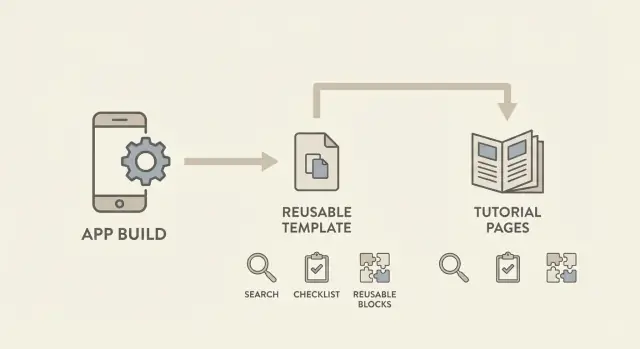
Learn template-led content marketing for builder products: turn real customer builds into reusable templates and tutorials that rank for high-intent searches.
Template-led content marketing means publishing content for people who are ready to build something specific. Not readers browsing ideas, but searchers with a clear goal like "customer portal", "inventory tracker", or "mobile booking app" who want a reliable path to ship.
A template is a repeatable build pattern. It isn't only a nice UI. It's a starting point with the parts people usually have to figure out from scratch: pages, a data model, core logic, and the basic flows that make the app useful.
A "real build" is the source of the template. It means you shipped something that works for a real use case, even if it started small. Real builds have constraints and tradeoffs that demos skip: validation, empty states, roles, basic error handling, and the first features users ask for.
For a builder product like Koder.ai, a real build might be a simple CRM a founder used to track leads, with a dashboard, contact records, tags, and reminders. That's more valuable than a generic "hello world" app because it matches what people search when they have a problem to solve.
Templates and tutorials work best together. The template gives instant progress; the tutorial earns trust and answers the questions that stop people from finishing.
Think of the outputs like this:
Template-led content marketing is one real build turned into repeatable assets that attract high-intent traffic and convert it into builders.
Most builder-product blogs lean on broad ideas: "why you should automate", "how to validate a startup", or "the future of no-code." That content can get views, but it rarely attracts the person who's ready to build something this week.
Builder users don't search for opinions. They search for a path they can follow, plus the missing pieces that make the build actually work: screen layouts, sample data, edge cases, and a finished result they can compare against.
The mismatch is simple. The reader wants steps and assets, but the content gives concepts. Someone searching "customer support portal template" wants a working starting point, not a thought piece about customer experience. If you don't show the flow (pages, fields, roles, emails, errors), it feels like homework.
This is why template-led content marketing often beats generic posts for builder tools. A real template is visible proof of what "done" looks like. It reduces the fear of getting stuck and shortens time-to-value. It also makes the product easier to trust because the build is concrete and repeatable.
High-intent traffic usually comes from specific use cases and constraints, such as a concrete app type (CRM, booking system, internal dashboard), a job-to-be-done ("track leads from a form to a pipeline"), a tech constraint (React admin UI, Go API, PostgreSQL), a workflow detail (roles, approvals, audit logs), or "replace X" intent (spreadsheet to app).
A Koder.ai user isn't searching "how to build faster." They're searching "lead tracking CRM with pipeline stages" or "client portal with login and file uploads." Content built around a finished template meets that intent directly.
Not every build deserves to become a template. The best candidates are the ones people actively search for because they solve a common job and reduce risk.
Start with everyday software, not novelty projects: CRM, appointment booking, internal dashboards, customer portals, inventory trackers, simple help desks. They're boring in a good way: lots of teams need them, and many people want a fast starting point.
Good template topics have clear inputs and outputs. You can point to what goes in (a form, a CSV import, a webhook event) and what comes out (a record created, a status changed, a report updated). Strong topics also have clear structure: roles, permissions, and workflows you can name.
Comparison-intent topics are especially strong. These are searches where the reader is choosing between approaches and wants proof they can ship quickly, like "customer portal vs website members area" or "booking system with deposits." A template that gets someone to a working version fast is a practical answer.
Use one simple bar before you commit: could a new user follow it in one sitting? If the build needs five integrations and lots of hidden rules, it's better as a series later, not your next template.
A quick scoring check:
A "simple sales CRM with pipeline stages" is usually a better template than a "fully custom ERP." In Koder.ai terms, you want a build that can be expressed cleanly in chat prompts, produces a working React + Go + PostgreSQL app quickly, and can be varied by changing fields, roles, and stages without rewriting everything.
Start with a real project that already works. A template isn't "everything you built." It's the smallest useful version that still delivers a clear outcome.
Write a one-sentence promise that says who it's for and what it delivers. Keep it specific enough that the reader can picture using it. Example: "For solo consultants who need to collect leads and track follow-ups in one simple CRM." If you can't say it in one sentence, the build is probably too broad.
List the core screens and flows, then cut aggressively. Aim for 3 to 5 screens that show up in many similar projects. For the CRM example, that might be Contacts list, Contact details, Pipeline board, Add contact form, and Basic settings. Anything optional becomes a later add-on tutorial.
Decide what stays fixed vs configurable. Fixed parts are the spine you don't want to maintain across ten variations (data relationships, key roles, navigation). Configurable parts are what users expect to change (fields, stages, permissions, branding, email copy). Choose defaults so the template works the moment it's copied.
Name the template using the phrase people actually type, not your internal project name. "Simple CRM for consultants" will be found more often than "Apollo v2."
Capture the assets someone needs so they can reuse it without guessing:
With those pieces in place, you have a template that's easy to clone and easy to teach.
Write the tutorial you wish you had on day one. Aim for a quick-start that gets someone from zero to a working result in one sitting (often 30 to 60 minutes). Keep it narrow: one outcome, one template, clear checkpoints.
A repeatable structure:
Then write a second tutorial that starts where the quick-start ends: customization. This is where high-intent readers show up, because they want the template to match their use case. Pick 3 to 5 common changes and cover them as small sections: add a field, change a workflow, set roles, update branding, swap a page layout. If your builder supports it, show how to save the customized version as a new variant so it's reusable.
Add troubleshooting only for real stuck points. Pull them from support chats, comments, and internal testing. Keep it practical: symptom, likely cause, fix. Over time, these fixes compound across many templates.
If you include a "why this works" box, keep it short and return to the steps. Example: "This template works because data, permissions, and views are separated. You can change the UI without breaking access rules."
Finish with a tight FAQ that matches sales and support questions. Five questions is usually enough, written in the words users say, not internal product terms. For a simple CRM template in Koder.ai, that often includes pipeline stages, who can edit deals, importing contacts, changing the look, and exporting source code.
High-intent search traffic comes from people who already know what they want to build. Your job is to match each template to the words they type, then prove quickly that the page delivers.
Assign a small keyword set to every template. It's better to own a tight cluster than chase a big, vague term.
A practical 3 to 5 keyword map:
Write titles in plain language: what it is, who it's for, and the result. "Client Portal Template for Agencies (Share Files + Track Requests)" signals a use case and outcome. "Client Portal Template" is vague.
Structure the page for scanning. Lead with the problem (one paragraph), then show the finished result, then the steps. If you're using a builder like Koder.ai, include the exact prompt you used to create the first version, followed by the edits that made it production-ready.
Decide early what deserves its own page vs staying inside a bigger guide. As a rule: give a specific, reusable query its own page; keep small variations inside the main guide; split when the audience changes (founders vs agencies).
If your product helps people build things, every real build can become a small content library. The trick is to capture decisions while they're fresh, then package the same work as a template, a tutorial, and a few supporting pieces.
Don't wait until the end to write. Keep a running log of what you chose and why, focused on details readers will copy: the goal and starting point, constraints (time, budget, compliance, team size), tradeoffs, exact choices (auth, roles, data model, integrations), and what broke along the way.
If you built a customer portal, note why you picked email login over social login, why you used two roles instead of five, and what you intentionally left out of v1.
Once the build works, treat the output as source material. One build can become a reusable template, a primary tutorial, a short FAQ, a troubleshooting section or post, and a small variation guide (payments, approvals, UI changes). You don't need a pile of new ideas to publish consistently.
Choose a cadence that fits your team: one build per week, or one build per month. Consistency beats volume.
If you're using Koder.ai, plan the build in Planning Mode, save snapshots as you go, and export the final source so the template and tutorial match what readers can reproduce.
Templates go stale fast when the UI or defaults change. Refresh the template and its main tutorial when a core step changes (auth flow, deployment steps, database setup). Keep a simple changelog so you know what to update.
Pageviews aren't the goal. Track intent: signups that start a build, users who copy a template, and users who reach a deployed milestone.
A template that looks perfect on paper often fails in real life. People trust templates that show the messy middle: what the starting point looked like, what you changed, and what the end result became.
Progress shots help because they show the moments where people get stuck, especially around settings like auth, database setup, deployment, and admin configuration.
Assets make the build easier to copy:
If your product is Koder.ai, a simple way to reduce guesswork is to include a copy-paste prompt that generates the first version, then show the edits that turn it into a real app.
Build a simple customer support ticket app.
Must have: login, tickets list, ticket detail, status (open/closed), priority, and an admin view.
Use a PostgreSQL database with seed data (10 example tickets).
Create a clean UI with empty states and validation messages.
Offer small variations that match real needs. Most readers want a version that fits their situation, not yours. Keep the core the same and provide 2 to 3 variants with clear differences, like lite (single user), team (roles and audit log), and paid (billing, limits, receipts).
Be honest about time and scope. Spell out what someone can ship in a day (basic CRUD, simple auth, seeded data) vs a week (roles, email flows, payments, logging, and a rollback plan).
Start with a build that solves a common, urgent problem. Imagine a solo founder who needs a lightweight CRM and a client portal in the same week. They're not shopping for a huge system. They need a place to track leads, log calls, and let clients see invoices and project updates.
They build it in Koder.ai by describing the app in chat: main pages, roles (admin vs client), and the data to store. After the first working version, they capture the reusable structure: tables (clients, deals, tasks, notes, invoices), key screens (pipeline, client profile, client portal), and core flows (add lead, move deal stage, send invoice, client views status).
That single build becomes a small set of repeatable assets: a CRM template ready to clone, a setup tutorial that gets readers to "I can track leads and invite a client," and a customization guide for common edits like adding a pipeline stage, changing fields, or adding a "Documents" tab.
Stability matters. If steps change every time you tweak the app, readers will get stuck. Use snapshots and rollback while you iterate so the tutorial stays consistent: lock a snapshot for "v1 tutorial steps," experiment freely, and roll back if a change breaks a step or a screenshot.
Some readers need ownership or plan to extend the app later. Mentioning that source code export is available makes the path clear: start fast with the template, then hand the code to a developer for deeper custom work.
The fastest way to waste a month is picking a "template idea" with no clear user and outcome. "Business dashboard template" is broad. "Customer support inbox for a Shopify store" tells you who it's for and what success looks like.
Another miss is publishing the template but skipping the setup path. People don't want a clever starting point. They want "working" quickly. If the template needs three key settings, a database table, and one deployment step, show them.
Over-customizing is a quiet trap. You build a beautiful template for one client, then realize nobody else can reuse it without tearing it apart. Keep a default version that solves the main job, then offer small variations (themes, roles, data fields) as optional add-ons.
Naming matters more than most teams expect. If your title uses internal product terms, searchers won't find it. A good test: would a new user type this phrase into Google, or is it something only your team says? On Koder.ai, "Planning Mode" is useful, but the tutorial should still be named around the outcome, like "plan and build a CRM from chat," not the feature name.
Don't let templates rot. Builder products change fast, and outdated steps create support tickets and lost trust. A light maintenance habit helps: rerun the template monthly, update screenshots after UI changes, add a short "last verified" note, refresh keywords based on what users actually search, and deprecate old versions instead of leaving them half-working.
Template-led content marketing works when you can answer three questions quickly: what does this build do, who is it for, and what will the reader have working at the end. If any of those are fuzzy, the template and tutorial will attract the wrong traffic.
Before you publish, check for:
If you only fix one thing, fix the outcome. Readers should be able to test success quickly (submit the form, see the record saved, get the notification).
Pick one recently shipped build and turn it into a repeatable asset. A simple flow that saves time (admin panel, booking page, lightweight CRM) usually beats a complex "everything app."
Outline the build first (pages, data tables, roles, main flow), ship the smallest useful version, then extract the reusable template: settings, sample records, and a couple of variations. From there, turn it into a short series: build, customize, deploy, plus a "common fixes" page.
If you're doing this on Koder.ai, it helps that you can plan in Planning Mode, save snapshots for stable tutorial steps, and export source code when you need to hand off or extend the app. If your team also wants to encourage consistent publishing, Koder.ai's earn-credits and referral programs can reward contributors without turning every post into a sales page.
Keep it simple: one build, one template, one tutorial set. Repeat, and the library grows on its own.
Template-led content marketing is when you publish a working starting point for a specific app people already want to build, plus content that helps them finish it. The template does the heavy lifting (screens, data model, core flows), and the tutorial explains the key decisions so someone can ship without guessing.
A real build is something that works for a real use case, even if it’s small. It includes the unglamorous parts like validation, empty states, basic roles, and error handling, so the template reflects what “done enough to use” looks like.
Pick everyday software that many people search for and can finish quickly, like a simple CRM, booking app, client portal, or inventory tracker. If you can’t describe the outcome in one sentence and get to a first working version in about an hour, it’s usually too broad for your next template.
Keep it to the smallest useful version that delivers a clear outcome. Aim for a handful of core screens and one main workflow, then move everything else into follow-up tutorials so the template stays easy to clone and maintain.
A good quick-start gets someone from zero to a working result in one sitting. Show the first successful checkpoint early (for example, creating a record and seeing it in a list), then add only the steps that prevent people from getting stuck.
Keep the core template stable and offer variations as small, named upgrades that match nearby searches. The trick is to change configurable parts like fields, stages, roles, and page layouts without rewriting the whole structure each time.
Map each template to a tight cluster of phrases that match a specific build goal, like “client portal template” or “lead tracking CRM with pipeline stages.” Then make the page prove the outcome fast by showing what someone will have working and the exact steps to reach it.
Lock a known-good version and only change it when a core step changes, like auth, deployment, or database setup. If the product UI moves, update the template and tutorial together so readers don’t hit mismatched steps that break trust.
Use Planning Mode to outline pages, tables, roles, and the main flow before you build so the result is consistent and teachable. Save snapshots as you go so you can keep tutorial steps stable, roll back breaking changes, and export source code when someone needs ownership or a developer handoff.
Export when you expect deeper customization, a handoff to developers, or stricter ownership requirements. For many users, the template and hosted deployment are enough to ship quickly, but having the source available removes friction for teams that want to extend the app later.