

Dec 06, 2025·8 min
Team snack schedule for kids’ sports: simple plan for parents
Create a team snack schedule for kids’ sports so every game has snacks, allergies are covered, and parents can swap dates easily.
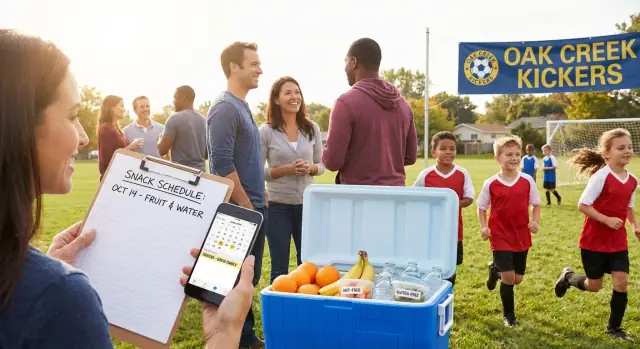
Create a team snack schedule for kids’ sports so every game has snacks, allergies are covered, and parents can swap dates easily.
Snack duty sounds simple until it isn't. Without a plan, it turns into a guessing game: Who's bringing what? Did someone already do snacks twice? Are we doing snacks for every game or just home games? The confusion usually hits right when everyone is already busy getting kids to the field.
Most of the frustration comes from the same predictable problems. Parents forget because the schedule lives in someone's head, or in an old text thread nobody can find. Two families bring the same thing, or nobody brings anything because each person thought it was "the other family's week." Then someone makes a last-minute store run and everyone feels awkward.
A simple team snack schedule fixes this by making four things clear: who, when, what, and how to swap. It also keeps snack duty fair, so the same reliable parents aren't stuck covering extra weeks.
Without a plan, teams usually run into a mix of these issues: nobody owns updates, rules are unclear (home only vs every game, snacks only vs snacks plus drinks), sign-ups get scattered across texts and emails, and you end up with last-minute "Can anyone bring snacks?" messages. Even when people do bring something, you get duplicates or snacks that don't fit the team's needs.
"One place everyone can see" should mean exactly one place. Not "it's in the group chat somewhere" or "check your email from two weeks ago." Pick a shared spot that stays the same all season, and make sure everyone knows to check it first.
The goal isn't perfection. It's a plan that's fair, clear, and easy to change when life happens, so game day feels calmer for everyone.
A team snack schedule only works when everyone is following the same rules. Spend 10 minutes agreeing on the basics before you start assigning names to dates.
Start with the calendar. Count how many dates you're covering and decide what counts. Some teams include only regular-season games. Others include tournament days (which might have two or three games) or even practices. If you treat a tournament day as one "snack shift," say that upfront. If you treat each game separately, be clear about how you'll handle back-to-back games.
Next, look at your family count and the real number of snack turns. If one family has two kids on the team, decide whether they get one turn or two. Most teams keep it simple: one slot per family, regardless of siblings, unless the roster is small and you need more coverage.
Before anyone signs up, agree on a few team-wide rules. Keep them short and practical, like:
That last one matters more than people think. A simple rule works: swap first, then tell the group, then the schedule owner updates the master.
Budget is the final piece, and it prevents awkward comparisons. Give a simple target like "about $10-15 total" or choose a standard option such as water plus fruit. When the expectation is clear, parents stop guessing and the snacks stay consistent week to week.
Once these decisions are written down in one place, building the schedule is usually quick and drama-free.
Snack schedules only work when everyone feels safe eating what shows up. Before you assign a single game, get clear on allergies and food rules so parents aren't guessing at the field.
Ask every family one simple question: "Any allergies or restrictions we should plan around?" Common ones are nuts, gluten, dairy, eggs, sesame, and food dyes. It's also worth noting non-allergy needs: religious restrictions, vegetarian preferences, diabetes, or choking concerns for younger siblings who tag along.
A good default is to avoid the most common allergens even if only one child has an issue. It's easier to follow one rule than to remember exceptions when you're packing at 7 a.m. Many teams choose nut-free by default because it's the hardest allergy to manage casually.
Write down a short policy parents can follow. Keep it boring and consistent.
If you allow sports drinks, set expectations. For many teams, water is the standard and sports drinks are reserved for extreme heat or long tournament days. That helps avoid sugar surprises.
Have a simple plan for unsafe or forgotten snacks. If someone accidentally brings nut granola bars, the coach or a parent lead can quietly remove them from the team pile and switch to a backup (extra bananas, pretzels, or a case of water kept in the team bin). If a snack is forgotten, skip the shaming: note it and move that parent to the next game.
When in doubt, choose the safest option: skip the questionable item and make sure every kid still gets water.
The best team snack schedule isn't the fanciest. It's the one parents can find in 10 seconds while standing in a parking lot with a kid and a water bottle.
A paper sign-up sheet can work for one meeting when everyone is present. It usually fails the moment someone misses that day, the sheet gets lost, or you need to change anything. You end up re-typing it anyway.
A group chat feels easy, but it rarely works as the master plan. Messages get buried under carpools, rainouts, and photos. New parents join late and can't see what was decided without scrolling forever.
A shared calendar or spreadsheet is often the sweet spot: one place, searchable, easy to edit, and familiar to most families. Keep it simple: one row per game with date, opponent, snack parent, and a short note (like "no nuts").
If your group struggles with spreadsheets, consider a single snack schedule page instead. Think of it as one mobile-friendly view that shows the whole season, plus a short rules box at the top. Parents shouldn't have to zoom, hunt through tabs, or guess which version is the latest.
Before you decide, check four basics: can parents open it on a phone without installing something new, does it show the whole season clearly, can one coordinator update it quickly when people swap, and is it obvious when it was last updated?
If you want to go beyond a spreadsheet, some coaches build a simple internal page or tiny web app using a chat-based builder like Koder.ai, then export the source code later if they want to keep it or host it elsewhere.
Set a timer and keep it simple. You're aiming for a plan parents can read in 10 seconds without texting you questions.
Start by pulling the season info from whatever the team already uses (league site, coach email, team app). List every game in order with date, start time, and field or gym. If there are tournaments, decide whether you're listing each game separately or treating the day as one shift, then format it consistently.
Build the schedule in one place with the same structure for every game. Most teams need one volunteer slot per game. Add a second slot only if your team truly needs it.
A simple flow:
If you have 10 games and 10 families, each family takes one game. If you have 12 families, ask for two backup volunteers who can cover a swap without stress. If you have fewer families, decide upfront whether some games will be no-snack days or whether a few families will take a second turn.
Before you share it, scan the first month: nobody should be scheduled twice in a row, and it should be easy to read on a phone.
Most snack plans fail for one reason: people forget, then feel embarrassed, then everyone scrambles. A calm reminder rhythm and a boring swap rule keep things moving.
A good default is two reminders: one about a week before the game, and one the day before. The week-ahead message gives families time to shop or ask for a swap. The day-before reminder catches the busy households who meant to handle it later.
Keep reminders short but specific. Every message should include the basics so nobody has to hunt for details: game date and arrival time (not just start time), field or gym location, expected headcount if siblings are common, and the key snack rules (allergies, drinks, no glass, no gum).
Swaps are where feelings get hurt, so make the process predictable. Pick one person to approve and update the schedule (often the team parent or manager). That way, everyone trusts the schedule.
A swap process that works:
Also plan for the week someone gets sick or stuck at work. Choose one designated sub (or a short list of two) who can grab a simple option like fruit and a case of water. If the sub steps in, the missed parent takes the sub's next assigned game. That keeps it fair.
A snack plan only works if it stays easy. The goal isn't to impress anyone. It's to get kids a quick bite and drink, keep the sideline clean, and avoid last-minute texts.
Choose a short menu and stick to it. Parents stop overthinking, and kids know what to expect.
Quick, not-messy ideas by age group:
If you want a treat option, make it predictable (for example, only after Saturday games). Random treats create expectations fast.
Plan for one item per player plus a couple extras for siblings or a coach who forgot theirs. If your roster is 12 kids, bring 14 portions. For drinks, one per player is usually fine, but on hot days two per player prevents arguing.
Aim for snacks that can be eaten in five minutes and tossed without crumbs everywhere. Avoid frosting, powdered snacks, and anything that melts.
A few non-food extras can save the day. If you rotate them in occasionally, keep it light: napkins or a small roll of paper towels, hand wipes, one trash bag, and a few ice packs in a reusable bag.
Most snack plans fall apart when parents stop trusting that the plan is current. Once that happens, people start asking in the chat, double-buying snacks, or skipping their turn because they thought they swapped.
The biggest trouble spots are consistent:
A common example: if Sam and Priya trade their snack dates by text, the coach might still announce "Sam is up this weekend." That's how you get no snacks, or three bags of chips. Any swap should be reflected in the same place as the schedule, right away.
Here's a simple example for a team of 12 kids playing 10 games. Two families cover each game (one brings a snack, one brings drinks). The rotation is assigned by jersey number order, so it feels neutral and is easy to explain.
| Game | Snack family | Drink family | Notes |
|---|---|---|---|
| 1 | #1 Rivera | #2 Chen | |
| 2 | #3 Patel | #4 Johnson | |
| 3 | #5 Kim | #6 Garcia | |
| 4 | #7 Smith | #8 Nguyen | |
| 5 | #9 Brown | #10 Ali | |
| 6 | #11 Davis | #12 Martinez | |
| 7 | #1 Rivera | #2 Chen | |
| 8 | #3 Patel | #4 Johnson | |
| 9 | #5 Kim | #6 Garcia | |
| 10 | #7 Smith | #8 Nguyen |
Mid-season change: a new family joins at Game 6. Instead of rewriting everything, add them starting Game 7 as a third option, then fold them into the rotation next season. If someone drops out, the simplest fix is to ask for one volunteer make-up slot, then return to the normal rotation.
Swap example: Brown can't do Game 5 and trades with Davis on Game 6. The schedule updates in one place, and both families get a quick note so nobody shows up with double snacks.
Allergy note: if one player is nut-free, the Notes column becomes a rule, not a suggestion. For that game, the snack family brings packaged nut-free items, and the drink family avoids shared coolers with unlabeled treats.
Before you send out your team snack schedule, do a quick pass. Five minutes here saves a week of side texts, missed snacks, and last-minute stress.
Confirm every game date, start time, and location. If the league still moves games around, add a short note like "times may shift" and commit to updating the schedule in the same place.
Make ownership obvious. Each game slot should have one named parent responsible for snacks (even if two families plan to split it). If a slot is empty, label it as unassigned.
Keep allergy and safety rules visible right where parents choose their game. Don't bury it in a long message. A simple label works, like "No peanuts" or "No shared dips." If a rule is strict, add one sentence on why.
Align on reminders and swaps so nobody feels singled out later. A predictable system feels fair.
Finally, name a backup option. Pick one emergency plan for when someone gets sick or forgets, like "coach has a box of shelf-stable snacks" or "team fund covers a quick store run." If the Saturday away game at Lincoln Field changes to Sunday, everyone should know where the update will appear and who confirms the replacement snack parent.
Pick the one tool you'll use and set it up today. The goal is one plan everyone can find quickly on a phone.
Before you send anything, do a quick sanity check: every game has a parent assigned (including playoffs if you know them), names match your roster, and the rules are short enough to read while standing in a parking lot.
Send one clear message that answers three questions: where the schedule lives, what each family brings, and how swaps work. Keep it calm and specific so you don't end up doing snack support all season.
A simple message structure:
Run the first week like a test. If someone forgets, resist adding new rules on the spot. Note what broke (late reminders, unclear portions, confusing swaps) and fix only that.
After the first two games, do a five-minute review with one other parent: are kids actually eating what gets brought, are portions right, and is the rotation fair? Small tweaks like "only water" or "no messy snacks" can cut complaints fast.
If you want a single-page, phone-friendly schedule that parents can edit by chatting, you can prototype a tiny team snack scheduler app with Koder.ai (koder.ai). Describe what you need in plain language, generate a simple web app, and export the source code later if you want to keep it or host it elsewhere.
Pick one master schedule and make it easy to find on a phone. The fastest fix is a shared spreadsheet or calendar that stays in the same place all season, with one person responsible for updates so swaps don’t get lost.
Decide first and write it at the top of the schedule so nobody guesses. A clear default is “home games only” for most seasons, and “every game” only if your team truly expects snacks on travel days too.
One slot per family is the easiest and feels fair for most teams, even if siblings are on the roster. Only switch to “two turns for two kids” if your roster is small and you won’t have enough coverage otherwise.
Set a simple target like “about $10–15 total” or standardize on something like water plus fruit. When the budget is stated up front, it prevents comparison and keeps snack duty from turning into a competition.
Collect allergy and restriction info before the first assignment and choose one team-wide rule that’s easy to follow, like nut-free by default. If your team needs stricter rules, say so clearly so parents can shop once and avoid last-minute field decisions.
A good rule is packaged, individual portions with minimal mess, plus water unless the team has agreed otherwise. If you keep the options predictable, kids eat quickly and the bench stays cleaner.
Plan for one portion per player plus a couple extra for coaches or siblings who show up. For drinks, one per player is usually fine, but in heat or tournament days, two per player prevents arguments and dehydration.
Use two reminders: one about a week before and one the day before. Keep each reminder specific with the game date, arrival time, location, and the key rules like allergies and “water only,” so nobody has to search for details.
Have the person who needs the swap ask in the main group chat, then have the schedule owner update the master schedule within a day. The key is that the schedule changes in the same place everyone checks, not just in private messages.
Skip the blame and use a boring backup plan, like a designated sub who can bring fruit and water, or a small stash of shelf-stable snacks. Then move the missed parent to the next available slot so the rotation stays fair.