

Jan 03, 2026·8 min
Pet groomer client card app for smoother repeat visits
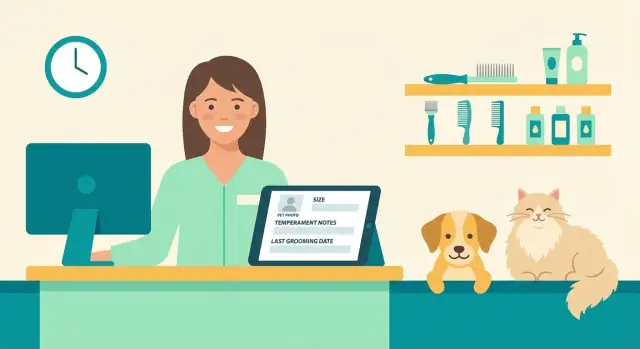
Pet groomer client card app that stores pet size, temperament notes, and last grooming date so every repeat visit is faster and calmer.
Why repeat visits get harder than they should
The first visit is usually fine because everything is fresh. The problems start on visit two or three, when the details live in too many places: a paper intake form in a drawer, a note on someone’s phone, a message thread, and a half-remembered conversation from last month. Add staff changes or rotating groomers, and the “usual routine” turns into guesswork.
When key info is missing, the appointment slows down. You spend extra minutes re-asking the same questions, re-checking coat length, or re-learning how the dog reacts to the dryer. That delay often shows up as a stressed pet, a frustrated owner, and a groomer who feels rushed.
A client card solves this by putting the same core facts in one place, every time. It’s not a full medical record, and it shouldn’t try to replace your vet. Think of it as a working profile for grooming: what you need to keep the visit safe, predictable, and consistent.
Without a clear card, most salons run into the same mess. Notes look different depending on who wrote them, temperament details get lost, “last groom” is unclear so timing and pricing drift, and new staff have no context so pets have to “start over.”
The goal is simple: one card per pet, updated after each visit, so anyone on your team can pick it up and know what to do. If you build a pet groomer client card app (even a basic one), the win isn’t fancy features. The win is consistency: the same info, in the same format, in the same place.
Example: If Bella “hates nail grinding but tolerates clipping with peanut butter,” that should be easy to find in 5 seconds, not rediscovered the hard way.
What to store on a pet client card (the practical version)
A good client card is not a biography. It’s a short, scannable page that helps your team groom the pet safely, match the owner’s expectations, and avoid the “what did we do last time?” guessing.
Start with five essentials, and keep each one brief:
- Pet basics that affect the groom: name, breed (or mix), age, weight range, and a simple size category (small, medium, large, giant). A weight range is often more useful than one number because it changes.
- Temperament and handling notes: triggers (face touch, paws, dryer noise), bite risk, what calms them (slow approach, treats, muzzle, owner present at drop-off), and any health flags that change handling.
- Grooming preferences that prevent rework: clip length, style notes, scissor finish vs clipper, ear and tail preferences, and product choices like hypoallergenic shampoo. If the owner has a “do not” request, write it clearly.
- Visit history basics: last grooming date, add-on services used (deshed, teeth, nails), and a quick note on outcomes (matting level, skin irritation, ran longer than normal). Track no-shows or late pickups only if it changes booking rules.
- Owner contact and pickup rules: best contact method, who can collect the pet, and any timing constraints (call before ready, text only during work).
A small example:
“Bella (medium, 18-22 kg). Hates high-velocity dryer, will try to jump. Calms with towel dry first, then low airflow. Feet sensitive, hold paw close to body. Last visit: 6 weeks ago. #5 body, round face, leave ears natural. Add-ons: nail grind.”
That single note can save time and prevent stress for everyone.
How to write temperament notes that actually help
Temperament notes should answer one question: what should the next groomer do differently because of this pet?
Keep notes short, specific, and tied to a real moment. “Anxious” is vague. “Pulled away when front paws were handled; accepted it after switching to floor grooming” is useful.
A simple note format
A consistent pattern makes notes easy to scan in seconds. One practical structure:
- Trigger: what set the pet off (nail clipper, dryer sound, face scissoring)
- What happened: the exact behavior (lunged, froze, tried to jump)
- What worked: the fix (muzzle, breaks, lick mat, towel wrap, owner present)
- Timing: total groom time, plus why it ran long (matting, extra breaks)
- Consent: what the owner approved (mat removal, short shave, shave-down length)
Add a short “do not” line when needed, and keep it factual: “Do not use high heat dryer near ears” or “Do not lift by front legs to position.” This prevents repeat mistakes, especially when a different staff member handles the pet.
Consistency matters for the basics around the notes, too. Use the same labels for size and coat type every time (for example: Small, Medium, Large; Doodle coat, Double coat, Short smooth). That avoids confusion like “tiny” vs “small” or “curly” vs “poodle mix.”
A realistic example you can drop into grooming client records:
“MED, doodle coat. Last groom 1h 50m (extra breaks). Trigger: dryer. Behavior: trembled, tried to turn head away. Worked: low air + towel dry first, then short dryer bursts with treats. Do not: point dryer at ears. Owner consented to mat removal on chest, no shave-down.”
When staff should update the card (so it stays accurate)
A client card only helps if it matches the pet you see today, not the one from six months ago. The simplest rule: update it at the same moments you already pause to think.
Before the pet arrives, do a 30-second refresh. Confirm the last grooming date, scan for safety notes (bite risk, stress triggers, medical limits), and check whether the previous visit had a plan (shorter session, two groomers, muzzle OK, owner stays nearby).
At check-in, the front desk should glance at size and temperament notes while the owner is there. This is when you catch changes fast: new meds, recent surgery, a bad experience at another salon, or a puppy that’s suddenly in a fear phase.
During the groom, update only what changed. Write in plain language that helps the next groomer make better choices.
A timing routine that works
Use the same four touchpoints every time:
- Pre-arrival: confirm date, warnings, and the last plan
- Check-in: verify coat condition, handling limits, and any new health info
- During groom: record changes (matting level, hotspots, new fear response)
- Check-out: save next-visit timing and home care notes
After check-out, add one last detail while it’s still fresh: what you’d do differently next time (shorter legs trim, avoid dryer on face, towel-dry first).
Between visits, flag pets that need follow-up, like seniors, anxious dogs, or pets with recurring skin issues. A quick reminder to book a quieter time slot can prevent a stressful visit.
Step by step: setting up your client card app workflow
Prototype intake in Planning Mode
Map required fields and note rules before you generate screens and data.
A pet groomer client card app only helps when it’s fast to use. Aim for a card that can be filled in during intake and updated in under a minute after the groom.
1) Start with a simple structure
Split fields into two groups: required (must-have every time) and optional (nice-to-have when there’s time). Keep required fields short so staff don’t skip them.
A practical setup:
- Required: pet name, owner name, owner phone, pet size, coat type, last grooming date
- Optional: temperament notes, behavior tags, clipper length used, allergies, style reference notes
2) Use quick-pick options wherever you can
Free text is slow and inconsistent. Use quick picks for anything that repeats: Small/Medium/Large, coat type (curly, double coat, wire, short), and behavior tags (nervous, mouthy, hates dryer, needs two people for nails). Then add one short sentence when something is unusual.
3) Set editing rules so data stays clean
Decide who edits what. Front desk updates owner contact details and consent items. Groomers update grooming notes, temperament notes, and the last grooming date. If everyone can change everything, mistakes happen and trust drops.
4) Prevent duplicates with a naming rule
Duplicates waste time and create contradictions. Use a clear rule like: Pet Name + Owner Phone. “Bella (555-0142)” is easier to find than “Bella Smith” when a last name changes or is misspelled.
5) Add photos only if they’ll be used
Photos can help for coat condition or a reference style. Keep it minimal: 1-2 pictures max, labeled “before” or “style reference,” and only if your team actually checks them.
Example: After a doodle’s first visit, the groomer tags “hates dryer” and adds: “Start with towel dry, use low airflow.” Next time, the groom starts smoother before the dog even gets nervous.
Designing for the front desk and the grooming table
A client card app has two jobs: help the receptionist check a pet in fast, and help the groomer work safely without hunting for details. If you design it for only one of those spots, people stop using it.
Front desk: speed first, safety always
At check-in, the screen should answer one question in seconds: “Is there anything I must know before this pet goes to the table?” Start with quick search (owner name, pet name, phone), then show essentials first: pet size, breed mix, age, and any alerts.
Use short prompts instead of a long form. Keep the required fields small so staff don’t create blank or sloppy records.
Grooming table: clarity, not clutter
At the table, the groomer needs a clean “last visit summary” and room for quick notes. Make it readable at a glance: big text, high contrast, and tap-friendly controls on a phone or tablet.
A layout that works:
- Last grooming date + what was done (clip length, style notes)
- Temperament highlights (bite risk, fear triggers, handling tips)
- Time savers (preferred shampoo, drying method, tools that worked)
- Add-ons and timing (nail trim, de-shed, teeth, extra brushing)
Managers also need consistency. Build a lightweight check step: spot missing fields, standardize wording, and log training reminders when the same issue keeps popping up (for example, “always use a muzzle for face trimming”).
Finally, plan for Wi-Fi failures. Keep a paper or local “downtime note” template (pet name, time, key incident, services), then assign one person per shift to sync it later so nothing gets lost.
Common mistakes that make client cards useless
A pet groomer client card app only helps if people can trust it in the moment. Most cards fail because they look “complete,” but they don’t remove the frictions that slow down a busy day.
One problem is collecting only basics (name, breed, rabies date) and skipping the details that keep a pet calm. Size notes, handling preferences, noise triggers, and what worked last time are what make repeat visits smoother.
Another issue is rewriting history. If you replace last visit notes with new notes, you lose patterns like “fine until nail trim” or “needs a break after dryer.” Short, dated updates keep context and help you spot what changed.
Formatting matters more than people think. Long paragraphs feel thorough, but nobody reads them while holding a leash and answering the phone. Notes should be quick to scan, with consistent phrasing.
Mistakes that quietly ruin grooming appointment history:
- Treating the card like an address book instead of a stress-reduction tool
- Replacing old notes rather than adding a short, dated update after each visit
- Writing story-length notes instead of tight, skimmable lines (what to do, what to avoid, what worked)
- Allowing duplicate profiles for the same pet, so staff update the wrong record
- Saving sensitive details you don’t need (keep it minimal and relevant to grooming)
Duplicates are especially painful. One profile might say “muzzles,” another says “doesn’t need one,” and now nobody knows which is current. Pick one rule: always search before creating a new pet, and match on owner phone/email plus pet name.
A quick example: “Milo - nervous on arrival” is vague. Better: “2026-01-12: 18 lb, trembles at front desk; take to quiet table, offer 2 min settle time; okay with clippers, dislikes dryer near face.” Short, dated, and actionable.
Quick checklist before you rely on the app daily
Ship a working app quickly
Publish your app for the team without managing servers yourself.
Before you make the app your default, do one dry run on a busy-day scenario: a returning dog arrives early, the owner is in a hurry, and a different groomer is available. If the card helps you act fast and stay calm, you’re close.
Use this check once, then repeat it after a week of real use:
- Core facts are complete: pet size (or weight range), coat type, and the last grooming date are filled in for every active client.
- Temperament notes are useful, not vague: include at least one clear trigger (for example, “hates front paws touched”) and one calming tip (for example, “let him sniff the loop first, then lift slowly”).
- Style preferences are easy to repeat: a preferred cut name plus a simple reference like clip length, guard number, or “leave tail plume.”
- Finding a card is instant: any staff member can pull it up in under 10 seconds using the same search habit (owner name, pet name, or phone). If it takes longer, change naming rules or the search screen.
- Changes get recorded the same way every visit: one small place to note what changed today (new matting, new sensitivity, owner request, product reaction).
If one of these fails, fix the workflow before you go all-in. Even a simple rule like “update notes before checkout” keeps records fresh.
Example: how a client card smooths out a real repeat visit
A new client walks in with a 2-year-old doodle, Miso. On the first visit, the front desk does a quick intake in the pet groomer client card app: weight and size, coat type, clip length requested, and a few clear temperament notes. The groomer adds baseline details after the appointment, including what tools worked, any sensitive spots, and a simple style reference for what the owner means by “teddy bear face.”
Six weeks later, Miso is back. Before check-in, the team sees the last grooming date and knows what to expect. That one detail changes the plan. They book the right amount of time and prep the right brush and comb so the start of the visit feels calm, not rushed.
Miso is also nervous with loud dryers. The card says: “Start in a quiet bay, use breaks, peanut butter on lick mat helps, avoid direct face drying.” So the receptionist assigns Miso to the groomer who’s patient with anxious dogs, and the groom is paced with short pauses. The dog stays under threshold, and the owner notices.
On visit two, the coat is more matted than expected on the belly. The card gets a calm note: where the matting was, what was attempted, what was shaved, and that the owner agreed after a quick call. Next time, nobody has to guess what happened or re-argue it at the counter.
After three visits, patterns become useful: timing (Miso does best every 5 to 6 weeks), add-ons (nail grinding is always requested), behavior (anxiety improves when the same check-in routine is used), coat (belly mats start when the harness rubs), and preferences (owner likes a shorter body before summer).
That’s when grooming client records stop being “notes” and start becoming a smoother, more predictable experience for everyone.
Privacy, access, and keeping records tidy
Standardize your grooming tags
Generate a shared set of coat and temperament tags your team can reuse.
A client card is helpful because it’s detailed. That also means it can cause problems if anyone can open it, or if notes are written in a way you wouldn’t want a pet owner to read.
Start with access. Most shops don’t need everyone to see everything. Limit editing to the people who groom, and limit viewing to the people who need context for scheduling and handoff.
Simple access rules that work for many salons:
- Front desk: view basics (owner contact, vaccinations, pickup notes), edit only contact details
- Groomers: view and edit coat, size, health flags, and temperament notes
- Managers: view all, handle corrections and disputes
- New staff: read only until trained
- Contractors: only the pets they handle that day
Write notes with respect and clarity. Assume an owner may ask to see the record. Use plain facts and observed behavior, not labels. For example: write “paws sensitive during nail trim, did better with peanut butter” instead of “difficult dog.” If something is a safety risk, be specific: “snaps when face is touched, use muzzle with owner approval” is clearer than “aggressive.”
To keep records tidy, build a retention habit. When a pet returns after a long gap, treat the card like a draft: skim it, confirm what’s still true, and delete outdated details. A good rule is to review any card that hasn’t been updated in 6 to 12 months.
Finally, plan for backups and consistency. You don’t want the whole shop dependent on one phone or tablet.
- Export your data on a schedule (monthly is often enough)
- Keep a backup copy stored by the business, not a single employee
- Use snapshots or rollback if your system supports it, so mistakes can be undone
- Use the same note style and access rules across all locations
Next steps: roll it out and improve over time
Start small so the app earns trust fast. Pick 20 regular clients who visit often (and whose pets have a few known quirks). Use the card on every visit for those clients only, then expand once the team feels the difference.
Keep training simple. Give staff three real note examples (one easy, one medium, one high-stress pet) and agree on a shared tag list. When everyone uses the same words, the card becomes readable at a glance instead of a wall of personal writing styles.
A starter tag set:
- Friendly / Cautious / Reactive
- Touch sensitivity (paws, face, tail)
- Triggers (dryer, clippers, other dogs)
- Handling tips (muzzle ok, towel wrap helps, slow approach)
- Safety notes (bite history, escape risk)
Measure whether it’s working with a few simple signals: average check-in time, how often a groomer says “I wish I knew that earlier,” and whether handoffs feel calmer. One fewer surprise per day usually justifies the habit.
If you want to build a custom salon intake form app instead of bending a generic tool to your process, Koder.ai (koder.ai) is a chat-based platform for creating web and mobile apps. For a team-built client card tool, features like source code export and snapshots/rollback can be useful if you want more control over your system as it grows.
Once the basics are solid, upgrade one thing at a time: reminders for overdue grooms or vaccines, pricing add-ons tied to coat condition or extra handling time, and simple reports like no-shows or average groom time.
Keep what works, trim what doesn’t, and review tags and fields regularly so the cards stay useful, not cluttered.