

Nov 16, 2025·8 min
OAuth vs SAML for SSO: what enterprise buyers expect
OAuth vs SAML for SSO explained in plain terms, plus what enterprises ask for, what to build, and how to keep your current login working.
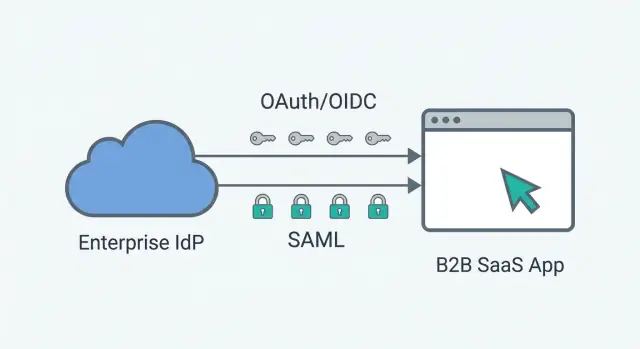
OAuth vs SAML for SSO explained in plain terms, plus what enterprises ask for, what to build, and how to keep your current login working.
SSO becomes urgent the moment a deal moves from a "team trial" to a company roll-out. A buyer might love your product, but security and IT will stall procurement if employees must create new passwords, manage MFA in yet another place, or leave accounts behind when people change roles.
For many enterprises, SSO is less about convenience and more about control. They want one place to enforce login rules, revoke access quickly, and show auditors that identity is centrally managed. That's why the "OAuth vs SAML for SSO" question shows up late in the sales cycle: it's a fast way to check whether you fit their identity setup.
Adding SSO late can break assumptions you already rely on. If your current model is "one email = one user," SSO introduces edge cases like shared aliases, multiple identity providers, or users who must keep both password login and SSO during a migration. If account linking is wrong, people lose access or, worse, get access to the wrong tenant.
SSO also changes onboarding and support. Done well, it reduces password resets and "who owns this account?" tickets. Done poorly, roll-outs stall, admins get angry, and renewals get risky because the product "worked in a trial" but fails on day one of enterprise deployment.
The decision rarely belongs to one person. The buyer wants momentum, security checks risk and audit needs, IT admins need clear setup steps, end users want a smooth login, and support ends up handling lockouts, migrations, and exceptions.
If you build apps on platforms like Koder.ai, it helps to plan for SSO early so you don't have to redesign identity after customers are already active.
SSO (single sign-on) means your customer logs in to your app using their company login, not a separate password you store. They sign in with their work account and access is controlled by company policy.
These are the terms you'll hear on enterprise calls:
When people say "OAuth login," they often mean OpenID Connect (OIDC). OAuth is mainly about authorization (permission to access something). OIDC adds authentication (who the user is), so it can be used for login.
SAML is an older, XML-based SSO standard. Enterprises still use it heavily because it's proven, widely supported by IdPs, and baked into many compliance checklists.
SCIM is not SSO. SCIM is for provisioning: creating, updating, and deactivating users (and sometimes groups) automatically. A common setup is SAML or OIDC for sign-in, plus SCIM so access is added and removed without manual admin work.
Enterprise buyers usually don't start with protocol details. They start with risk and control: "Can we manage access from our identity provider, and can we prove who did what?"
Most enterprise teams want at least one enterprise-friendly option, and many want both:
They'll also ask how setup works: metadata or discovery URL, certificate rotation, and whether IT can self-serve without waiting on your engineers.
The fastest way to lose an enterprise deal is to be vague about offboarding. They will ask what happens when an employee leaves, changes departments, or loses a laptop.
Expect questions like:
A simple scenario they care about: an admin disables a user at 9:02, and by 9:03 that user shouldn't be able to open the app, even if they still have a browser tab open. If you can't explain that flow clearly, expect extra review cycles.
OAuth was originally built for delegated access: letting one system call another system's API without sharing a password. Many teams still use it for that (for example, an integration that reads calendars). For employee login, most products use OpenID Connect (OIDC), which sits on top of OAuth and adds a standard way to prove who the user is.
With OIDC, the common setup is the authorization code flow. Your app sends the user to the company's IdP to sign in. After a successful login, the IdP sends your app back a short-lived authorization code. Your backend exchanges that code for tokens.
The token split that matters:
A practical way to think about OAuth vs SAML for SSO: OIDC is great when you want a modern login that fits web, mobile, and API patterns. SAML is more common when the enterprise wants the classic "sign in to the app" handshake and cares less about API access.
What you store should stay simple: the user's stable identifier (subject), their email (if provided), and the tenant connection they used. What you shouldn't store is the user's password. Also avoid storing long-lived refresh tokens unless you truly need offline API access.
To make this work per customer tenant, you'll need:
Done right, users land back in your app, you validate the tokens, and you create your normal session without rewriting your entire auth model.
SAML lets an enterprise IdP tell your app: "this person has already signed in, here are their details." The IdP sends a SAML assertion, which is basically a signed note that includes who the user is (and sometimes group or role info) plus a short validity window.
To make that note trustworthy, SAML relies on metadata and certificates. Metadata is a small configuration package that describes endpoints and keys. Certificates are mainly used for signing, so your app can confirm the assertion came from the customer's IdP and wasn't changed.
Two identifiers show up in almost every setup:
If either is wrong, login fails even if everything else looks correct.
Real-world SAML is as much operations as code. Plan for tenant-level SAML settings, certificate rotation without downtime, clock skew (even a few minutes can break assertions), and clear errors for admins (not just "invalid response").
A common pattern: the customer admin enables SAML per tenant, then your app verifies the signature, checks that the assertion isn't expired, and maps the email (or NameID) to an existing user or a safe auto-provision rule. In practice, this is the heart of the OAuth vs SAML decision: SAML usually forces you to build stronger admin workflows.
Choosing between OIDC and SAML is mostly about what your buyer already runs. Many B2B apps end up supporting both over time, but you can still make a clean decision per customer and keep your auth system predictable.
OIDC is often smoother for modern apps. It fits browser and mobile apps, plays nicely with APIs, and is typically easier to debug and extend (scopes, token lifetimes, and so on). If your enterprise customer already uses a modern IdP setup and their IT team is comfortable with OIDC, start there.
SAML can be non-negotiable. Many large companies have existing SAML programs and vendor onboarding rules like "SAML only." In those cases, the best approach is straightforward: implement SAML once in a controlled way and keep it isolated from the rest of your login system.
Questions to ask before you commit:
A quick decision guide:
| If the customer says... | Prefer | Why |
|---|---|---|
| "We use Entra ID and want a modern app integration" | OIDC | Better fit for web and API flows |
| "Our policy is SAML only for vendors" | SAML | Required to pass security onboarding |
| "We need both for different subsidiaries" | Both | Common in large orgs |
| "We need custom claims per app" | Either | Both support attribute mapping |
If you support both, keep the rest of your app consistent: one internal user model, one session model, and one set of authorization rules. The SSO method should answer "who is this user and which tenant do they belong to," not rewrite how access works.
Start by defining what "tenant" means in your product. For most B2B apps, SSO is configured per organization or workspace, not per user. That choice drives where you store IdP settings, who can change them, and how users move between workspaces.
Next, choose a login behavior that's predictable. Email domain routing (type email, then redirect if the domain is SSO-enabled) reduces confusion, but you must handle edge cases like contractors and multi-domain companies. A simple "Continue with SSO" button is easier to understand, but users can pick the wrong option.
A safe build order for either OIDC or SAML:
Testing isn't optional. Use a sandbox IdP and a staging tenant with realistic domains. Run happy path and failure cases: expired cert, wrong audience, clock skew, user removed from IdP. Treat SSO rollout like a feature flag.
Platforms like Koder.ai make this kind of iteration easier by supporting snapshots and rollback alongside per-tenant configuration, so a bad change doesn't lock out every customer at once.
SSO isn't just a login button. Security teams will ask about session length, offboarding, and what you can prove when something goes wrong. If you treat SSO as a core part of your auth system (not a bolt-on), you avoid most painful escalations.
Start with session rules. Pick an idle timeout and an absolute session lifetime, and be explicit about what happens when someone closes a laptop and returns tomorrow. With OIDC, refresh tokens can keep sessions alive longer than expected, so set limits (rotation, max age) if you use them. With SAML, browser sessions can live a long time unless you force re-auth.
Logout is another trap. "Single logout" isn't universal. Support local logout reliably, and document that global logout across every app depends on the IdP.
MFA is similar. Enterprises want the IdP to enforce MFA, so your app should accept an authenticated user without prompting again. Still, it's useful to support step-up checks for risky actions (like exporting data or changing billing), because not every IdP policy is perfect.
User provisioning is where access leaks happen. JIT provisioning is convenient, but it can create accounts for anyone who can authenticate. Invite-only is safer but adds admin work. Many teams land on a middle ground: JIT is allowed, but restricted by allowed domains and (optionally) group claims.
Keep SSO configuration behind least-privilege roles. Someone shouldn't need super-admin rights just to rotate a certificate or update an IdP URL.
For support, log enough to trace a single login without storing secrets:
This is the difference between "we can't reproduce it" and fixing an enterprise SSO outage in minutes.
A mid-market company hits procurement and says: "We need SSO before we can sign." That's rarely philosophical. It's a control they need for onboarding, offboarding, and audit.
Now the twist: you're selling to two teams. Team A is happy with OIDC because they use Okta with modern apps. Team B insists on SAML because their legacy tools still rely on it. This is where the OAuth vs SAML question stops being a debate and becomes a rollout plan.
Keep one rule: SSO is a per-tenant login option, not a global replacement. Existing users can still sign in the old way until the tenant admin flips "SSO required."
On first SSO login, you need safe account linking. A clean approach is: match on verified email, confirm the tenant by domain (or an invite), then attach the IdP identity to the existing user. If there's no match, create the user just-in-time, but only if the admin allowed it.
Role assignment is where deals often get stuck. Keep it simple: a default role for new users, plus optional mapping from IdP groups or claims to your roles.
On the admin side, they usually need to configure:
To avoid lockouts during the switch, keep a break-glass admin account outside SSO, run a test mode for the first few logins, and only enforce SSO after at least one confirmed working admin session.
Most SSO incidents aren't caused by the IdP. They happen because your app treats SSO as a single global switch, not a per-customer setting.
A classic failure is missing tenant boundaries. One new IdP config gets saved globally, and suddenly every customer is redirected to the last IdP you touched. Keep IdP settings tied to a tenant, and always resolve the tenant before you start the SSO handshake.
Account matching is the next big trap. If you rely on email alone, you'll create duplicate users or lock real users out when their IdP email differs from the email they used before SSO. Define your merge policy up front: which identifiers you trust, how you handle email changes, and how admins can fix mismatches without engineering help.
Teams also tend to over-trust claims. Validate what you get back: issuer, audience, signature, and that the email is verified (or use a stable subject identifier instead). Accepting the wrong audience or an unverified email is an easy way to grant access to the wrong person.
When something fails, vague errors create long support calls. Give users a clear message, and give admins a diagnostic hint (for example: "Audience mismatch" or "Certificate expired") without exposing secrets.
Time-related issues are worth testing before you ship. Clock skew and certificate rotation break logins at 9am on a Monday.
Five checks that prevent most outages:
SSO is where small assumptions turn into big support tickets. Before you tell an enterprise customer you support it, make sure the basics are true in your product, not just in a demo.
Run through these in a staging environment that mirrors production:
Do one full "bad day" drill: rotate a certificate, change a claim, or break the IdP URL and confirm you can detect it quickly.
Then confirm you have monitoring and alerts for SSO failures (by tenant), plus a rollback plan (feature flag, config revert, or quick deploy) that you've practiced.
Pick a clear starting point. Most enterprise buyers ask for "SAML with Okta/Entra ID" or "OIDC with Google/Microsoft," and you don't want to promise both in week one unless you have the team for it. Decide what you will support first (SAML only, OIDC only, or both) and write down what "done" means for your product and support team.
Before you involve a real customer, create a small internal demo tenant. Use it to rehearse the full flow: enable SSO, test login, lock it down to a domain, and recover access when something goes wrong. This is also where your support playbook gets tested.
Keep an enterprise requirements doc that stays alive. Reviews change over time, and having one place to track what you support prevents one-off promises that later break onboarding.
A simple plan that works in practice:
If you want to move quickly on the product side, you can prototype the settings screens and tenant structure in Koder.ai (koder.ai) and iterate as customer security questionnaires arrive.
Plan for the add-ons that often follow right after SSO: SCIM provisioning, audit log exports, and admin roles with clear permissions. Even if you don't ship them immediately, buyers will ask, and your answer should stay consistent.
Most enterprise teams want centralized control over access. SSO lets them enforce MFA and login rules in their identity provider, remove access quickly when someone leaves, and satisfy audit requirements without relying on your app to manage passwords correctly.
Start with what their identity provider already supports and what their vendor onboarding policy requires. OIDC is often the smoother option for modern web and mobile flows, while SAML is frequently mandatory in larger companies because it’s widely standardized in existing enterprise setups.
OIDC is an authentication layer on top of OAuth that’s designed for login. OAuth alone is mainly about authorizing access to APIs, not proving who the user is. If you’re implementing “Sign in with the company IdP,” you almost always mean OIDC rather than raw OAuth.
No. SSO is about signing users in, while SCIM is about automatically creating, updating, and disabling user accounts (and sometimes groups). A common enterprise setup is SAML or OIDC for sign-in plus SCIM so offboarding and role changes don’t rely on manual admin work in your app.
Treat SSO as a per-tenant setting, not a global switch. Resolve the tenant first (by domain routing, invite, or an explicit org selection), then start the SSO handshake using that tenant’s IdP configuration. This prevents one customer’s IdP settings from affecting another customer’s logins.
Use a stable identifier from the IdP (like OIDC sub or a SAML NameID) as the primary link, and treat email as a secondary attribute that can change. For the first SSO login, link to an existing account only when you’re confident it’s the same person and the tenant is correct, otherwise require an invite or admin confirmation.
Keep a break-glass admin account that can sign in without SSO, and make SSO opt-in until an admin verifies it works. Also provide a single toggle to disable SSO for that tenant if the IdP configuration breaks, so support can restore access quickly without a code change.
Support local logout reliably in your app and be clear that global sign-out across all apps depends on the customer’s IdP features and configuration. Also plan for fast access revocation by expiring sessions or re-checking user status so a disabled user can’t keep using the app from an old browser tab.
Focus on tenant-scoped SSO error logs that help you pinpoint what failed without storing secrets. Capture a correlation ID, the tenant, the issuer/entity ID, timestamps, and a clear reason like signature failure, audience mismatch, or expired certificate. Avoid storing raw tokens, full SAML assertions, client secrets, or private keys in logs.
You need tenant-level configuration storage, an admin UI to manage IdP settings, safe account-linking rules, and a rollback path. If you build on Koder.ai, plan the tenant model early and use snapshots and rollback during rollout so a bad change doesn’t block every customer from signing in.