

Jan 10, 2026·6 min
Meal Train Signup for Churches and Communities: Simple Setup
Set up a meal train signup that lets people pick a day, share one link, and keep the family informed without messy group texts.
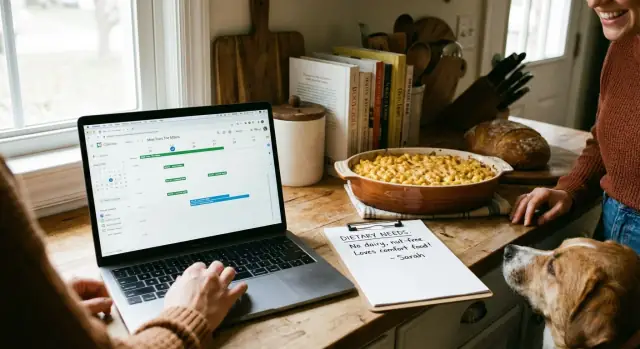
Set up a meal train signup that lets people pick a day, share one link, and keep the family informed without messy group texts.
When someone is sick, just had a baby, or is grieving, people want to help fast. But good intentions can turn into a messy plan when everyone uses whatever tool is closest: a group text, a spreadsheet, or a social post.
Group texts break down quickly. Messages get buried, new volunteers join late and miss earlier details, and the same questions keep popping up: What day is open? Any allergies? What time should I drop it off? The family can end up feeling like they have to manage the help while they’re already overwhelmed.
Spreadsheets can be better, but they still create friction. Editing on a phone is awkward, accidental changes happen, and the plan can split into multiple versions. Once people start sharing screenshots, nobody is sure which version is current.
What families usually need is simple: one clear plan they can trust, with fewer messages to manage. Volunteers want the same thing: a quick way to pick a day, see basic guidelines, and get a reminder so the meal actually shows up.
A single shared link, like a meal train signup page, works because it keeps the essentials in one place: which dates are covered, food preferences and allergies, the drop-off window and location (or pickup notes), and who’s bringing what.
When the plan is easy to see, support feels lighter for everyone, especially the family.
A meal train signup is a shared plan where people pick a day (and sometimes a time) to bring a meal to a person or family. Everyone sees the same schedule in one place, so you don’t have to juggle group texts, paper lists, or duplicate signups.
It’s usually a clear calendar of meal slots with a short set of notes about what helps. Many groups start with 1-4 weeks and extend it only if needed. That’s long enough to cover the toughest stretch, but short enough that volunteers don’t burn out.
A strong setup also separates what’s public from what should stay private. The page can show the date, drop-off window, and food preferences. Private details like the address, gate code, and phone number should go only to the person who signs up for that slot.
A meal train signup isn’t a catch-all support plan. It’s not a fundraising page, a medical update hub, or a substitute for hands-on coordination when care is complex.
A meal train is usually not the right fit when the family can’t safely receive deliveries, dietary needs are too strict to manage without mistakes, the real need is rides or childcare (not meals), or the situation changes day to day and fixed slots would constantly shift. In those cases, a point person coordinating directly, or a different kind of signup focused on the right task, works better.
The best meal train signup is the one that matches how your people already show up. A church care team may want one coordinator and a clear plan. A small group might prefer something informal. Neighbors or coworkers often need the simplest option possible, since not everyone knows the family well.
Timing matters. Starting too early can create confusion, but starting too late can leave the first hard week uncovered. Often, the right moment is when the family is back home after a hospital stay, right after a new baby arrives, or in the days following a loss when daily tasks feel heavy.
Before you publish the plan, decide the scope. Dinner-only is easiest, but it’s not always what helps most. If schedules are unpredictable, flexible support (like groceries or gift cards) can work better.
If you’re unsure, pick one main track and one backup option. For example, you might focus on dinners on specific days, and keep a backup like groceries or gift cards for last-minute gaps.
Set expectations so helpers feel confident. Clarify whether meals should be dropped off quietly or if short visits are welcome. If visits aren’t helpful right now, say it kindly. A simple note like “Porch drop-off only, please text when delivered” prevents awkward moments and protects the family’s rest.
A good meal train signup reduces back-and-forth texting and prevents double bookings. The best setups feel simple: one page, clear dates, and a signup that works on a phone.
If people have to create an account, hunt for the calendar, or pinch-zoom on mobile, signups drop quickly.
Keep the basics non-negotiable:
Once the schedule is easy, a few extras can save a lot of coordination. Reminders help people follow through. A simple way to note portions, allergies, and preferences reduces awkward re-dos.
Meal support is personal, so check privacy settings before you share widely. Ideally, the address is only shown to people who sign up, and family contact info is shared only if the family agrees. If the page will be forwarded, keep sensitive details in a private note or in the confirmation message.
Cost and effort matter too. Free options can be fine for short, simple schedules. If you need tighter control or a page that fits your group’s exact flow, a lightweight custom page can be worth it.
Before choosing, decide who will manage edits, how reminders go out, and what happens if someone cancels last-minute.
A meal train signup takes less time to set up than it does to manage in group chat. Decide a few details up front so volunteers don’t have to guess.
Choose dates and how many meals per day. Start with the first day meals are needed, then pick an end date. Decide if you want one slot per day (dinner only) or two (lunch and dinner). If the family is overwhelmed, fewer slots is often better.
Write a short intro for volunteers. In 3-5 sentences, say who the meals are for, the date range, what kind of help matters most, and one “please do” and “please don’t” (for example, “Label containers” and “No surprise visitors”).
Collect preferences and dietary needs. Ask about allergies, spice level, kid-friendly options, foods to avoid, and portion size (for example, “2 adults, 3 kids”). If disposable containers are preferred, say so.
Set the drop-off window and location. Pick a clear time range (like 5:00-6:00 pm) and one drop spot. If privacy matters, use a coordinator’s porch or a church office instead of the family’s home.
Publish and test on a phone. Before you share it widely, open the page on your phone and try picking a slot. Make sure the key details are visible without extra tapping, and the confirmation is clear.
A meal train works best when everyone knows who decides what, and how changes get handled. Without a few simple roles, you end up with duplicate meals, missed days, or the family getting a dozen texts at once.
Name one coordinator who “owns” the plan. This person sets the schedule, writes the notes (allergies, portions, delivery window), and answers volunteer questions. It helps if the coordinator is organized and comfortable sending short reminders.
Choose a backup coordinator too. Life happens. The backup should be able to update the schedule quickly, confirm swaps, and make sure the same day doesn’t get taken twice.
Give the family one point of contact, and protect them from becoming the help desk. Often that’s a sibling or close friend who can share real needs (diet changes, best drop-off time) without the family repeating themselves.
A few ground rules prevent awkward moments at the door:
Example: If Tuesday’s cook can’t make it, they tell the coordinator. The coordinator reopens the slot and finds a replacement, instead of texting the family directly.
A meal train signup works best when each slot answers the questions volunteers would otherwise text five different people. Clear slots also help the family feel cared for, not managed.
Start with portions. Write the number of adults and kids to feed, plus a simple note like “kid-friendly preferred” or “spicy is fine.” If the family wants leftovers, say so (for example, “Dinner for 2, leftovers welcome”).
Keep dietary needs specific and easy to follow. Instead of “healthy food,” list real limits like nut allergy, gluten-free, halal, no pork, dairy-free, or low sodium. If cross-contact matters for a serious allergy, say it plainly so volunteers can choose safer options.
Decide how to handle repeat meals. Some groups love duplicates because it reduces stress. Others prefer variety. One sentence is enough: “Repeats are fine,” or “Please avoid the same main dish two days in a row.”
Keep notes short and practical. A few examples that prevent confusion:
For last-minute changes, set a simple rule: if someone can’t make it, they update their slot as soon as they know and tell the coordinator. If you want a time guideline, “please try to give 24 hours’ notice” is clear without being harsh.
A meal train works best when everyone uses the same single page. Share one signup link, keep it in one place, and avoid sending new versions that split the group.
Start with a clear announcement where people already pay attention. Pick 2-3 channels, not all of them. For example: a short Sunday mention, one pinned group-chat message, and a simple email.
After you post it, expect a rush in the first day and then silence. That’s normal. Reminders fill the remaining slots.
Two reminders usually do the job: one 2 days before someone’s slot, and one on the morning of their day. If your tool can send automatic reminders, use it. If not, one coordinator can do it manually.
Keep each reminder short and focused: date and drop-off window, address and any parking notes, dietary needs, portion size, and one point of contact for day-of questions.
When something changes, message only the people it affects. Update the signup page so the next volunteer sees the latest details without extra group messages.
A family of four is coming home after a parent’s surgery. They’re tired, the kids still need routine, and friends want to help without creating extra phone calls.
A simple plan: 10 days of dinners, with two signups per day. One slot is the main meal. The second slot is “side, salad, or kid-friendly add-on.” That creates flexibility without flooding the family with food.
The coordinator sets drop-off for 5:30-6:30 pm. Volunteers can cook earlier, but deliveries arrive at a predictable time when the family is actually home.
Before sharing the signup, the coordinator adds clear notes:
Each day’s slot title stays specific, like “Day 3: Dinner (feeds 2 adults + 2 kids)” and “Day 3: Side or fruit.” People know what “counts” as helpful.
If someone cancels the same day, the coordinator reopens the slot and sends one clear message: “Tonight’s dinner slot reopened. If you can help, please claim it by 3:00 pm.” If nobody takes it, the coordinator uses a backup option already listed in the notes (like ordering a basic pizza or dropping off a grocery gift card), so the family is still covered.
Most meal trains fall apart for simple reasons, not because people don’t care. A few small choices early on prevent awkward moments for volunteers and extra stress for the family.
A practical backup plan can be as simple as having one on-call person per week and a couple of fallback options ready (gift cards, freezer meals, or a default takeout plan).
Before you send the signup to the whole group, take five minutes to sanity-check it. One small mistake (like the wrong address or unclear food notes) can create stress for the family and the volunteers.
If the family has a serious allergy, put it at the top so nobody misses it.
Start with the simplest version people will actually use. A meal train signup works when it feels like one clear link, one clear plan, and no extra steps.
If your group is small and the plan is straightforward, a basic hosted signup page is often enough. If you need more control (diet notes, delivery instructions, last-minute changes, or different meal types), a custom flow can be worth it.
If you do go custom, keep the essentials: a calendar view, a short signup form (name, phone, what you’re bringing, timing), and a way for a coordinator to edit quickly.
One option some groups use is Koder.ai (koder.ai), a chat-based platform for creating simple web pages and apps. If you want to own the process, it can help you build a lightweight meal train page, host it with a custom domain, and use snapshots and rollback if you need to undo a change.
After you launch, improve based on the questions you keep getting. If people keep asking “What time should I come?” add the window to every slot. If they keep asking “Did anyone take Tuesday?” make the calendar view more obvious and send one reminder to fill gaps.
Use a meal train signup when multiple people want to help and you need one reliable schedule everyone can see. It’s especially useful after a hospital stay, a new baby, or a loss, when the family can’t manage a flood of messages.
Start with dinner-only for 1–4 weeks and extend only if needed. Keeping it shorter makes it easier to fill, and it prevents volunteers from burning out while still covering the hardest stretch.
Pick a clear drop-off window, list portions, and write dietary needs in plain words. Add one simple rule about visits, such as “porch drop-off only,” so no one has to guess what’s welcome.
Don’t post the address, door codes, or private phone numbers publicly. Share sensitive details only with the person who signs up for a slot, ideally through a private note or a confirmation message.
Name one coordinator who owns the plan and answers volunteer questions, plus a backup who can edit the schedule if the coordinator is unavailable. Give the family a single point of contact so they aren’t turning into the help desk.
Defaults work best: a consistent daily window like 5:00–6:00 pm and one standard drop spot. If the family’s home is stressful, use a coordinator’s porch, a church office, or another agreed location to reduce interruptions.
Put the allergy or key restriction at the top and keep it specific, like “no nuts” or “gluten-free only,” rather than vague labels like “healthy.” If the restrictions are extremely strict or hard to follow, meals may not be the right kind of help and a different support option can be safer.
Set a simple rule that cancellations go to the coordinator, not the family, and reopen the slot as soon as possible. Have a fallback ready, like an on-call person, a freezer meal, or an easy takeout option so the day is still covered.
Send two reminders: one about two days before and one the morning of the slot. Keep the reminder short with the drop-off window, key food notes, and the day-of contact so volunteers can follow through without extra back-and-forth.
Yes, if you need a simple page that matches your exact flow and is easy to update. A chat-based builder like Koder.ai can help you create and host a lightweight signup page, and features like snapshots and rollback are useful if someone edits the wrong thing and you need to undo it fast.