

Dec 12, 2025·8 min
Maintenance window message templates users actually trust
Maintenance window message templates that calm users during planned downtime, partial outages, and degraded performance, reducing panic and support tickets.
Maintenance window message templates that calm users during planned downtime, partial outages, and degraded performance, reducing panic and support tickets.
Most maintenance notes fail for one simple reason: they create uncertainty. A banner that says “We’re doing maintenance” without details forces users to guess what’s broken, how long it will last, and whether their work is safe. Guessing turns into fear, and fear turns into support tickets.
Vague messaging also feels suspicious. If users see errors but your message sounds calm and generic, they assume you’re hiding the real problem. That gap between what they experience and what you say is what breaks trust.
People usually need three things right away: clear impact, clear timing, and clear next steps.
Impact means naming what’s affected (login, exports, payments), not just saying “service disruption.” Timing means a specific window and when the next update will happen, not “shortly.” Next steps means telling them what to do while they wait, like “try again in 20 minutes” or “use the mobile app instead.”
Over-promising is the fastest way to make things worse. “No impact expected” is risky unless you’re truly confident. When even one user is affected, that line becomes proof you’re not paying attention. Honest updates work better: say what you know, what you don’t know yet, and exactly when you’ll check in again.
The goal isn’t to “spin” the story. It’s to reduce uncertainty. When people understand what’s happening, what it means for them, and what they should do now, they stop refreshing, stop assuming the worst, and stop opening tickets just to feel in control.
Users relax when you name the situation in plain words. If you call everything “maintenance” or “issues,” people assume the worst and start retrying, refreshing, and opening tickets.
Start with the right label:
“Degraded” should never be vague. Say what the user will notice. For example: “Exports may take 10 to 20 minutes longer than usual” is clearer than “Experiencing degraded performance.”
Be specific about what’s affected, even if the list is short. Mention the areas people care about most: login, payments and billing, sync, notifications, dashboards, exports, API access, and file uploads.
Avoid scary words, but don’t hide the truth. Replace “critical failure” with “some users can’t log in,” and replace “system instability” with “you may see timeouts when saving.” A calm tone comes from accuracy, not optimism.
If you’re unsure, pick the label that matches the user impact, not the internal cause. “Database maintenance” means little to most people. “Billing page may be unavailable for up to 15 minutes” tells them what to expect and what to do.
Users trust what they can see at the exact moment they’re blocked. Good message templates are less about clever wording and more about using the right surface.
Use an in-app banner for most planned work. It stays visible while people continue what they can, and it doesn’t hijack the screen.
Use a modal only when the user can’t safely continue (billing actions, data edits, signups). If you do use a modal, let people close it, and keep a persistent banner afterward.
Toasts are best for short, low-risk updates (for example, “Exports may be slower for 10 minutes”). They’re easy to miss, so don’t use them for real downtime.
A simple rule:
If users might be unable to log in, put the same message on the login screen. This is where panic starts, because users assume their account is broken. A simple note like “Login may fail between 02:00-02:30 UTC” reduces tickets fast.
Use your status page for ongoing updates and history (what changed, what’s still affected, what’s fixed). Use the in-product notice for what the user should do right now (wait, retry later, avoid exports, etc.). Don’t hide critical details only on the status page, because many users will never check it.
Email and push notifications help when the impact is high and users need to plan around it. Otherwise, they feel noisy. If you send them, keep them consistent with the in-app copy.
Finally, align support with the same wording. Your auto-reply should match the banner text and status updates so users don’t get mixed messages.
People trust maintenance notices when they feel specific, honest, and useful. That doesn’t mean long. It means answering the questions a stressed user has in the first 10 seconds, with clear timing and a plan.
A reliable notice includes five basics:
Time is where messages often lose trust. Use a window people can understand, like “Jan 16, 01:00 to 02:30 UTC.” If you have a large global audience, consider adding a second reference time many users share (for example, “08:00 to 09:30 Singapore time”). Avoid false precision like “back at 02:17.” A range like “30 to 60 minutes” feels more honest and reduces angry refresh cycles.
If you don’t know something yet, say what you’re checking next. For example: “We’re investigating elevated database load and reviewing recent deploys and slow queries. Next update by 14:30 UTC.” That one sentence turns silence into a plan.
Always include a next update time, even if it’s soon and even if nothing changes. “Next update in 20 minutes” calms people because it sets a promise you can keep.
Example of trust-building detail: “File exports may take 10 to 30 minutes longer than usual. In the meantime, you can view reports in-app. We’ll post another update by 16:10 UTC.”
Good maintenance notices feel calm because they’re specific and consistent. Treat them like checklists, not announcements.
Write the first draft with clear placeholders. Start with: what’s affected, when it starts, how long it may last, and who is impacted. Leave brackets for details you might confirm later (exact end time, affected regions, feature name). That lets you publish early without guessing.
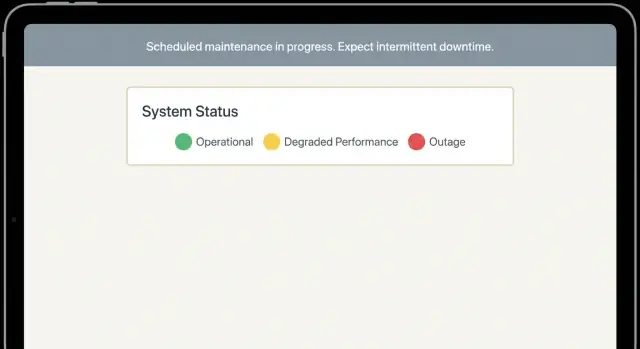
Pick a severity label that matches reality. Use one label and stick to it across your banner, status page, and email. For example: Maintenance (planned), Partial outage (some users or features), Degraded performance (slow or delayed). If you use colors, keep them consistent (green = normal, yellow = degraded, red = outage) so users can scan fast.
Add one sentence that explains the label in plain language. “Degraded” should always mean something concrete like “exports may take 5-15 minutes.”
Offer a workaround when possible. Even a small alternative reduces tickets. Example: “If you need the report now, use the CSV download from the dashboard while scheduled exports are delayed.” If there’s no workaround, say so once, clearly.
Plan your updates before you hit publish. Schedule two reminders: one shortly before the window, and one “starting now” message at the exact start time. If timing changes, update the notice first, then send the reminder.
Close the loop with a final update. Say what changed, when it was restored, and what users should do if something still looks wrong (refresh, retry, or contact support with a specific detail like a timestamp or job ID).
Use these templates as a starting point, then adjust the details to match what your users actually do in your product. Keep the tone calm and plain. Give one clear action users can take.
Subject/Title: Planned maintenance on [Day], [Date] at [Start time] [TZ]
Message: We have scheduled maintenance on [Day, Date] from [Start time] to [End time] [TZ].
During this window, [what will be unavailable]. [what will still work] will remain available.
If you need to prepare: please [recommended action, e.g., finish exports, save drafts] before [time]. We’ll post updates here during the window.
Title: Maintenance is now in progress
Message: Maintenance has started and is expected to take until [End time] [TZ].
Right now, [what is unavailable]. If you try to [common task], you may see [expected error/behavior].
Next update at [time] (or sooner if anything changes).
Title: Maintenance is taking longer than planned
Message: Maintenance is taking longer than expected. The new estimated end time is [New end time] [TZ].
What this means for you: [impact in one sentence]. What you can do now: [safe workaround or “please try again after X”].
Sorry for the disruption - we’ll share another update at [time].
Title: Maintenance is complete
Message: Maintenance is complete as of [time] [TZ].
You can now [top 2-3 key actions to verify, e.g., sign in, run an export, submit a payment]. If something still looks wrong, try [simple step like refresh/re-login] and then contact support with [what info to include, e.g., time, account, screenshot].
Title: Monitoring after maintenance
Message: Systems are back online, and we’re monitoring closely for the next [X hours].
You might notice [minor symptom, e.g., slower loading, delayed emails] while queues catch up. If you hit errors, please retry after [time].
Next update at [time] (or sooner if we spot an issue).
When the app isn’t fully down, vague banners create the most panic. Be specific about what’s affected (feature, region, or step), what still works, and what users should do right now.
Use when most of the product works, but one area doesn’t.
Template
Title: Partial outage: [feature/service] unavailable in [region/account type]
Body: We’re seeing an issue where [feature] isn’t working for [who is affected]. Other parts of the app, including [what still works], are operating normally. Our team is working on a fix.
Impact: You may see [error message/symptom] when you try to [action].
Workaround: Until this is fixed, please [safe alternative action].
Next update: By [time + timezone] (or sooner if resolved).
Use when requests succeed, but feel broken because they’re slow.
Template
Title: Degraded performance: slower than normal [area]
Body: Some actions are taking longer than usual, especially [specific actions]. You might see timeouts or retries, but data should not be lost.
What to do: If you hit an error, wait [X minutes] and try again. Avoid repeating the same action many times (it can create duplicates).
Next update: By [time + timezone].
Use when the hardest part is uncertainty.
Template
Title: Intermittent issue: [feature] may fail or succeed unpredictably
Body: We’re investigating an issue where [feature] works for some attempts but fails for others. If it fails, it’s safe to retry after [X minutes].
How to help: If you contact support, include [request ID / time range / affected region].
Use when users can’t get in. Keep it calm and direct.
Template
Title: Login issues: some users may not be able to sign in
Body: We’re seeing elevated login failures for [who is affected]. If you’re blocked, please don’t reset your password repeatedly unless you see a clear password error.
What to try: Refresh once, then wait [X minutes] and try again. If you use SSO, note whether the issue is SSO only or all login methods.
Use when users think data is missing.
Template
Title: Data delay: [reports/sync/analytics] may be behind by [X minutes/hours]
Body: New activity may take longer to appear in [area]. Your data is still being collected, but processing is delayed.
What this means: Exports/reports created during this time may be incomplete. If possible, wait until [time] to run critical reports.
Next update: By [time + timezone].
Most support spikes during maintenance aren’t caused by the maintenance itself. They come from wording that makes people guess what’s happening, how it affects them, and when it’ll be over. If users have to guess, they open tickets.
Patterns that create panic fast:
A small example: your export tool is slow, but the rest of the app works. If your banner says “Service outage,” users who aren’t exporting will still stop and message support. If it says “Exports may take 10-20 minutes; dashboards and editing are normal. Next update at 14:30 UTC,” many will simply wait.
If you’re building message templates, aim for plain language that answers three questions quickly: What’s affected, what should I do right now, and when will you update me next.
Before you hit publish, read your message like a worried customer would. The goal is simple: reduce uncertainty.
Make sure the wording matches across your banner, email, help desk macros, and any status messaging. If one says “degraded” and another says “down,” people assume you’re hiding something.
Keep the tone calm and factual. Avoid hype, jokes, or “no worries” phrasing. A simple, steady line like “We’re investigating slow exports” works better than trying to sound upbeat.
Do the clarity test: can a new user repeat the issue back in one sentence without adding their own guesses? If not, rewrite.
When it’s over, close it out explicitly: confirm it’s resolved, give the resolution time, and tell users what to do next (for example, “Retry your export,” or “If you still see errors, refresh and try again”).
A common “everything is broken” moment is when one feature fails while the rest of the app looks fine. Picture a finance tool: the billing page loads, invoices show up, and payments still go through. But CSV exports start timing out for some users. People refresh, try again, and then open support tickets because they assume data is missing.
The first message should say what works, what doesn’t, who is affected, and what to do right now. For example:
“Exporting invoices to CSV is currently timing out for some accounts. Billing pages and payments are working normally. If you need data urgently, use the on-screen filters and copy results, or try exporting a smaller date range. We’re investigating and will update here in 15 minutes.”
Over the next hour, the updates should evolve from “we see it” to “here’s what changed”:
The final message closes the loop. It includes the fix, scope, and a clear support path:
“Resolved: we increased export worker capacity and adjusted timeout settings. From 10:05-11:05 UTC, some CSV exports failed, but billing and payments stayed available. If you still cannot export, reply to your last ticket with the export time and invoice range.”
Teams that communicate like this usually see fewer tickets because users learn three things quickly: their data is safe, what to try now, and when the next update will arrive.
Treat maintenance messaging like a small product feature, not a one-off apology. The goal is consistency: users should recognize the pattern, know what to do, and trust that you’ll update them on schedule.
Turn your best copy into reusable blocks with clear variables, and keep them in one place so anyone on the team can ship a notice without rewriting from scratch. Standardize basics like start time, expected end time, affected features, regions, and who’s impacted (all users vs a subset).
Write down ownership and a simple approval flow. One person drafts, one person approves, and one person publishes, even if two of those roles are the same on small teams. Set an update cadence in advance (for example, every 30 minutes during an incident) so support isn’t guessing when the next message is coming.
Be careful with “snapshots” and “rollback” language. Only promise what you can reliably do under pressure. If rollback is possible but not guaranteed, say so plainly, and focus on what users can count on.
If you want to make this repeatable inside the product, it helps to build the delivery points once and reuse them: an in-app banner component, a lightweight status page, and a post-maintenance “all clear” flow. If your team builds products with Koder.ai (koder.ai), you can create these UI pieces and update flows through a chat-driven build process, then adjust the copy and variables without rebuilding the whole app.
Finish by running a dry run during a low-risk maintenance window. Use real templates, publish to the real surfaces, time your updates, and review what happened afterward:
Once you have that loop, your templates stop being documents and become a habit.
Start with what’s affected, how long it will last, and what the user should do right now. A plain line like “Exports may take 10–20 minutes longer; dashboards work normally; next update at 14:30 UTC” prevents guessing and cuts tickets.
Use Maintenance for planned work with a defined window, Partial outage when a specific feature/region is down, and Degraded performance when things work but are slow or error-prone. Pick the label that matches what users feel, not the internal cause.
Write what the user will notice in one sentence, then quantify it if you can. For example: “Exports may take 10–30 minutes and may time out on large date ranges,” instead of “We’re seeing degraded performance.”
Use an in-app banner for most situations so people can keep working. Use a modal only when continuing could cause errors or lost work (like billing actions or data edits), and keep a persistent banner afterward so the message doesn’t disappear.
Put the same message on the login screen whenever sign-in might fail, because that’s where panic starts. If you only post updates inside the app, locked-out users will assume their account is broken and flood support.
Avoid false certainty like “No impact expected” unless you’re truly sure. Say what you know, what you don’t know yet, and when you’ll update next; that honesty reads as competence, not weakness.
Always include a specific next update time, even if nothing changes. “Next update in 20 minutes” sets a promise users can rely on and reduces the refresh-and-ticket cycle.
Give one safe action that reduces risk and duplicates. For example: “Retry once after 2 minutes,” “Avoid repeating the same export,” or “Use a smaller date range,” and if there’s no workaround, say so clearly once.
State what’s affected, what still works, and what to do if they’re blocked. Tell users not to do high-risk actions repeatedly (like password resets or repeated submissions) unless the message specifically tells them to.
Close with an explicit “resolved” note that includes the time, what was restored, and what to try if something still looks wrong (refresh, re-login, retry once). If users may still see edge cases, say you’re monitoring and when you’ll post the final confirmation.