

Jan 18, 2026·8 min
Laundry care label cheat sheet app for saving wash settings
Stop guessing what tag symbols mean. A laundry care label cheat sheet app lets you save symbol meanings and your preferred wash and dry settings per item.
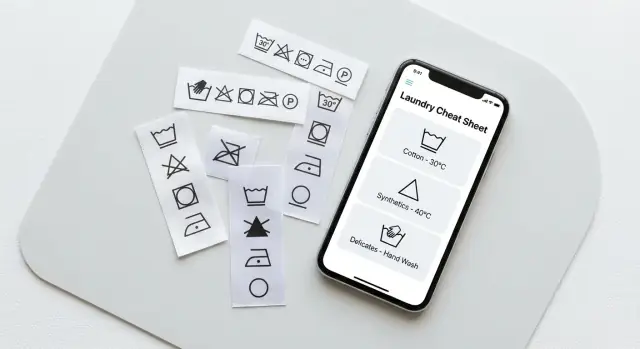
Stop guessing what tag symbols mean. A laundry care label cheat sheet app lets you save symbol meanings and your preferred wash and dry settings per item.
Most clothing damage isn’t caused by “bad fabric.” It happens when you do something reasonable for one item, but wrong for that specific blend, dye, or finish. Care labels are meant to prevent that, but they often fail in real life because they’re hard to read, easy to forget, and tough to translate into the actual buttons on your washer and dryer.
False confidence is a big part of it. You remember that one sweater was “gentle,” so you treat all sweaters the same. Or you assume “cold wash” means safe, then the dryer heat does the real damage. Shrinking, fading, and weird texture changes usually come from one wrong step, not your whole routine.
Most people guess in a few predictable moments: you sort fast by color (not fabric and finish), pick a cycle based on time (quick wash) instead of movement (how much agitation it uses), use the same detergent amount for everything, or throw “mostly dry” items into a hot dryer to finish faster. Another common one is treating stains with hot water without checking whether heat sets them.
Labels also fight how laundry actually gets done. In busy households, the person doing laundry often didn’t buy the item. Even when the label is there, it’s tiny, cryptic, or already worn off.
Googling helps, but only for the symbol you’re staring at right now. It doesn’t remember that your black jeans bleed dye, that your gym shirts snag on normal cycles, or that linen wrinkles badly unless you take it out immediately. A personal cheat sheet solves the repeat problem: once you decode an item, you save your own “this works” settings and stop making the same mistake next month.
That’s especially useful for shared laundry rooms, busy families, and anyone with delicates or “special” pieces (wool, silk, tailored items, stretchy blends). One saved note like “air dry only” can be the difference between a favorite top lasting two years or two washes.
A care label is trying to say one simple thing: how to clean this item without changing its size, color, shape, or feel. The problem is that it says it in tiny icons, and the icons describe limits, not guarantees.
Most labels are built from five symbol groups:
Even when you understand the icons, the same symbol can still lead to different results at home. Labels don’t know your washer type, how full you load it, how hard your water is, or whether your dryer runs hot. A “low heat” tumble dry symbol can be safe in one dryer and still shrink a top in another if the cycle runs long or the lint filter is clogged.
Fabric changes how forgiving an item is. Cotton often handles heat better than wool, but cotton can still shrink if it wasn’t pre-shrunk. Synthetics like polyester resist shrinking, but they can hold odors and can melt or get shiny if ironed too hot.
Construction matters just as much as fabric. A loose knit sweater, a structured blazer, and leggings can all be “cold wash,” yet behave very differently. Seams can twist, linings can pucker, elastic can weaken, and prints can crack if you use the wrong cycle.
Here’s a quick example. Two tops both say “wash cold, gentle, tumble dry low.” A thick cotton sweatshirt might come out fine every time. A rayon blend blouse might still lose shape if it sits wet in the drum, or if you use a heavy spin. The label is the starting point. Your real-world settings and habits decide the outcome.
A care label looks like a tiny puzzle, but you can read it the same way every time. Think left to right: wash, bleach, dry, iron, and sometimes dry clean. Once you know which symbol you’re looking at, you can turn it into real buttons on your machine.
A fast scan that works even when you’re standing in the laundry room:
From there, the main decisions are water temperature, cycle type, and spin speed.
Water temperature is mostly about color and fiber. Cold is safer for dark colors and items that fade. Warm helps with oils and everyday dirt. Hot is strongest, but it can shrink some fabrics and fade dyes faster.
Cycle type is about agitation. If the label hints at “gentle” (often shown as one line under the tub), choose Delicates or Gentle. If it’s a sturdy cotton tee with no warnings, Normal is usually fine. For towels and sheets, Heavy Duty can make sense, but only if the fabric is built for it.
Spin speed matters more than people think. High spin removes more water, but it can wrinkle and stress knits. If something stretches easily (sweaters, athletic knits), use a lower spin even if you wash it cold.
Follow the tag closely for wool, silk, lined items, stretch fabrics, and anything expensive or sentimental. You can be more flexible with sturdy cotton basics and towels, as long as you keep darks away from hot water and avoid high-heat drying.
Drying is where most damage happens. If the label is unclear, assume lower heat first. A practical rule: if it shrank once, skip the dryer next time. If it pills or looks fuzzy, reduce heat and time, and consider air drying.
Example: a “cold wash, gentle, do not tumble dry” label becomes cold water, Delicates, low spin, and air dry flat or on a rack. That’s exactly the kind of translation worth saving so you don’t decode the same symbols every week.
A useful laundry cheat sheet isn’t just a symbol decoder. It remembers what you decided to do for that exact item, so you can repeat the same result next time without thinking.
Start with a simple “garment card” for each item. The goal is to identify it fast, even when it’s inside-out in a basket. A short name helps (“Black work tee,” “Cream wool sweater”), but the details are what stop mistakes.
What’s worth saving for each garment:
Next, save the settings you actually use. Labels are often vague, and real life is messy, so the app should record your choice, not just the manufacturer’s ideal.
Keep settings in plain words that match your machines:
Optional notes are what make it personal and genuinely helpful. “Cold wash still shrank a bit, air dry only.” “Pilled after high spin, use delicate.” Even a simple stain history can save time later: “oil stain on cuff, dish soap worked,” or “ink never came out.”
Picture a real scenario: you buy a textured knit top that pills easily. After one bad wash, you switch it to cold, delicate, low spin, and air dry, and you write “no towels in same load.” Next month, you don’t have to remember any of that. You just search the item and follow your saved settings.
If you’re building the app, keep the data model simple. These fields map cleanly to a basic form and a searchable list, which is what you need on laundry day.
Start with the tag, not your memory. Most laundry mistakes happen because you “sort of remember” what a symbol meant.
Grab the garment and take two quick photos: one close shot of the care label (so symbols are readable), and one of the item itself (so you can spot it fast in a pile). Good light matters more than camera quality.
Then capture what the label is saying. If your app supports symbol selection, pick the closest matches. If not, type the basics in plain words. Don’t overthink uncommon icons. You mainly need washing, drying, and ironing rules.
Now choose the settings you’ll actually use. Labels usually give a limit (like “max 30C”), but you still have to pick a cycle and a dry method that fits your machines. Save your defaults so you don’t decide again next week.
Write “do not” notes like you’re warning your future self. These are the rules people break when they’re tired or rushing.
A fast flow that fits on one screen:
Before you hit save, add one detail that makes it reusable: a short name you’d recognize instantly, like “Black work tee” or “Wool sweater - gray.” If you want one extra field, add “load type” (whites, darks, delicates) so grouping is easier later.
The payoff is simple: next time, you search the item, tap your saved settings, and you’re done.
Most laundry disasters aren’t caused by one huge mistake. They happen when small “close enough” choices add up: the wrong cycle, a little too much heat, and mixing the wrong items.
A few habits cause most shrinking, fading, and that rough, fuzzy look (pilling):
A common chain reaction looks like this: you wash a new dark hoodie with light gym shirts, cold water doesn’t fully remove deodorant residue, you rewash, then you overdry to “finish it.” Result: faded gym shirts, a hoodie that looks dusty, and a fuzzy surface from extra friction.
The goal isn’t perfect laundry. It’s fewer repeats and less heat.
Pick the cycle based on fabric texture, not just color. Use the lowest dryer heat that fully dries the load. If it needs more time, add time before you add heat. Separate new darks for the first few washes. Match water temperature to the problem (cold for protecting color, warm for lifting oils, if the label allows it). And when you find settings that work, save them so you stop doing trial and error on your favorite pieces.
A cheat sheet only helps if it answers a question fast while you’re standing in front of the washer. That means fewer taps, clear groupings, and reminders that prevent the classic mistake: “I forgot this was hang dry only.”
Search should match how people think, not how items are stored. Most people don’t search by fiber content. They search by situation: work shirts, gym wear, delicates, kids’ clothes. A category picker plus a search bar is usually enough.
Grouping is the next upgrade because it matches how laundry happens at home. Many households split loads by person, basket, or room. If the app can show “Sam’s basket” or “Baby hamper,” it becomes a tool you open mid-task, not a library you visit once.
A few features that feel genuinely helpful:
Seasonal lists matter because “special care” items disappear for months, then come back when you’ve forgotten their rules.
Hang-dry tracking should be loud and simple. On laundry day, you want one view that answers: “Which pieces must not go in the dryer?” Many people treat hang-dry items as their own mini-load, even if they were washed with similar colors.
Keep notes short on purpose. One sentence is enough, and it should be practical, not technical: “Wash inside out to stop fading,” or “Zip before washing or it snags.”
Laundry mistakes often happen in the last 10 seconds. You toss everything in, pick a default cycle, and hope for the best. A quick check at the washer and again before the dryer saves more clothes than any fancy detergent.
Start with the rule that’s hardest to undo. Most of the time, that’s drying, not washing. Heat and tumbling can lock in shrinkage, bake in stains, and rough up fibers fast. If the label is unclear or missing, treat the item like it can’t handle high heat.
A fast checklist while the door is still open:
A simple habit that works: when you see a label that worries you, pause and translate it into actions you can set on your machines. Instead of remembering “gentle” as a vague idea, save: cold wash, delicate cycle, low spin, lay flat to dry.
If you remember one thing, make it this: when in doubt, reduce heat first. Cool water and low dryer settings are the easiest way to prevent shrinking, fading, and pilling.
You dump one basket on the bed and realize it’s the usual mix of “easy” and “one mistake ruins it”: a new sweater, a dress shirt, and leggings. This is when saved settings matter, because you don’t have to re-interpret tiny symbols while holding a damp sleeve.
Here’s what you save the first time (a photo of the tag plus your preferred settings):
Laundry goes smoother because the app turns “don’t tumble dry” into a clear, repeatable rule.
Now the annoying part: the sweater tag is itchy, so you cut it off. Before you do, you save the tag photo and a note like “tag removed, always dry flat.” If the tag is already missing, you can still save a best guess: material (from the product page or receipt), what you’ve done so far, and a conservative default (cold + gentle + no heat).
After one successful wash, update the item. Maybe the dress shirt wrinkles less if you take it out damp and hang it. You mark “worked well” and change the dryer note to “5 minutes low, then hang.”
If someone else in the house does laundry, shared notes matter. They don’t need to know symbols. They just pick “sweater,” see “dry flat,” and avoid the one choice that would ruin it.
Pick a minimum version you can actually finish. If it takes more than a weekend of spare time (or a few focused evenings), it’s probably too big.
A solid MVP is just three things: add an item, save the settings you actually use, and find it fast later. Everything else can wait until you prove you’ll use it on laundry day.
A simple MVP scope that stays small but useful:
Decide where it will live. If you need it while standing next to the washer, phone-first usually wins. If you also want to type faster, manage a family list, or edit in bulk, add a basic web view later.
If you want one codebase for iOS and Android, Flutter is a common starting point. Keep the data model tiny: Item, Settings, and a few tags. Start with local storage so you can ship quickly, then add sign-in and cloud backup only after the app proves its value.
A typical sequence:
If you want to prototype quickly, Koder.ai (koder.ai) can help you build the screens and data model from a chat prompt, then export the source code when you’re ready to take it further. It’s a practical way to get the “add item” flow right before spending time on extras.
Once the basics feel smooth, the next features that usually pay off are reminders (like “lay flat to dry”), shared household lists (so nobody guesses), and backups (so a new phone doesn’t wipe your work). Keep each new feature tied to a real laundry problem you’ve had, not a nice-to-have you might never open.
Start by treating the label as a set of limits, not perfect instructions. Translate the wash icon into three choices you can actually set: water temperature, cycle (agitation), and spin speed, then decide the drying method separately because most damage happens there.
Focus on the five groups: wash (tub), bleach (triangle), dry (square), iron (iron), and dry clean (circle). If you only have time for one, prioritize the dry symbol, because high heat and tumbling cause the fastest shrinkage and texture damage.
Match “gentle” to a Delicates/Gentle cycle and usually a lower spin, not just cold water. Cold protects color, but agitation and spin are what stretch knits, cause pilling, and leave items twisted.
Use the dryer icon to choose between air drying and tumble drying, then pick the lowest heat that gets the job done. If you’re unsure, reduce heat first and shorten tumble time, because you can re-dry later but you can’t unshrink fabric.
Create a “garment card” with a clear name, a photo of the item, and a photo or summary of the tag. Save your real settings in plain words: wash temp, cycle, spin, dry method, and one short warning like “hang dry only” or “no towels in same load.”
Take two quick photos (tag and garment), then record just the decisions you’ll repeat: wash limit, cycle, spin, and dry plan. Add one “do not” note for rushed days, like “no heat” or “dry flat,” and save it under a name you’ll recognize instantly.
Overdrying is usually the biggest one, followed by using one default cycle for everything. Mixing rough items (like towels) with delicate knits increases friction, which speeds up pilling and can distort stretchy pieces.
Cold water is a safe default for color, but it won’t always remove oils and deodorant buildup well. If stains linger, repeated rewashing wears fabric down, so it’s often better to use the warmest water the label allows for dirty or oily items.
Start with “dry plan first,” because drying mistakes are hardest to undo. Then confirm the hottest safe water temp, choose a gentler cycle for knits or drapey fabrics, keep new darks separate until they stop bleeding, and skip high heat when you’re unsure.
Build the MVP around three actions: add an item, save settings, and find it fast. If you want to prototype quickly, Koder.ai can help you generate the screens and a simple data model via chat, then you can export the source code when you’re ready to customize and ship.