

Dec 30, 2025·6 min
Gift Card Balance Checker Page: customer lookup and staff edits
Learn how to design a gift card balance checker page with a customer code lookup, plus staff tools to adjust balances safely after purchases.
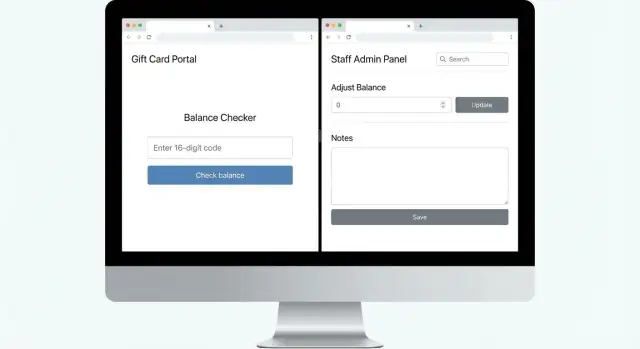
Learn how to design a gift card balance checker page with a customer code lookup, plus staff tools to adjust balances safely after purchases.
A gift card balance checker page has one job: tell someone how much money is left on a gift card, quickly and without confusion. People use it right before buying something, right after they receive a card, or after a recent purchase.
This page usually serves two audiences:
Be specific about what “code” means in your store. It might be a printed number on the back of a physical card, a code from an email, or something shown inside an app. Some programs also require a PIN or a scratch-off section. If your system needs both a card number and a PIN, say that immediately so people don’t waste time.
A good experience feels predictable: a clear place to enter the code, one obvious “Check balance” action, and a result that’s easy to read (currency plus a “last updated” time). When something goes wrong, the page should explain how to recover without making the person feel stuck.
Accuracy is the whole point. If the page shows the wrong amount, you get conflict at checkout, more support calls, and lost trust.
A gift card balance checker page has two jobs: help customers confirm what’s left, and give staff a safe way to update balances when something changes at the counter. The best setups keep the customer view simple and put the powerful actions behind a staff-only screen.
On the customer side, the flow should feel like a receipt lookup. Enter the code, tap check, get a clear answer. Show the remaining balance in the store’s currency and include a “last updated” timestamp so people know the result is current.
On the staff side, the flow is search, verify, then adjust. Staff should be able to find a card by code (and later, if you choose, by scanning), review the current balance and recent activity, then add value (top-up) or subtract value (manual redemption or correction). Every adjustment should require a short reason and, when possible, a reference like a receipt number.
Most teams ship a first version with:
Example: a cafe sells $25 gift cards. A customer enters a code and sees “$13.40 remaining, updated 2 minutes ago.” Later, a staff member realizes the register missed a redemption, finds the same code, subtracts $4.60, and saves the note “latte, receipt 887.”
Edge cases drive support tickets, so handle them calmly:
A gift card balance checker page should be quick, calm, and hard to mess up. Many customers are on a phone, standing at a counter, and trying not to hold up a line.
Keep the input simple. Use one field for the code, with a visible label (not just placeholder text). Add a short example format like “Example: ABCD-EFGH-IJKL,” and make it paste-friendly. Avoid surprising formatting that changes what the user typed.
Make the action obvious. “Check balance” is clearer than “Submit.” After tapping, show a loading state (“Checking…”) and disable the button so the request isn’t sent twice.
Error messages should help honest customers recover, while revealing as little as possible to people guessing codes. On the public customer page, keep failures generic. Save the detailed reasons (expired, blocked, not found) for the staff screen after someone verifies the customer.
A short UX checklist that prevents most confusion:
Accessibility matters even on a small page. Make sure the label is tied to the input, keyboard users can reach the button, focus outlines are visible, and contrast is strong enough for bright store lighting.
A good staff admin screen is boring in the best way. It helps employees fix a gift card issue in seconds, while leaving a clear trail for later.
Start with staff login and simple roles. Most staff should be able to look up a card and view history, while only managers (or a small trusted group) can change balances. If you run multiple locations, tag changes to a store/location.
Make lookups fast and forgiving. Spaces and dashes shouldn’t break searches. For real-world cases where a code is damaged or unreadable, you can offer secondary search options only if you can do it safely (and only for staff), such as receipt/order ID, or customer email/phone if you already collect it.
Once a card is found, show the current balance and recent activity before any edit controls. This reduces the classic mistake: adjusting the wrong card because multiple tabs are open.
Keep the adjustment form structured instead of free-form:
After entering an amount, preview the result clearly: “Current balance: $40.00. New balance: $15.00.” Add a confirmation step for large changes (for example, any change over $100 or over 25% of the current balance). For high-risk changes, require a manager PIN or re-entering the amount.
A gift card balance checker page sounds simple, but it attracts guessing, abuse, and honest mistakes. The goal isn’t perfect security. It’s removing easy attacks and making problems easy to spot and fix.
Treat gift card codes like passwords. If someone gets a list of codes, they can drain value fast.
Two basics go a long way: store codes safely, and make it hard to test lots of codes quickly. Many systems avoid storing the raw code in plain text. Instead they store a protected version (like a one-way hash), so a database leak doesn’t hand attackers working codes.
On the customer screen, avoid echoing the full code back after lookup. Show a masked version (for example, only the last 4 characters) so screenshots and shoulder-surfing do less harm.
Rate limits also matter. Without them, a bot can try thousands of combinations. Keep it simple:
Most real losses come from staff adjustments done without enough controls, not from movie-style hacking. Every balance change should create an audit trail: who did it, when, how much, and why.
Keep staff access tight. Not everyone needs the power to edit balances. Avoid shared logins, because they make the audit trail useless.
Decide how refunds and chargebacks affect gift cards and write it down as a simple internal rule. For example: refunds return value to the original gift card when possible; if the card was already spent, the case is flagged for review.
The page feels simple, but the data behind it should be provable. A safe approach is: don’t rely on a single editable “balance” number without a transaction trail that explains it.
A common structure uses three tables:
Treat the transaction table as the source of truth. Typical transaction types include issuance (initial load), redemption (purchase), adjustment (staff correction), and refund (undo a redemption). You can compute the current balance as a sum of transactions, or keep a cached balance on the card record that you update carefully.
To prevent double-charging when someone taps twice on a slow device, use an idempotency key for each write. That gives each checkout or adjustment a unique operation ID, and repeated submits are ignored.
For audits and support, a few fields pay for themselves:
Decide what the customer sees before you build anything. The page should explain where to find the code, what “balance” means in your store, and what to do if the lookup fails. On the result screen, show the balance, the currency, and a clear “last updated” time.
Define the code rules and validate early. Pick a fixed length and allow only the characters you actually print. Validate as the user types and again on submit, so you catch typos fast without revealing extra details.
Build the customer lookup flow in small steps: create the input screen, call the backend on submit, then handle three outcomes - found, not found/invalid, and temporarily unavailable.
Then add the staff side. Staff should sign in before they can change anything, and every change should require an explicit reason. Add a confirmation step that repeats the code and the amount.
After adjustments work, add history. Each gift card should show a transaction list and an audit log that records who changed what and when.
Finally, test real scenarios before launch: a typo, a zero balance, a partial redemption, a refund that restores value, and two staff members adjusting the same card minutes apart.
Most support tickets come from two things: unclear feedback for honest customers, and missing records for staff actions.
One common trap is being too specific with public error messages. Details like “code exists but is inactive” can help attackers guess valid codes. Keep the customer-facing message neutral, and show specifics only in the staff tool after verification.
Another ticket magnet is letting staff change balances with no context. When someone says, “My card had $50 yesterday,” you need an answer fast. Silent edits create a he-said-she-said situation.
The mistakes that usually hurt the most:
Example: a cashier redeems $25, the tablet lags, and they tap “Confirm” again. Without protection, the system records two redemptions. Fix this by treating each change as a single recorded event, and making “Confirm” safe to press twice.
Before you publish the gift card balance checker page, do a fast “pretend you’re a customer” run, then a “pretend you’re staff” run.
Customer checks to run:
Staff checks to run:
Also check your wording. Don’t mix “gift card balance” with “store credit” unless they truly mean the same thing in your store. If there are limits (expiry dates, in-store only), say it in one short sentence.
Imagine a small gift shop that sells physical gift cards at the register. Customers can check their balance at home before they visit, and staff can redeem cards in person.
On Sunday night, Maya finds a gift card in a drawer. She opens the shop’s balance checker page, types the code from the back of the card, and sees a simple result: current balance, last update time, and a short reminder to keep the code private. No account needed.
On Monday, Maya buys items totaling $38.50 and pays with the gift card. At checkout, staff open the admin screen, search the same code, and redeem a partial amount. Staff see more detail than Maya does, including history and a place to add a note.
Later that day, Maya returns one item for $12.00. The staff member records a refund with a clear reference. When someone asks why the balance changed, the answer is in one line of history instead of someone trying to reconstruct the story.
Pick a small first release you can trust. For most stores, the minimum is a customer balance checker plus a staff tool that can adjust balances with a reason and a history log.
A practical v1 includes customer lookup by code, staff sign-in, adjustments with required reasons, a transaction log for every change, and basic limits (plus a second confirmation step for large changes).
Before expanding features, write a short internal rule for messy situations like refunds and disputes, then train staff using two or three real examples. After launch, review support messages weekly and fix the top pain points first.
If you’re already using Koder.ai (koder.ai) to build internal tools, keeping the customer lookup and the staff editing as separate screens with separate permissions from day one makes the project easier to maintain as it grows.
Put the focus on one task: enter a gift card code and see the remaining amount. Show the balance in the store’s currency and include a clear “last updated” time so the result feels trustworthy.
Ask for whatever your program truly requires, and say it upfront. If you need both a card number and a PIN (or a scratch-off), show both fields immediately so people don’t waste time.
Keep it simple and paste-friendly: one labeled input, an example format, and a single “Check balance” button. After submit, show a short loading state and disable the button to prevent double checks.
Show the balance, the currency, and a “last updated” timestamp. Mask the code in the result (for example, show only the last 4 characters) so screenshots and shoulder-surfing reveal less.
Use a generic message on the public page, like “We couldn’t verify that code. Please check and try again.” Save details like “expired” or “blocked” for the staff tool after someone verifies the customer.
Don’t treat it like an error. Display “$0.00 remaining” (with the last updated time) so customers understand the card is valid but empty.
Separate it from the customer page and require staff sign-in. Most staff should only view, while a smaller group (like managers) can adjust balances, with every change recorded to an audit trail.
Require a reason and a reference when possible (like a receipt or order ID), and capture who made the change and when. Show a preview like “Current balance” and “New balance” before the final confirmation to reduce mistakes.
Track every change as a transaction history, not just an editable balance number. Issuance, redemption, refund, and manual adjustments should each create a new record so you can explain any balance later.
Add rate limits and a cooldown after repeated failures so bots can’t test lots of codes quickly. Also store gift card codes safely (for example, in a protected form) and avoid showing the full code back to the user.