

Sep 07, 2025·7 min
Explain data residency to customers without legal jargon
Learn how to explain data residency to customers with clear wording, simple diagrams, and FAQs about where data lives, where it can move, and controls.
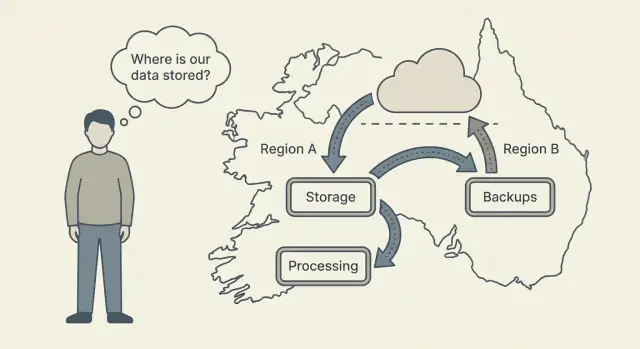
What customers mean when they ask about data residency
When a customer asks about data residency, they usually want reassurance about three things: where their data sits, who can see it, and whether it can move somewhere they didn’t plan for.
Most people aren’t asking for a legal definition. They’re asking, “Will our data end up somewhere unexpected, and can we control that?” Start by naming that concern plainly. It signals you understood the real question.
Behind most residency questions are these three prompts:
- Where is our data stored (which country or region)?
- Who can access it (your staff, vendors, support)?
- Can it leave that location (backups, logs, analytics, support tooling, AI processing)?
Set expectations early. You can explain how your system works in clear, practical terms, but you’re not giving legal advice. A simple line like this usually lands well:
“I can describe our controls and typical data flows. Your counsel can confirm how this maps to your policies.”
Also clarify what “residency” covers and what it doesn’t. Residency is mainly about where data is hosted and where it may be transferred. It’s not automatically a promise about everything else.
Data residency alone doesn’t answer questions like:
- Data retention (how long you keep it)
- Data ownership and IP terms
- Security quality (encryption, monitoring, incident response)
- What users choose to upload or share
- What happens after a customer exports data to another system
Data residency in plain language (and what it is not)
Data residency is simply the country or region where customer data is stored when it’s “at rest,” meaning saved in databases, file storage, and backups.
If a customer asks about data residency, they want a clear answer to: “Where does our data live day to day?”
A few quick distinctions help avoid confusion:
- Data residency vs data privacy: privacy is about how data is used and protected (who can access it, why, and what safeguards exist), regardless of location. Residency is about location.
- Data residency vs data sovereignty: sovereignty is about which country’s laws claim authority over the data. Residency is about where it’s stored.
Why does “region” matter so much? Because location affects real obligations and risk, including laws, contract promises, audit evidence, disaster recovery design, and cross-border transfer rules.
When you explain residency, stay concrete. Talk about storage, backups, access paths, and third parties in everyday language.
A short script your team can read
“Data residency means where your data is stored. For your account, our goal is to keep stored data in the region you choose. Sometimes data may move temporarily for operations like support troubleshooting or security monitoring, but we limit that and control who can access it. If you tell us your required country or region, we can confirm what is stored there, what might transfer, and what controls we use.”
The 5 places customer data can show up
Residency questions get messy when people mix up where data can appear. Naming the “places” up front makes the rest of the conversation easier.
1) Storage (the “home”)
Storage is where data sits when nobody is actively using it: databases, file uploads, object storage (documents, images), and sometimes logs.
2) Backups and replicas (the “safety copies”)
Backups are copies for recovery after mistakes, bugs, or outages. Replicas are extra copies used for performance and availability. From a residency standpoint, a copy in another region is still customer data.
3) Processing (the “workbench”)
Processing is where requests are handled: app servers, background jobs, API gateways, and short-lived caches. Data may briefly exist in memory or temporary files while a request runs.
4) Admin access (the “people layer”)
Support and engineers can work from anywhere, but that doesn’t automatically mean data moves there. The question customers are really asking is: can staff view customer data, under what rules, and with what logging?
5) Third-party services (the “helpers”)
A third party matters when it can store, process, or access customer data on your behalf (often called a sub-processor). Common examples include email delivery, error tracking, analytics, payment systems, and AI model providers.
A simple story that covers most cases:
A user uploads a contract (storage), it’s copied to a nightly backup (backup), the system extracts key fields (processing), support investigates an issue using read-only access (admin), and an error report containing a snippet is sent to a monitoring tool (third-party).
Make it concrete: which data are we talking about?
“Where is our data stored?” can mean very different things depending on whether the customer is asking about uploaded content, billing records, logs, or temporary processing.
A practical way to answer is to split data into three buckets:
- Customer content: what the customer intentionally puts into the product (files, records, messages, documents, images, submitted text). Many customers also consider generated outputs part of their content.
- Service data: what the service needs to run the account (account profile, billing and invoices, plan level, roles, authentication events, basic usage totals). This often includes diagnostics like error logs and performance metrics.
- Transient data: short-lived data created while the service is working (in-memory processing, short caches, queues, temporary files). It isn’t meant for long-term storage, but it can still exist briefly in a region.
A quick way to name it in writing
When answering, go in this order: (1) customer content, (2) service data, (3) transient processing.
Here’s a table format you can reuse in a doc or email:
| Data type | What it includes (plain words) | Typical location | Typical retention |
|---|---|---|---|
| Customer content | What users upload or enter | Primary hosting region | Until deleted by customer or per contract |
| Metadata | IDs, timestamps, object names | Same as content or nearby services | As needed to operate features |
| Analytics | Aggregated usage stats | Analytics systems (may be separate) | Time-limited, often aggregated |
| Support tickets | Messages with support | Support tool region | Per support policy |
| Diagnostics | Logs, crash reports | Logging/monitoring region | Short window (days/weeks) |
Example wording:
“Your project content stays in the selected region. Billing and account records are service data and may be stored separately. During processing, some transient data may briefly exist in memory or caches, then expires.”
Simple diagrams you can reuse in emails and docs
Map data flows before you build
Use Planning Mode to outline storage, backups, and third parties in plain language.
A small diagram often answers residency questions faster than a paragraph. Keep it readable on a phone and focus on what’s stored where, plus what can move.
Diagram 1: One region, with the main data “homes”
Use this when the customer wants a simple statement like “everything stays in Region A.”
Customer
  |
  | use app
  v
[Region A]
  - App servers (process)
  - Database (store)
  - Backups (copy, store)
This works best with one sentence under it:
“All customer content is stored in Region A, and backups are also stored in Region A.”
Diagram 2: Two regions (primary and disaster recovery)
Use this when there is a standby region. Make the arrows do the talking.
           normal use
Customer  ----------->  [Primary Region]
                             - App (process)
                             - DB (store)
                             - Backups (copy)
                                  |
                                  | encrypted copy
                                  v
                         [DR Region]
                             - Backup copy (store)
                             - Standby (no access unless failover)
If the customer is sensitive to transfers, label the arrow with what moves (for example, “encrypted backup copy”) and how often (for example, “daily”).
Diagram 3: One user action, shown as touchpoints
Use this when customers ask “Where does my file go?” or “Does anything leave the region when I click save?”
User uploads a file
  1) App server (process upload)
  2) Object storage (store file)
  3) Database (store metadata)
  4) Backup system (copy for recovery)
User views the file
  5) App server (read)
  6) Object storage (send)
Labeling rules that keep you out of trouble:
- Avoid acronyms. Write “database” not “DB,” “disaster recovery” not “DR.”
- Use verbs customers recognize: store, copy, process, send, delete.
- Put the region name on every box, not just the title.
- If something can leave the region, draw an arrow and name it.
- If something does not happen (for example, “no analytics export”), say it clearly near the diagram.
How to explain it step by step (a repeatable script)
A calm, repeatable script keeps you away from legal wording and reduces guesswork.
The script you can follow on any call or email
-
Start with one clarifying question: “What rule are you trying to meet - a specific country, a region (like EU), or an internal policy?”
-
Align on what “data” means to them: “Do you mean content, user accounts, files, logs, backups, or analytics?”
-
State the default location in one sentence: “By default, your application data is stored in the region where your environment is deployed.”
-
Describe what can move, and why. Keep it practical: support troubleshooting, recovery design (restore/failover), and third parties. If something never leaves the region, say so. If it can leave under certain conditions, name those conditions.
-
Offer the controls they can choose. Focus on what the customer can decide (region selection, access controls) and what they can do themselves (exports, restores).
Then end with a clean next step:
“I’ll send a short written summary of what stays put, what can move, and what you can control. Reply with any corrections.”
What to include in the written summary
Keep it to five lines:
- Customer requirement (country/region and which data types)
- Storage location (default and chosen region)
- Allowed transfers (support, recovery, third parties)
- Customer controls (region choice, access, exports, snapshots)
- Open questions (anything you still need from them)
Clear wording templates you can copy and paste
Customers want two answers: where their data lives, and whether it ever moves. Separate those ideas:
“Data lives in X. It may move to Y only for Z.”
Be careful with “always” and “never.” Only use absolutes if they hold up during backups, outages, and support work.
Three ready-to-send answers
-
Short answer (email or chat) “Your customer data lives in [REGION/COUNTRY] on our cloud infrastructure. It may move outside that region only for [SPECIFIC REASON, for example disaster recovery or approved support], and only under the controls listed below.”
-
Detailed answer (for procurement or IT) “Data lives in [REGION/COUNTRY] for normal use: application data, database records, and file uploads. Backups are stored in [BACKUP REGION] and kept for [RETENTION]. Data may move temporarily to [SUPPORT/DIAGNOSTIC LOCATION] only when needed to resolve an issue and only with restricted access. If we use sub-processors (for example, cloud hosting or AI model providers), we list them and the regions they operate in.”
-
Security review answer (formal, but still plain English) “Our residency explanation covers: (1) where production data is stored, (2) where backups and disaster recovery copies are stored, (3) who can access data and how access is logged, and (4) what third parties may process data.”
Fill-in template you can keep in your docs
Use this as a single source of truth, then copy sections into replies:
- Region (production): [REGION/COUNTRY], [CLOUD], [TENANT SETUP]
- Backups: stored in [REGION], encrypted [AT REST/IN TRANSIT], retention [DAYS]
- Support access: [WHO], [WHEN], [APPROVAL NEEDED?], [LOGGING]
- Disaster recovery: [DISASTER RECOVERY REGION], “only used during outages”
- Sub-processors: [LIST], including any AI model providers if applicable
If any line is unknown, don’t guess. Say what you know, what you’re confirming, and when you’ll follow up.
Common mistakes and wording traps to avoid
Host on AWS globally
Choose a country or region for deployment without changing your app workflow.
The fastest way to lose trust is to sound confident but vague. These are the mistakes that trigger follow-up emails and long security reviews.
The most common mistakes
Saying “we’re compliant” without saying where data is stored. Customers usually want one plain sentence: what data is stored, which country or region it’s stored in, and whether that’s configurable.
Mixing compute location with storage location. An app can run in one place while the database, file storage, or analytics live somewhere else. If you only talk about “where the app runs,” you can accidentally mislead.
Forgetting “side data.” Backups, logs, crash reports, and support tickets often matter just as much as the main database.
Using “data never leaves” when there are exceptions. Real systems often have edge cases: incident response, approved support workflows, optional disaster recovery, third-party tooling. If you can’t explain the exceptions in plain words, avoid absolutes.
Assuming a cloud “region” automatically means “no cross-border access.” Even if data is stored in one region, staff or systems elsewhere may be able to access it under specific controls. Customers often care about that distinction.
Safer wording patterns:
- “Customer content is stored in the selected deployment location. Backups are stored in the same location unless you enable cross-location disaster recovery.”
- “Support access is limited and logged. We can describe the approval process used for access.”
- “We use third-party services for specific functions. We will confirm what data is sent and when.”
A quick checklist before you answer a customer
Don’t start with policy text. Start with a few facts you can say in one or two sentences, then add detail only if they ask.
The 5 checks to do first
- Primary storage location: What country/region is the customer’s main database and file storage in?
- Backups and retention: Where are backups kept, for how long, and who can restore them?
- Replication and failover: Can the system copy or move data to another region (performance, outage recovery, maintenance)? Under what conditions?
- Human access paths: Who can access customer data, from where, and what approvals/logs exist?
- Third parties that handle data: Which vendors touch data (cloud hosting, email/SMS, analytics, AI model providers), and what they receive.
After that, describe customer controls in plain language: what they can choose (like a region), what they can do themselves (export), and what they can request.
Final sanity check before you hit send
Make sure your reply answers these three questions:
- “Where does my data live day to day?”
- “Can it leave that place, and when?”
- “What stops random access or random transfers?”
Concrete wording you can reuse:
“Your primary data is stored in [region]. Backups are stored in [region] for [time]. Data only moves to another region if [failover/replication rule]. Access is limited to [roles] and is logged. Our subprocessors include [vendors] for [purpose].”
Example: answering a real customer question (simple scenario)
Create a residency-friendly prototype
Generate a working app by chat, then review what data is stored and where.
A customer in Germany emails: “Does our data stay in the EU? And if there’s an outage, will you move it somewhere else?”
3-sentence reply (copy/paste)
Yes - we can host your application and database in an EU region, so your stored customer data lives there.
During an outage, we do not automatically move your data to a different country unless you approve a failover setup in advance.
If you tell us which EU countries/regions are acceptable (and which are not), we will confirm the exact hosting location and document it for your account.
Optional appendix (only if they ask for details)
When we say “data lives in the EU,” we mean where the main systems that store it run: application services, the database, and file storage.
For outages, there are two common approaches:
- Stay in one EU region only: simplest for residency, but recovery can take longer if the whole region has problems.
- EU-to-EU failover: the service can switch to a second EU region if the primary one is down, which improves availability but means data may be processed in that second EU region during the incident.
Practical notes customers usually care about:
- Backups and snapshots are stored in the approved region(s) you choose.
- Support access is controlled and limited; it doesn’t change the data’s hosting region.
- If you export data or source code, it leaves the platform only when you request the export.
Action to close the loop: ask them to confirm acceptable regions (for example, “EU-only, with optional failover to a second EU region”), then record the choice in onboarding docs.
FAQ and next steps for your team (and your customers)
FAQ: Where exactly is data stored (region vs country)? A clear way to say it: data is stored in a chosen cloud region. A region maps to a geography, but it isn’t always the same as a single country. If a customer needs a specific country, confirm which region satisfies that requirement.
FAQ: Can data move during support or troubleshooting? Most support work shouldn’t require copying customer content elsewhere. If a rare case requires temporary access or a customer-provided sample, say that clearly: who can access it, how long it’s kept, and how it’s deleted.
FAQ: Do backups stay in the same region? Customers usually expect backups and snapshots to stay with the primary data. If backups are in-region, say that plainly. If disaster recovery can store copies elsewhere, call it out and describe the option.
FAQ: What about logs, analytics, and email notifications? This is where confusion happens. Even if the database stays in one place, supporting data can include logs, performance metrics, audit trails, and emails (like password resets). State whether these can contain personal data, where they’re stored, and what customers can configure.
FAQ: What controls can customers turn on or request? Only list controls you can actually support, such as:
- Choosing the deployment region up front
- Limiting team access (role-based access, least privilege)
- Setting retention rules for data, logs, and backups
- Using snapshots and rollback with clear retention rules
- Exporting data or source code when needed
Next steps Capture residency requirements early (country, region, backups, support access) and write them down before deployment.
If you’re using a platform like Koder.ai (koder.ai), it can run applications in specific countries on AWS and supports features like source code export and snapshots/rollback. Those details matter when you document what customers can control and how recovery works.