

Sep 29, 2025·8 min
Event tracking plan for SaaS: names, properties, 10 dashboards
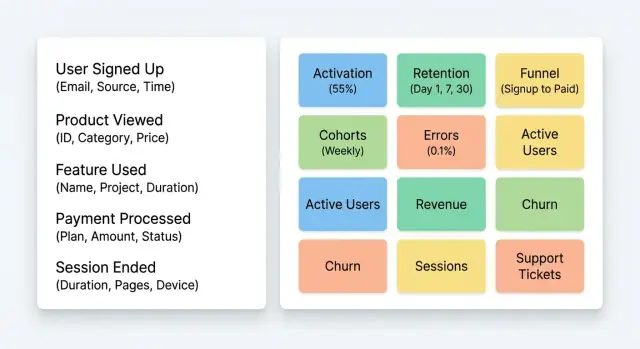
Use this event tracking plan for SaaS to name events and properties consistently, and set up 10 early dashboards for activation and retention.
What you need to understand early (and why it is hard)
Early analytics in a first SaaS app often feels confusing because you have two problems at once: not many users, and not much context. A handful of power users can skew your charts, while a few “tourists” (people who sign up and leave) can make everything look broken.
The hardest part is separating usage noise from real signals. Noise is activity that looks busy but does not mean progress, like clicking around settings, refreshing pages, or creating multiple test accounts. Signals are actions that predict value, like finishing onboarding, inviting a teammate, or completing the first successful workflow.
A good event tracking plan for SaaS should help you answer a few basic questions in the first 30 days, without needing a data team.
What you should be able to answer fast
If your tracking can answer these, you are in a good place:
- Where do new signups drop off before reaching first value?
- How many users reach “first value” within 24 hours and within 7 days?
- Which features are used by people who come back next week?
- What is the most common path to success (and the most common dead end)?
- Are returning users coming back to do the same job, or just poking around?
Here is a plain-English view: activation is the moment a user gets their first real win. Retention is whether they keep coming back for that win again. You do not need perfect definitions on day one, but you do need a clear guess and a way to measure it.
If you are building quickly (for example, shipping new flows daily in a platform like Koder.ai), the risk is instrumenting everything. More events can mean more confusion. Start with a small set of actions that map to “first win” and “repeat win,” then expand only when a decision depends on it.
Define activation and retention in plain terms
Activation is the moment a new user first gets real value. Retention is whether they come back and keep getting value over time. If you can’t say both in simple words, your tracking will turn into a pile of events that answer nothing.
Start by naming two “people” in your product:
- Core user: the person doing the work (the one who clicks, uploads, sends, builds).
- Account: the customer who pays and owns billing (a person or a company).
Many SaaS apps have teams, so one account can have many users. That’s why your event tracking plan for SaaS should always be clear about whether you are measuring user behavior, account health, or both.
One sentence for activation
Write activation as a single sentence that includes a clear action and a clear outcome. Good activation moments feel like: “I did X and got Y.”
Example: “A user creates their first project and successfully publishes it.” (If you were building with a tool like Koder.ai, that could be “first successful deploy” or “first source code export”, depending on your product’s promise.)
To make that sentence measurable, list the few steps that usually happen right before first value. Keep it short, and focus on what you can observe:
- Sign up
- Create the first workspace/project
- Add the key input (data, content, integration, or settings)
- Run the core action (send, publish, generate, invite)
- Reach a success state (completed, delivered, deployed)
What retention means for you
Retention is “did they come back” on a schedule that matches your product.
If your product is used daily, look at daily retention. If it’s a work tool used a few times per week, use weekly retention. If it’s a monthly workflow (billing, reporting), use monthly retention. The best choice is the one where “coming back” realistically signals ongoing value, not guilt-driven logins.
Step-by-step: build your first event tracking plan
Start with the path to first value
An event tracking plan for SaaS works best when it follows one simple story: how a new person gets from signup to their first real win.
Write down the shortest onboarding path that creates value. Example: Signup -> verify email -> create workspace -> invite teammate (optional) -> connect data (or set up project) -> complete first key action -> see result.
Now mark the moments where someone can drop off or get stuck. Those moments become the first events you track.
Define and test the minimum set
Keep the first version small. You usually need 8-15 events, not 80. Aim for events that answer: Did they start? Did they reach first value? Did they come back?
A practical build order is:
- Map the onboarding and first-value path (one page, no debate)
- Choose a short event list that covers each step of that path
- Define every event in a tiny spec (name, when it fires, key properties)
- Add one stable user ID and one account/workspace ID to every event
- Test the events by running the real flows before release
For the event spec, a small table in a doc is enough. Include: event name, trigger (what must happen in the product), who can trigger it, and properties you will always send.
Two IDs prevent most early confusion: a unique user ID (person) and an account or workspace ID (the place they work). This is how you separate personal usage from team adoption and upgrades later.
Before you ship, do a “fresh user” test: create a new account, complete onboarding, then check that every event fires once (not zero, not five times), with the right IDs and timestamps. If you build on a platform like Koder.ai, bake this test into your usual pre-release check so tracking stays accurate as the app changes.
A simple naming convention for events
A naming convention is not about being “correct”. It is about being consistent so your charts do not break when the product changes.
A simple rule that works for most SaaS apps is verb_noun in snake_case. Keep the verb clear and the noun specific.
Examples you can copy:
created_project,invited_teammate,uploaded_file,scheduled_demosubmitted_form(past tense reads like a completed action)connected_integration,enabled_feature,exported_report
Prefer past tense for events that mean “this happened”. It removes ambiguity. For example, started_checkout can be useful, but completed_checkout is the one you want for revenue and retention work.
Avoid UI-specific names like clicked_blue_button or pressed_save_icon. Buttons change, layouts change, and your tracking turns into a history of old screens. Name the underlying intent instead: saved_settings or updated_profile.
Keep names stable even if the UI changes. If you rename created_workspace to created_team later, your “activation” chart may split into two lines and you will lose continuity. If you must change a name, treat it like a migration: map old to new, and document the decision.
Reserved prefixes (small, not fancy)
A short set of prefixes helps keep the event list tidy and easier to scan. Pick a few and stick to them.
For example:
auth_(signup, login, logout)onboarding_(steps that lead to first value)billing_(trial, checkout, invoices)admin_(roles, permissions, org settings)
If you are building your SaaS in a chat-driven builder like Koder.ai, this convention still holds. A feature built today might be redesigned tomorrow, but created_project remains meaningful across every UI iteration.
Properties to include (and how to keep them consistent)
Plan activation in minutes
Outline onboarding steps and your key events before writing code.
Good event names tell you what happened. Properties tell you who did it, where it happened, and what the outcome was. If you keep a small, predictable set, your event tracking plan for SaaS stays readable as you add more features.
Start with a small “always-on” core
Pick a handful of properties that appear on almost every event. These let you slice charts by customer type without rebuilding dashboards later.
A practical core set:
- user_id and account_id (who did it, and which workspace it belongs to)
- plan_tier (free, pro, business, enterprise)
- timestamp (when it happened, from the server if possible)
- app_version (so you can spot changes after releases)
- signup_source (where the user came from, like ads, referral, or organic)
Then add context only when it changes the meaning of the event. For example, “Project Created” is far more useful with project_type or template_id, and “Invite Sent” becomes actionable with seats_count.
Track outcomes, not just actions
Whenever an action can fail, include an explicit result. A simple success: true/false is often enough. If it fails, add a short error_code (like "billing_declined" or "invalid_domain") so you can group problems without reading raw logs.
A realistic example: on Koder.ai, “Deploy Started” without outcome data is confusing. Add success plus error_code, and you can quickly see if new users fail due to missing domain setup, credit limits, or region settings.
Consistency rules that save your dashboards
Decide the name, type, and meaning once, then stick to it. If plan_tier is a string on one event, do not send it as a number on another. Avoid synonyms (account_id vs workspace_id), and never change what a property means over time.
If you need a better version, create a new property name and keep the old one until you have migrated dashboards.
Data hygiene and privacy basics
Clean tracking data is mostly about two habits: send only what you need, and make it easy to fix mistakes.
Start by treating analytics as a log of actions, not a place to store personal details. Avoid sending raw emails, full names, phone numbers, or anything a user might type into a free-text field (support notes, feedback boxes, chat messages). Free text often contains sensitive info you did not plan for.
Use internal IDs instead. Track something like user_id, account_id, and workspace_id, and keep the mapping to personal data inside your own database or CRM. If a teammate really needs to connect an event to a person, do it through your internal tools, not by copying PII into analytics.
IP addresses and location data need a decision upfront. Many tools capture IP by default, and “city/country” can feel harmless, but it can still be personal data. Pick one approach and document it: store nothing, store coarse location only (country/region), or store IP only temporarily for security and then drop it.
Here’s a simple hygiene checklist to ship with your first dashboards:
- Define an allow-list of event properties you will send (everything else is blocked)
- Add a way to delete a user’s data on request (by
user_idandaccount_id) - Limit access: who can view raw events, who can export, and who can change tracking
- Keep a short tracking doc with examples of “safe” vs “not safe” properties
If you build your SaaS on a platform like Koder.ai, apply the same rules to system logs and snapshots: keep identifiers consistent, keep PII out of event payloads, and write down who can see what and why.
10 must-have dashboards for early activation and retention
A good event tracking plan for SaaS turns raw clicks into answers you can act on. These dashboards focus on two things: how people reach first value, and whether they come back.
Dashboards that explain activation
- 1) New users trend (daily/weekly) + signup_source: Count new accounts and break them down by where they came from (ads, organic, referral, invite). Watch for spikes that later fail to activate.
- 2) Activation funnel with drop-offs: A simple funnel like Signup -> Email verified -> Project created -> First value action. Highlight the biggest drop step and inspect sessions.
- 3) Time to first value (median, p75): Measure how long it takes users to hit your first value event. Median shows the typical path; p75 shows who is struggling.
- 4) Feature adoption (top 5 value actions): Track the few actions that mean real use (not settings clicks). Keep it to the top 5 so it stays readable.
- 5) Activation rate by signup_source: Same activation definition, split by source. One channel often brings curious visitors, another brings buyers.
If you built your first version in a platform like Koder.ai, you can still use these same dashboards - the key is consistent events.
Dashboards that explain retention
- 6) Retention cohorts (week 1, week 4): Cohorts by signup week, retention measured by doing a key action. This shows if the product is getting stickier over time.
- 7) Returning users trend (WAU): Weekly active users (based on a key action) to separate “logins” from real usage.
- 8) Repeat value frequency: How many days per week users perform the core action. This reveals whether you have a habit-forming workflow.
- 9) Re-activation funnel: Inactive -> Returned -> Did key action. Helps you see if reminders and new features actually bring people back.
- 10) Friction dashboard (errors and failed actions): Track “error_shown”, “payment_failed”, or “integration_failed”. Spikes here quietly kill activation and retention.
Example scenario: tracking a new SaaS from signup to first value
Build the core workflow now
Turn your “first value” flow into a working app from a simple chat.
Imagine a simple B2B SaaS with a 14-day free trial. One person signs up, creates a workspace for their team, tries the product, and (ideally) invites a teammate. Your goal is to learn, fast, where people get stuck.
Define “first value” as: the user creates a workspace and completes one core task that proves the product works for them (for example, “import a CSV and generate the first report”). Everything in your early tracking should point back to that moment.
Here’s a lightweight set of events you can ship on day one (names are simple verbs in past tense, with clear objects):
- created_workspace
- completed_core_task
- invited_teammate
For each event, add just enough properties to explain why it happened (or didn’t). Good early properties are:
- signup_source (google_ads, referral, founder_linkedin, etc.)
- template_id (which starting setup they picked)
- seats_count (especially for team invites)
- success (true/false) plus a short error_code when success is false
Now picture your dashboards. Your activation funnel shows: signed_up -> created_workspace -> completed_core_task. If you see a big drop between workspace creation and the core task, segment by template_id and success. You might learn that one template leads to many failed runs (success=false), or that users from one signup_source choose the wrong template and never reach value.
Then your “team expansion” view (completed_core_task -> invited_teammate) tells you whether people invite others only after they succeed, or whether invites happen early but the invited users never complete the core task.
This is the point of an event tracking plan for SaaS: not to collect everything, but to find the single biggest bottleneck you can fix next week.
Common mistakes that ruin early insights
Most tracking failures are not about tools. They happen when your tracking tells you what people clicked, but not what they achieved. If your data cannot answer “did the user reach value?”, your event tracking plan for SaaS will feel busy and still leave you guessing.
Mistake 1: Measuring clicks instead of outcomes
Clicks are easy to track and easy to misread. A user can click “Create project” three times and still fail. Prefer events that describe progress: created a workspace, invited a teammate, connected data, published, sent first invoice, completed first run.
Mistake 2: Renaming events every sprint
If you change names to match the latest UI text, your trends break and you lose week over week context. Pick a stable event name, then evolve meaning through properties (for example, keep project_created, add creation_source if you add a new entry point).
Mistake 3: Forgetting B2B identifiers
If you only send user_id, you cannot answer account questions: which teams activated, which accounts churned, who is a power user inside each account. Always include an account_id (and ideally role or seat_type) so you can view both user and account retention.
Mistake 4: Sending too many properties
More is not better. A giant, inconsistent property set creates empty values, weird spelling variants, and dashboards nobody trusts. Keep a small “always present” set, and add extra properties only when they support a specific question.
Mistake 5: Not testing end to end
Before release, verify:
- Events fire once (not twice) and at the right moment
- Required IDs are present (
user_id,account_idwhere needed) - Property values match the agreed list (no surprise strings)
- Dashboards update from real flows, not only test data
- You can replay the user journey in order
If you build your SaaS in a chat-driven builder like Koder.ai, treat tracking like any other feature: define expected events, run a full user journey, and only then ship.
Quick checklist before you ship tracking
Turn referrals into credits
Refer other builders and earn credits when they start using Koder.ai.
Before you add more events, make sure your tracking will answer the questions you actually have in week 1: are people reaching first value, and do they come back.
Start with your key flows (signup, onboarding, first value, returning use). For each flow, pick 1-3 outcome events that prove progress. If you track every click, you will drown in noise and still miss the moment that matters.
Use one naming convention everywhere and write it down in a simple doc. The goal is that two people can independently name the same event and end up with the same result.
Here’s a quick pre-ship check that catches most early mistakes:
- Outcome first: each key flow has a small set of outcome events, not dozens of UI click events.
- Names are consistent: events follow the same verb+noun style, and the meaning of each event is documented in one place.
- Properties are typed: critical properties keep the same type across all events (for example, plan is always a string, and seat_count is always a number).
- Dashboards match definitions: your activation dashboard uses your activation event, and your retention dashboard uses your retention event (not a random proxy).
- QA once like a user: run through the app and confirm events fire once, at the right time, with the right properties.
A simple QA trick: do one full journey twice. The first run checks activation. The second run (after logging out and back in, or returning the next day) checks retention signals and prevents double-firing bugs.
If you are building with Koder.ai, do the same QA after a snapshot/rollback or code export too, so tracking stays correct as the app changes.
Next steps: keep it lightweight and iterate
Your first tracking setup should feel small. If it takes weeks to implement, you will avoid changing it later, and the data will fall behind the product.
Pick a simple weekly routine: look at the same dashboards, write down what surprised you, and only change tracking when you have a clear reason. The goal is not “more events”. It is clearer answers.
A good rule is to add 1-2 events at a time, each tied to one question you cannot answer today. For example: “Do users who invite a teammate activate more often?” If you already track invite_sent but not invite_accepted, add only the missing event and one property you need to segment (like plan tier). Ship, watch the dashboard for a week, then decide the next change.
Here’s a simple cadence that works for early teams:
- Review activation and retention dashboards once a week, same day and time
- Write 3 takeaways and 1 follow-up question
- Add or adjust tracking only if it unlocks that question
- Keep event names stable; add properties before you add new events
- Remove nothing until you are sure it is unused (deleting breaks trends)
Keep a tiny changelog for tracking updates so everyone trusts the numbers later. It can live in a doc or a repo note. Include:
- Date and owner
- What changed (event/property name)
- Why it changed (the question)
- Expected impact (dashboards affected)
If you are building your first app, plan the flow before you implement anything. In Koder.ai, Planning Mode is a practical way to outline the onboarding steps and list the events needed at each step, before code exists.
When you iterate on onboarding, protect your tracking consistency. If you use Koder.ai snapshots and rollback, you can adjust screens and steps while keeping a clear record of when the flow changed, so sudden shifts in activation are easier to explain.