

Oct 02, 2025·8 min
Environment variables for API keys: a simple secrets model
Environment variables for API keys explained for non-technical builders: keep keys out of prompts and repos, map dev staging prod, and rotate safely.
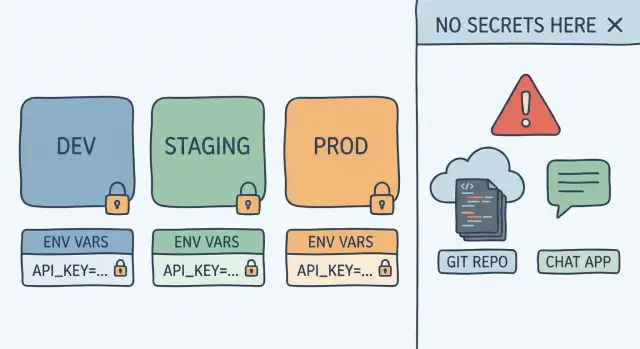
Environment variables for API keys explained for non-technical builders: keep keys out of prompts and repos, map dev staging prod, and rotate safely.
An API key is like a password for a service your app talks to (payments, email, maps, AI, analytics). It tells that service, "this request is coming from my account," so the service can charge you, apply limits, and allow access.
Keys leak because they often start life as a quick copy-paste. You paste it into a chat, a settings file, or a note "just for now," and then it gets saved somewhere you didn't mean to share.
Common accidental leak paths include chat prompts (especially when you're building fast in a vibe-coding tool), committing a key to a repo or uploading a zip "for review," putting a key into a screenshot or screen recording, leaving it in a shared doc or team chat, or hardcoding it into front-end code that anyone's browser can read.
The risk isn't abstract. The fastest pain is surprise bills: someone uses your key to call an API thousands of times. The next risk is data access: if the key can read customer data or send emails, an attacker can do the same. In the worst case, a key with broad permissions can lead to account takeover (for example, if it can create new keys).
You don't need to be a security expert to get most of the benefit. A small habit change goes a long way: treat keys as "secrets" and keep them out of prompts and repos. That's exactly what environment variables are for: store the secret in a protected place, and have your app read it at runtime, without baking it into your code or screenshots.
If you remember one rule, use this: code is what your app does, config is how it behaves, and secrets are what it must never reveal.
Code is the logic you build and ship (screens, buttons, calculations, API calls). It should be safe to share with teammates, and it often ends up in a repo.
Config is a setting that can be public without causing harm. Think: your app name, which region to run in, feature flags, or the base URL of a service. If someone saw it, they shouldn't be able to spend your money, access private data, or impersonate you.
Secrets are the keys to the kingdom: API keys, database passwords, private tokens, signing keys. If a stranger gets them, they can act as your app.
An environment variable is just a labeled slot your app reads when it runs. Your code looks for a label (like STRIPE_SECRET_KEY) and uses whatever value is currently stored there. This separation is why environment variables work so well for API keys: the code can stay the same, while the secret value stays outside your prompts, files, and repo.
Keeping code and secrets in different places also makes fixes easier. If you accidentally expose a secret, you can replace the value without changing the code.
A practical way to think about environments is: same labels, different values.
Example: you might use the label PAYMENTS_KEY everywhere, but dev uses a test key, staging uses a restricted key, and prod uses the full live key. If you're deploying with a platform like Koder.ai, this maps cleanly because you can deploy the same app to different environments with different environment settings.
A secret is any value that gives someone power they shouldn't have. If a stranger gets it, they can log in, spend your money, read your data, or pretend to be your app.
Common secrets include API keys, database passwords, private access tokens, signing keys, and webhook secrets. If it can create, delete, charge, read private data, or sign requests, treat it as a secret.
Some values feel harmless but are still sensitive. Write tokens are the classic trap: they might not look like "passwords," but they let an attacker push changes, upload files, send emails, or write into your database. The same goes for admin keys, service account JSON files, and any token that looks like a long random string.
Not everything needs secret handling. These are usually non-secrets: feature flags (that only change UI or behavior, not access), public URLs, UI text, analytics measurement IDs, and internal IDs that can't be used to access data by themselves. If it's meant to be visible in your app's front end or docs, it probably isn't a secret.
A quick test: if you'd be upset seeing it pasted in a public chat or committed to a public repo, it's a secret.
Keep a small, written list of the secrets your app uses. For each one, note what it's for (payments, email, database, storage), where it should live (dev, staging, prod), who owns it (you, a teammate, a vendor account), and whether it should be read-only vs write access. This list becomes your map when you later rotate keys without guessing.
Most leaks aren't "hackers." They're normal moments where someone copies a value to get unstuck, then forgets it's still visible later. A good rule: if it can be searched, synced, forwarded, or screen-shared, treat it as public.
Chat is a big one. People paste full API keys into prompts, team chats, or support messages because it feels quick. But chats get saved and shared. If you need help, paste only the last 4-6 characters and the key name, like STRIPE_SECRET_KEY ...9f2a.
Git is the classic trap. You add a key to a file "just for now," commit it, and later delete it. The secret is still in commit history. It can also spread through forks, copied snippets, or pull request diffs.
Screenshots and screen recordings leak more than people expect. A demo video can capture a settings screen, a terminal command, or an error message showing a token. Even blurred text can be risky if other parts are visible.
Issue trackers and notes apps are another quiet source. Tickets, checklists, and shared docs get copied across teams and vendors. Treat them like public logs.
A few habits prevent most leaks:
If you're building in Koder.ai, use the same mindset: keep sensitive values in environment settings, not inside the chat that defines your app.
The goal is simple: your app should read secrets from the environment, not from your prompt, not from your code, and not from files that end up in Git.
A .env file is a plain text file on your machine that stores key-value pairs. It makes local setup easy, but it also leaks easily, so treat it like a wallet.
Create a .env file locally, and make sure it's ignored by Git (usually via .gitignore). If you need to share the names of variables with teammates, share an example file like .env.example that contains only placeholders, never real values.
Pick clear names so it's obvious what they are and where they belong:
OPENAI_API_KEYSTRIPE_SECRET_KEYDATABASE_URLSENDGRID_API_KEYS3_ACCESS_KEY_IDGood names reduce mistakes when you later set dev, staging, and production.
When the app starts, it asks the operating system, "Do you have a value for OPENAI_API_KEY?" If the value exists, the app uses it. If it's missing, the app should fail early with a clear error, rather than running with broken behavior.
A practical habit: log that a variable is present (yes/no), but never print the secret itself.
Don't paste keys into chat threads or tickets. Use a password manager (shared vault) or another secure channel, and share only what a person needs. If someone leaves the team, rotate the key.
Example: a founder exports a Koder.ai project and runs it locally. They keep .env on their laptop, commit only .env.example, and give teammates access to the real keys through a shared password manager.
Think of environments as three separate rooms.
Dev is your laptop or a personal sandbox where you change things fast. Staging is a safe copy of production where you test the full app with real settings, but without real customer impact. Prod is what customers use.
The simple rule: keep the variable names identical everywhere, and only change the values. Your code reads STRIPE_SECRET_KEY in every environment, but each environment provides a different key.
A small mapping table (even a simple note) helps:
| Variable name (same everywhere) | Dev value | Staging value | Prod value |
|---|---|---|---|
PAYMENTS_API_KEY | test key | staging key | live key |
APP_BASE_URL | localhost URL | staging domain | custom domain |
DATABASE_URL | local DB | staging DB | prod DB |
Prod must not reuse dev keys. Dev keys are often shared across teammates and sometimes have wide permissions.
To keep environment values organized with a small team, agree on a few rules:
STRIPE_KEY vs STRIPE_API_KEY).If you're using a hosted builder like Koder.ai, treat each deployment target (dev, staging, prod) as a separate environment with its own secret values, even though the code is the same.
Rotating a secret means replacing an API key on purpose, on your schedule. Done right, rotation is boring: you swap the key, confirm everything still works, then disable the old one.
The safest mental model is "two keys for a short time." Many services let you create more than one active key. That overlap is what keeps your app running while you change configuration.
A simple rotation window looks like this:
If the provider doesn't support multiple active keys, pick a low-traffic time and expect a short restart. The goal stays the same: change the secret in one place without touching code.
If you think a key leaked, act first and investigate second. Revoke the key immediately (or disable it), then issue a new one and update your environment variable. After your app is stable again, look for where it escaped: chat prompts, build logs, screenshots, old commits, or shared documents.
Example: you built a small CRM in Koder.ai and it uses an email API. You generate a new email key, set it in the app's environment settings, run a test email, then revoke the old key.
CI/CD is an automated pipeline that builds and deploys your app when you push changes, and it often needs the same secrets your app needs.
The main rule: don't smuggle API keys into build logs, source code, or chat prompts. Treat the pipeline as another computer that must receive secrets in a controlled way.
Try to separate secrets used to build from secrets used to run.
Build-time secrets are only needed during the build step (for example, downloading a private package). Runtime secrets are needed after deploy (for example, calling Stripe or sending email). If you can keep keys runtime-only, you reduce the chance they end up baked into a bundle, cached in artifacts, or printed in build output.
A quick self-check: if the secret is needed in the user's browser, it isn't a secret. Browser-visible "public keys" can be fine, but server API keys must stay on the server.
Use your hosting platform's environment-specific secret storage so dev, staging, and prod can have different values.
If you deploy with Koder.ai hosting, set secrets as environment variables per environment instead of pasting keys into code or configuration files. Then your app reads them at runtime (for example, PAYMENTS_API_KEY in production vs a test key in staging).
To keep production safe, limit who can view or change prod secrets. Keep the "view secrets" group small, and separate deploy permissions from secret-edit permissions when your tooling allows it. Also keep separate keys per environment so staging can't access prod data.
Most leaks are everyday shortcuts that stick around and then get copied to the next project.
If a key is inside your source files, it can end up in backups, screenshots, shared zips, and git history.
Fix:
.env to your ignore file before your first commit.When you paste a real key into a chat, you lose control of where that text is stored, copied, or shared. If you're using a vibe-coding tool like Koder.ai, it's tempting to drop everything into the chat. Instead, replace secrets with placeholders like PAYMENTS_API_KEY=REDACTED and describe the symptom.
A good habit: copy error messages, never copy credentials.
One key used across dev, staging, and prod means one leak becomes a bigger incident. If multiple teammates share the same key, you also can't tell who used it.
Fix: create separate keys per environment, and if your provider supports it, separate keys per person or per app.
A common trap is printing "all config" on startup. That often includes tokens.
Fix: log only what you need (for example, "Stripe key loaded: yes"), and mask values (show last 4 characters) when you must identify which key is active.
Example: if staging is failing, don't print the full key. Print STRIPE_KEY ending in 9K2P so you can confirm you deployed the right one without exposing it.
Before you ship, do one calm pass focused only on secrets.
api_key, secret, token, and provider names. Also check shared docs, screenshots, and pasted chat logs. If a key ever appeared in git or a doc, assume it's burned and replace it.A quick example: if your app uses a payments API and an email API, you should have two separate sets of keys for dev, staging, and prod, and a clear owner for each. When you deploy (whether through your hosting setup or a platform like Koder.ai), you're mapping the right env vars into the right environment, not copying them into prompts, code, or repos.
Maya is a non-technical founder building a simple web app: users can pay for a subscription, and the app emails receipts and password resets. She keeps her prompts and repo clean by treating secrets as settings that live outside the code, injected at runtime using environment variables.
Here's a small, practical set of env vars she defines (names stay the same everywhere; only values change):
APP_ENV = development / staging / productionAPP_BASE_URL = http://localhost:3000 / https://staging.example.com / https://example.comPAYMENTS_PROVIDER_SECRET_KEY = test key (dev) / test key (staging) / live key (prod)EMAIL_PROVIDER_API_KEY = sandbox key (dev) / restricted key (staging) / full key (prod)DATABASE_URL = local DB (dev) / staging DB (staging) / production DB (prod)A simple rule helps: dev and staging should use test modes and separate data. Production uses live keys and real data. That way, a mistake in staging doesn't charge real cards or email real customers.
Now a realistic rotation event: a contractor who had access leaves the team. Maya assumes the old keys may be compromised. She creates new keys in the payments and email dashboards, then updates the environment values for each environment. She rotates production first during a quiet window, verifies signups, payments, and emails still work, and only then rotates staging and dev. If something breaks, she rolls back quickly by restoring the previous known-good config.
Next steps that keep this from becoming messy later:
Write a one-page "Env Var List" for your app (name, what it's for, where it's set, and who can access it). Put a monthly 10-minute review on the calendar to remove unused keys and rotate anything high-risk.
If you're already building with Koder.ai (koder.ai), it helps to keep this organized because you can manage deployments and environment settings in one place. Snapshots and rollback are also handy when a config change causes an outage and you need to recover fast.
An API key can rack up unexpected charges fast and can sometimes grant access to private data or actions like sending emails. Treat it like a password: if someone else gets it, they can often act as your app.
Put secrets in environment variables so the value lives outside your code and outside anything you might paste, commit, or screenshot. Your app reads the secret at runtime by its name (like STRIPE_SECRET_KEY), while the code stays safe to share.
A secret is anything that would let a stranger spend money, access private data, or impersonate your app. API keys, database passwords, private tokens, signing keys, and webhook secrets are secrets; public IDs and UI-only settings usually are not.
The most common leaks happen through chat prompts, team chats, tickets, screenshots, and git commits (including commit history). A good habit is to assume anything searchable, synced, forwarded, or screen-shared might become public.
Keep a local .env file on your machine for convenience, but never commit it. Commit a .env.example with placeholders so teammates know the variable names without seeing real values.
Use the same variable names in every environment and change only the values. For example, PAYMENTS_API_KEY exists in dev, staging, and prod, but dev uses a test key and prod uses the live key.
No, server API keys must never be in front-end code because anyone can read them in the browser. If you need to call a service securely, route the request through your backend and keep the secret on the server.
Create a new key first, update the environment variable, restart or redeploy, and verify the real workflow works. After you confirm the new key is live, revoke the old key so it can’t be used anymore.
Revoke or disable the exposed key immediately and generate a new one, then update your environment settings and redeploy. After things are stable, search for where it leaked (chat logs, commits, screenshots) so you can clean up the source of the leak.
Store secrets in environment settings per environment and keep them out of the project chat and source code. If a config change breaks something, use snapshots and rollback to return to a known-good state quickly without reintroducing leaked keys.