

Dec 04, 2025·7 min
Dog walker visit proof app: walk logs owners can trust
A practical guide to choosing and using a dog walker visit proof app to log time, notes, and photos and auto-share a clear recap owners can trust.
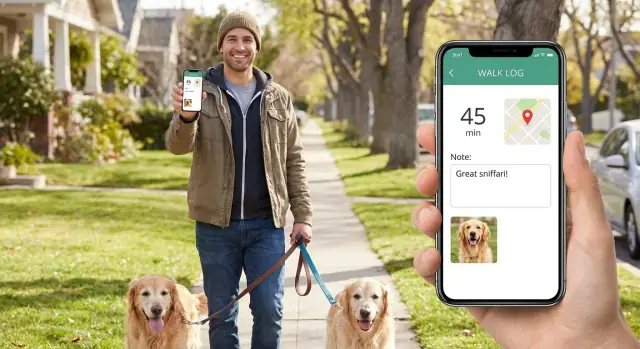
A practical guide to choosing and using a dog walker visit proof app to log time, notes, and photos and auto-share a clear recap owners can trust.
When owners aren't home, it's easy for worry to fill the gaps. Did the walk start on time? Did the dog actually get outside, or just a quick yard break? Did anything risky happen, like a loose leash near traffic or a tense moment with another dog?
Most of the time, it isn't about mistrust. It's about responsibility. If they can't see what happened, they want a simple record they can rely on.
Walkers need something, too: logging that takes seconds, not minutes. Nobody wants to send five separate texts after every visit, or deal with a payment dispute because the visit details are fuzzy.
A dog walker visit proof app works best when the "proof" feels like normal life, not paperwork. Owners usually want four basics:
That simple combination does two jobs at once. It reassures the owner and protects the walker with a clear, time-stamped record.
The real win is the recap. A good recap cuts the back-and-forth that drains everyone's day. Instead of "Did he poop?" and "How long were you there?" and "Can you send a pic?" the owner gets one tidy update and moves on.
Picture a common scenario: an owner checks their phone after a meeting and sees a quick photo, a start and end time, and "Peed and pooped, drank water, calm on leash, no issues." That one message answers almost every question before it gets asked.
A walk log is only useful if it answers the questions an owner will ask later: When did you arrive? How long was the walk? How did the dog do? Is there proof you were there? A solid dog walking proof of service captures those details without slowing you down.
Start with a clear check-in. Owners trust an arrival time that's automatic, not typed in later. One tap at the door creates a believable timestamp and sets the tone for the visit.
Timing is next. A lot of disputes happen because "about 30 minutes" means different things to different people. A good log records start and end time (or runs a timer) and still gives you a way to note real-life interruptions, like waiting for the dog to settle before leaving the driveway.
Notes should be short, specific, and focused on care. Think of them like a mini status update, not a diary. Most notes fit into a few predictable buckets: bathroom breaks, water/feeding if included, behavior and energy, safety issues, and anything you did differently (like a shorter route due to weather).
Photos are the proof owners feel. One or two clear photos beat five blurry ones. Aim for a shot that shows the dog's face and a bit of context (outside, on leash, at a familiar corner). If the dog is shy, a wider photo is fine as long as it's clearly their dog.
Finally, send the recap right after the walk while the details are fresh. A quick auto-shared summary reduces follow-up texts and helps prevent "Did you actually go today?" messages.
Example recap that builds trust:
"Checked in 1:05 pm. 32-min walk. Peed twice, one poop. Drank water after. A bit distracted by scooters but manageable. Photo near Maple and 3rd."
A dog walker visit proof app only earns its place in your day if it saves time, reduces stress, and prevents "he said, she said" moments. The best benefits are boring in a good way: fewer messages, fewer mistakes, clearer expectations.
For walkers, the biggest win is less admin. You check in, add a quick note, snap a photo, and you're done. No rewriting details later from memory, no scrolling through texts to confirm what happened, and no mixing up which dog had the longer walk.
Owners get peace of mind without chasing updates. Instead of texting "How did it go?" every day, they receive the same kind of recap every time. That consistency builds trust fast, especially with new clients.
For a business (even a one-person operation), clean records make recurring work easier to manage. When a client asks, "Did you do Tuesday's visit?" you can answer in seconds. It also helps when you're matching visit history to invoices or packages.
People tend to notice the same practical wins: faster end-of-day paperwork because notes and photos are captured in the moment, a cleaner schedule because each visit has clear start and finish times, fewer misunderstandings about duration or care instructions, and easier proof for billing questions.
When something goes wrong, a simple record can protect both sides. If a dog limps after the walk, the log shows when you noticed it and what you did. If an owner says a gate was left open, your note can confirm "latched gate after exit," and the photo can show the dog safe inside.
Example: You arrive at 2:05, walk 24 minutes, note "water bowl refilled, paw looked slightly sore, avoided stairs," and attach one clear photo outside. That recap can prevent a long argument later, and it helps the owner decide whether to monitor or call the vet.
A walk log only works if it's easy to do every time. The goal is simple: capture what happened, when it happened, and any detail the owner would want to know, then send it while the visit is still fresh.
Create a client and pet profile with the details you never want to retype: the dog's name, the visit address, entry notes (gate code, key location), and any "don't forget" items like allergies or fear triggers.
Then save the usual routine. This is where you lock in expectations: typical walk length, leash rules (harness only, no off-leash), where the dog can and can't go, and any feeding or water notes if the visit includes them.
When you arrive, start with a quick check-in. That timestamp is the backbone of a walker check-in and photo log. It protects both the owner and the walker if there's ever a question later.
Keep the rest to a small rhythm you can repeat:
Your note should be specific, not long. Mention bathroom breaks, anything unusual (pulled on leash, got spooked), and care actions (fresh water, wiped paws). One photo is often enough, but a second can help if it supports the note (for example, muddy paws or a refill of the water bowl).
Before you send, read the recap once to catch typos and make sure it matches what the owner expects.
Example recap:
"Checked in 2:05 PM. 25-minute walk around Oak St. Pee and poop both normal. Pulled a bit near construction noise but calmed down after we crossed. Refilled water bowl and wiped paws. Photo at the park entrance."
If something needs action (vomit, limping, no bathroom, broken leash clip), don't bury it in the recap. Send a direct message right away: what you saw, what you did, and what you recommend next.
A recap should answer one question: "What happened on this walk?" The more you sound like a calm witness, the easier it is for an owner to trust you.
A simple template keeps every visit consistent and quick to read. In a dog walker visit proof app, that consistency is often what stops follow-up questions.
Most days, this structure is enough:
Add one extra detail only when it matters. Too many "extras" can make owners worry.
Vague notes feel copy-pasted. Specific notes feel real, even when they're short. Compare:
Better: "15:10-15:40. Calm pace, stayed on Oak St loop. Drank water after."
Vague: "Great walk today!"
Better: "Poop was normal. Briefly pulled near construction noise, settled after 1 minute."
Vague: "All good."
If there's no photo today, say it plainly once. A simple reason helps: "No photo today - phone battery died. Walk completed 12:05-12:35, pee + poop, back inside with water." Honesty builds more trust than a blurry or misleading image.
Add extra detail when it changes care or safety: meds given (what and when), a quick paw check if you noticed limping, skipped food/water, or unusual behavior (shaking, hiding, vomiting). Keep the tone factual so owners know what's important without panicking.
Most disputes aren't about whether the dog was walked. They happen because the log leaves room for doubt. When an owner reads your recap, they're trying to answer one question: "If I wasn't there, can I clearly picture what happened?"
A common trigger is missing or delayed check-in. If the timestamp appears after you're already gone, it can look like you forgot the visit and tried to backfill it. Even if you were busy or had no signal, the owner only sees a late record with no explanation.
Photos cause problems in two opposite ways. Ten random shots can feel like noise, while one blurry photo where you can't see the dog can feel like missing proof. Owners usually want one or two clear images that show their dog and hint at the setting (leash, harness, familiar street, or a recognizable park corner).
Notes get misread, too. Short, defensive lines like "Dog was fine" can sound dismissive. Vague comments like "Had issues" without details can make owners worry. Write as if the owner could forward your note to someone else, like a partner or vet.
Another frequent issue is changing the walk length without saying why. If a 30-minute walk becomes 18 minutes, the owner may assume you rushed. If it becomes 45 minutes, they may worry the dog got overtired. The fix is simple: state the reason (heat, heavy rain, paw sensitivity, unsafe noise) and what you did instead.
Finally, relying on memory at the end of the day leads to mixed-up details. Two golden retrievers start to blur together, and you end up writing the wrong potty note for the wrong home.
Simple habits prevent most "he said, she said" moments:
Example: If Luna refused to walk past a loud construction site, note that you turned back and did a shorter loop for safety, then played a few minutes of indoor sniff games. That reads like care, not an excuse.
A dog walker visit proof app should feel faster than texting a client. If it takes too many taps, people skip steps, and the log stops being reliable.
Test an app the way you actually work: leash in one hand, phone in the other, low battery, spotty signal outside an apartment building. The best tools save the basics first (time, location, photo) and sync later without losing anything.
Look for features that reduce mistakes and keep records clear: fast one-handed check-in/check-out, offline support with later sync, an edit history (so changes are visible), support for multiple pets per household, and recaps that read well on a phone.
Good editing matters. Everyone makes typos (wrong note, wrong photo). You want to fix mistakes while still showing that it was corrected, so an owner never feels like details were quietly changed.
The recap is what owners actually see. Open a few sample recaps on a small phone screen. If you have to scroll forever to find the key info, the owner will miss it and keep asking questions.
A simple test: imagine you walked two dogs for one client, then did another visit right after. Can the app keep visits separated, label the pets clearly, and show the right photo with the right walk? If not, mix-ups will happen.
If you can't find an app that fits your routine, another option is to build a small custom logger and recap flow with a chat-built app platform like Koder.ai (koder.ai), then export the source code and keep full control of your records.
A consistent routine is what turns a simple note into proof of service. It also protects you when memories get fuzzy later.
Keep the flow short enough to follow on a busy day:
If the owner later asks, "Did Luna poop today?" your note should answer it in one line. If they ask, "Were you actually there?" the check-in plus one or two simple photos usually settles it.
Most apps already map to this: start time, end time, notes, photos. The habit matters more than the tool.
It's 12:10 pm. The owner is at work and wants proof the midday walk happened, plus a quick note on how their dog did.
A clear log might look like this:
That's enough detail to be useful without turning it into a diary.
A good client recap for dog walks reads calm and specific:
"Hi Sam - I checked in at 12:10 and we walked from 12:12 to 12:40 (28 min). Luna had good energy and did one normal poop. She pulled a bit when she saw squirrels on Maple St, but she settled after a few 'leave it' cues. I left fresh water and locked up at 12:43. Photo attached."
A week later, if the owner asks, "Has she been pulling more on the leash?" you don't have to guess. You can point to the note: where it happened, what triggered it, and what worked.
If something goes wrong, log it the same way: facts first. For example, record a rain delay with exact timing and what you did instead, or document an access issue with arrival time, contact attempts, and departure time.
Owners don't expect perfection. They expect a clear record they can trust.
The fastest way to earn trust is consistency. Pick one simple walk log format and use it on every visit, even when you're busy. Owners don't need a novel. They want the same key facts every time so they can scan it and feel confident their dog was cared for.
A standard is a routine, not a perfect message. Save a few note templates, use a consistent photo style (dog plus a recognizable landmark), and always log time the same way.
A small routine that scales as you add clients:
If you ever build your own system, define the recap fields before you design screens. Decide what must be captured every time (time, note, photo), what's optional (route, weather), and what you never want to guess later (potty details, meds, gate locked).
To lock in your standard today, write your "ideal recap" in three lines and treat it like a script:
"Walked 25 min (2:05-2:30). Peed and pooped once, good energy, pulled near squirrels. Fresh water filled, back door locked, photo attached."
Use the same structure for every client. As you grow, consistency becomes your brand, and your logs become proof everyone can trust.
Most owners want four things: a clear start and end time, one short care note, at least one identifiable photo, and basic location confirmation. If you capture those consistently, you prevent most follow-up questions and billing disputes.
Check in immediately when you arrive, before you leash up or start chatting. An automatic timestamp at the door is the simplest way to show the visit really started when you said it did.
Keep it factual and repeatable: duration, potty results, water/food if included, one behavior detail, and anything unusual. If you sound like a calm witness instead of a cheerleader, owners trust it more.
One clear photo is usually enough if the dog is easy to identify and it looks like you’re actually outside or on the walk. Add a second only when it supports the note, like muddy paws or a safety issue you’re documenting.
Say it directly in the recap and include the rest of the proof you do have, like check-in/out times and location. A simple reason helps, such as a shy dog, bad weather, or a dead battery, but don’t over-explain.
Send a separate urgent message right away with what you saw, what you did, and what you recommend next. Keep the recap factual too, but don’t hide the problem inside a “normal” update.
Log the visit in the moment, even if you have to keep the note short and finish it right after the walk. Backfilling at the end of the day is where times, potty notes, and even dogs can get mixed up.
State the actual duration and add one sentence explaining the change, like heat, heavy rain, or the dog refusing a route due to noise. Owners usually accept changes easily when the reason is clear and safety-focused.
Use an app that can save the basics first and sync later without losing timestamps, notes, or photos. If you were offline, mention it once in the recap so the timing doesn’t look like it was added after the fact.
If you need a very specific flow, you can build a simple custom logger that matches your routine, including required fields and recap formatting. Platforms like Koder.ai can help you prototype it quickly and keep control over how records are stored and exported.