

Dec 31, 2025·7 min
Correlation IDs end-to-end: trace a user action in logs
Correlation IDs end-to-end shows how to create one ID in the frontend, pass it through APIs, and include it in logs so support can trace issues fast.
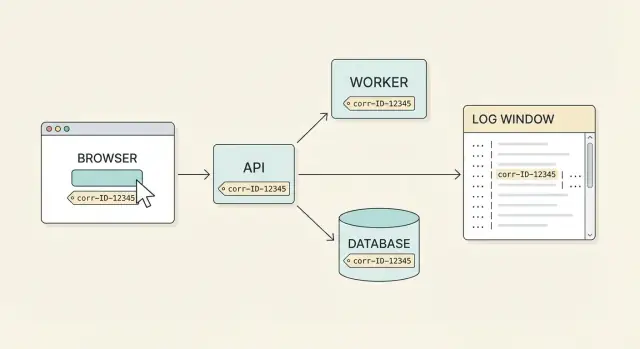
Correlation IDs end-to-end shows how to create one ID in the frontend, pass it through APIs, and include it in logs so support can trace issues fast.
Support almost never gets a clean bug report. A user says, "I clicked Pay and it failed," but that single click can touch the browser, an API gateway, a payments service, a database, and a background job. Each part logs its own slice of the story at different times, on different machines. Without one shared label, you end up guessing which log lines belong together.
A correlation ID is that shared label. It’s one ID attached to one user action (or one logical workflow) and carried through every request, retry, and service hop. With true end-to-end coverage, you can start with a user complaint and pull the full timeline across systems.
People often mix up a few similar IDs. Here’s the clean separation:
What good looks like is straightforward: a user reports an issue, you ask them for the correlation ID shown in the UI (or found in a support screen), and anyone on the team can find the full story in minutes. You see the frontend request, the API response, the backend steps, and the database result, all tied together.
Before you generate anything, agree on a few rules. If every team picks a different header name or log field, support will still be stuck guessing.
Start with one canonical name and use it everywhere. A common choice is an HTTP header like X-Correlation-Id, plus a structured log field like correlation_id. Pick one spelling and one casing, document it, and make sure your reverse proxy or gateway won’t rename or drop the header.
Choose a format that’s easy to create and safe to share in tickets and chats. UUIDs work well because they’re unique and boring. Keep the ID short enough to copy, but not so short that you risk collisions. Consistency beats cleverness.
Also decide where the ID must show up so humans can actually use it. In practice, that means it’s present in requests, logs, and error outputs, and it’s searchable in whatever tool your team uses.
Define how long one ID should live. A good default is one user action, like "clicked Pay" or "saved profile." For longer workflows that hop across services and queues, keep the same ID until the workflow ends, then start a new one for the next action. Avoid "one ID for the whole session" because searches get noisy fast.
One hard rule: never put personal data in the ID. No emails, phone numbers, user IDs, or order numbers. If you need that context, log it in separate fields with the right privacy controls.
The easiest place to start a correlation ID is the moment the user begins an action you care about: clicking "Save," submitting a form, or triggering a flow that kicks off multiple requests. If you wait for the backend to create it, you often lose the first part of the story (UI errors, retries, canceled requests).
Use a random, unique format. UUID v4 is a common choice because it’s easy to generate and unlikely to collide. Keep it opaque (no usernames, emails, or timestamps) so you don’t leak personal data into headers and logs.
Treat a "workflow" as one user action that may trigger multiple requests: validate, upload, create record, then refresh lists. Create one ID when the workflow starts, then keep it until the workflow ends (success, failure, or user cancels). A simple pattern is to store it in component state or a lightweight request context object.
If the user starts the same action twice, generate a new correlation ID for the second attempt. That lets support distinguish "same click retried" from "two separate submissions."
Add the ID to every API call triggered by the workflow, usually via a header like X-Correlation-ID. If you use a shared API client (fetch wrapper, Axios instance, etc.), pass the ID in once and let the client inject it into all calls.
// 1) when the user action starts
const correlationId = crypto.randomUUID(); // UUID v4 in modern browsers

// 2) pass it to every request in this workflow
await api.post('/orders', payload, {
  headers: { 'X-Correlation-ID': correlationId }
});

await api.get('/orders/summary', {
  headers: { 'X-Correlation-ID': correlationId }
});
If your UI makes background requests unrelated to the action (polling, analytics, auto-refresh), don’t reuse the workflow ID for those. Keep correlation IDs focused so one ID tells one story.
Once you generate a correlation ID in the browser, the job is simple: it must leave the frontend with every request and arrive unchanged at every API boundary. This is what breaks most often when teams add new endpoints, new clients, or new middleware.
The safest default is an HTTP header on every call (for example, X-Correlation-Id). Headers are easy to add in one place (a fetch wrapper, an Axios interceptor, a mobile networking layer) and don’t require changing payloads.
If you have cross-origin requests, make sure your API allows that header. Otherwise the browser may silently block it and you’ll think you’re sending it when you’re not.
If you must put the ID in the query string or request body (some third-party tools or file uploads force this), keep it consistent and written down. Pick one field name and use it everywhere. Don’t mix correlationId, requestId, and cid depending on the endpoint.
Retries are another common trap. A retry should keep the same correlation ID if it’s still the same user action. Example: a user clicks "Save," the network drops, your client retries the POST. Support should see one connected trail, not three unrelated ones. A new user click (or a new background job) should get a new ID.
For WebSockets, include the ID in the message envelope, not only in the initial handshake. One connection can carry many user actions.
If you want a quick reliability check, keep it simple:
correlationId field.Your API edge (gateway, load balancer, or the first web service that receives traffic) is where correlation IDs either become dependable or turn into guesswork. Treat this entry point as the source of truth.
Accept an incoming ID if the client sends one, but don’t assume it’s always there. If it’s missing, generate a new one immediately and use it for the rest of the request. This keeps things working even when some clients are older or misconfigured.
Do light validation so bad values don’t pollute your logs. Keep it permissive: check length and allowed characters, but avoid strict formats that reject real traffic. For example, allow 16-64 characters and letters, numbers, dash, and underscore. If the value fails validation, replace it with a fresh ID and continue.
Make the ID visible to the caller. Always return it in response headers, and include it in error bodies. That way a user can copy it from the UI, or a support agent can ask for it and find the exact log trail.
A practical edge policy looks like this:
X-Correlation-ID (or your chosen header) from the request.X-Correlation-ID to every response, including errors.Example error payload (what support should see in tickets and screenshots):
{
  "error": {
    "code": "PAYMENT_FAILED",
    "message": "We could not confirm the payment.",
    "correlation_id": "c3a8f2d1-9b24-4c61-8c4a-2a7c1b9c2f61"
  }
}
Once a request hits your backend, treat the correlation ID as part of the request context, not something you stash in a global variable. Globals break the moment you handle two requests at once, or when async work continues after the response.
A rule that scales: every function that can log or call another service should receive the context that contains the ID. In Go services, that usually means passing context.Context down through handlers, business logic, and client code.
When Service A calls Service B, copy the same ID into the outgoing request. Don’t generate a new one mid-flight unless you also keep the original as a separate field (for example parent_correlation_id). If you change IDs, support loses the single thread that ties the story together.
Propagation is often missed in a few predictable places: background jobs kicked off during the request, retries inside client libraries, webhooks triggered later, and fan-out calls. Any async message (queue/job) should carry the ID, and any retry logic should preserve it.
Logs should be structured with a stable field name like correlation_id. Pick one spelling and keep it everywhere. Avoid mixing requestId, req_id, and traceId unless you also define a clear mapping.
If possible, include the ID in database visibility too. A practical approach is to add it to query comments or session metadata so slow query logs can show it. When someone reports "Save button hung for 10 seconds," support can search correlation_id=abc123 and see the API log, the downstream service call, and the one slow SQL statement that caused the delay.
A correlation ID only helps if people can find it and follow it. Make it a first-class log field (not buried inside a message string), and keep the rest of the log entry consistent across services.
Pair the correlation ID with a small set of fields that answer: when, where, what, and who (in a user-safe way). For most teams, that means:
timestamp (with timezone)service and env (api, worker, prod, staging)route (or operation name) and methodstatus and duration_msaccount_id or a hashed user id, not an email)With this, support can search by ID, confirm they’re looking at the right request, and see which service handled it.
Aim for a few strong breadcrumbs per request, not a transcript.
rows=12).To avoid noisy logs, keep debug-level details off by default and promote only the events that help someone answer, "Where did it fail?" If a line doesn’t help locate the problem or measure impact, it probably doesn’t belong in info-level logs.
Redaction matters as much as structure. Never put PII in the correlation ID or logs: no emails, names, phone numbers, full addresses, or raw tokens. If you need to identify a user, log an internal ID or a one-way hash.
A user messages support: "Checkout failed when I clicked Pay." The best follow-up question is simple: "Can you paste the correlation ID shown on the error screen?" They reply with cid=9f3c2b1f6a7a4c2f.
Support now has one handle that connects the UI, API, and database work. The goal is that every log line for that action carries the same ID.
Support searches logs for 9f3c2b1f6a7a4c2f and sees the flow:
frontend  INFO  cid=9f3c2b1f6a7a4c2f event="checkout_submit" cart=3 items
api       INFO  cid=9f3c2b1f6a7a4c2f method=POST path=/api/checkout user=1842
api       ERROR cid=9f3c2b1f6a7a4c2f msg="payment failed" provider=stripe status=502
From there, an engineer follows the same ID into the next hop. The key is that backend service calls (and any queue jobs) forward the ID too.
payments  INFO  cid=9f3c2b1f6a7a4c2f action="charge" amount=49.00 currency=USD
payments  ERROR cid=9f3c2b1f6a7a4c2f err="timeout" upstream=stripe timeout_ms=3000
db        INFO  cid=9f3c2b1f6a7a4c2f query="insert into failed_payments" rows=1
Now the problem is concrete: the payments service timed out after 3 seconds, and a failure record was written. The engineer can check recent deploys, confirm whether timeout settings changed, and see if retries are happening.
To close the loop, do four checks:
The fastest way to make correlation IDs useless is to break the chain. Most failures come from small decisions that feel harmless while you build, then hurt when support needs answers.
A classic mistake is generating a fresh ID at every hop. If the browser sends an ID, your API gateway should keep it, not replace it. If you truly need an internal ID too (for a queue message or background job), keep the original as a parent field so the story still connects.
Another common gap is partial logging. Teams add the ID to the first API, but forget it in worker processes, scheduled jobs, or the database access layer. The result is a dead end: you can see the request enter the system, but not where it went next.
Even when the ID exists everywhere, it can be hard to search if each service uses a different field name or format. Pick one name and stick to it across frontend, APIs, and logs (for example, correlation_id). Also pick one format (often a UUID), and treat it as case-sensitive so copy-paste works.
Don’t lose the ID when things go wrong. If an API returns a 500 or a validation error, include the correlation ID in the error response (and ideally in a response header too). That way a user can paste it into a support chat, and your team can immediately trace the full path.
A quick test: can a support person start with one ID and follow it through every log line involved, including failures?
Use this as a sanity check before you tell support to "just search the logs." This only works when every hop follows the same rules.
correlation_id in request-related logs as a structured field.Pick the smallest change that makes the chain unbroken.
correlation_id and add a separate span_id if you need more detail.A quick test that catches gaps: open devtools, trigger one action, copy the correlation ID from the first request, then confirm you see the same value in every related API request and every corresponding log line.
Correlation IDs only help when everyone uses them the same way, every time. Treat correlation ID behavior like a required part of shipping, not a nice-to-have logging tweak.
Add a small traceability step to your definition of done for any new endpoint or UI action. Cover how the ID is created (or reused), where it lives during the flow, which header carries it, and what every service does when the header is missing.
A lightweight checklist is usually enough:
correlation_id) across apps and services.Support also needs a simple script so debugging is fast and repeatable. Decide where the ID shows up for users (for example, a "Copy debug ID" button on error dialogs), and write down what support should ask for and where to search.
Before you rely on it in production, run a staged flow that matches real usage: click a button, trigger a validation error, then complete the action. Confirm you can follow the same ID from the browser request, through API logs, into any background worker, and up to the database call logs if you record those.
If you’re building apps on Koder.ai, it helps to write your correlation ID header and logging conventions into Planning Mode so generated React frontends and Go services start consistent by default.
A correlation ID is one shared identifier that tags everything related to one user action or workflow, across the browser, APIs, services, and workers. It lets support start from a single ID and pull the full timeline instead of guessing which log lines belong together.
Use a correlation ID when you want to debug one incident quickly end-to-end, like “clicked Pay and it failed.” A session ID is too broad because it covers many actions, and a request ID is too narrow because it only covers one HTTP request and changes on retries.
The best default is at the start of the user action in the frontend, right when the workflow begins (form submit, button click, multi-step flow). That preserves the earliest part of the story, including UI errors, retries, and canceled requests.
Use a UUID-like opaque value that’s easy to copy and safe to share in support tickets. Don’t encode personal data, usernames, emails, order numbers, or timestamps into the ID; keep that context in separate log fields with proper privacy controls.
Pick one canonical header name and use it everywhere, such as X-Correlation-ID, and log it under a consistent structured field like correlation_id. Consistency matters more than the exact name, because support needs one predictable thing to search for.
Keep the same correlation ID across retries if it’s still the same user action, so the logs stay connected. Only generate a new correlation ID when the user starts a new attempt as a separate action, like clicking the button again later.
Your API entry point should accept an incoming ID when present, and generate a new one when it’s missing or clearly invalid. It should also echo the ID back in the response (including errors) so users and support can copy it from a UI message or debug screen.
Pass it through by putting the correlation ID into your request context and copying it to every downstream call, including internal HTTP/gRPC requests and queued jobs. Avoid creating a new correlation ID mid-flight; if you need extra granularity, add a separate internal identifier without breaking the original chain.
Log it as a first-class structured field, not buried inside a message string, so it’s searchable and filterable. Pair it with a few practical fields like service name, route, status, duration, and a user-safe identifier, and make sure failures log it too so the trail doesn’t end at the most important moment.
A good quick test is to trigger one action, copy the correlation ID from the first request or error screen, then confirm the same value appears in every related request header and every service log line that handles the workflow. If the ID disappears in workers, retries, or error responses, that’s the first gap to fix.