

Dec 04, 2025·6 min
Classroom supplies wish list with claim buttons for families
Set up a classroom supplies wish list with claim buttons so parents can reserve items, avoid duplicates, and track what is still needed.
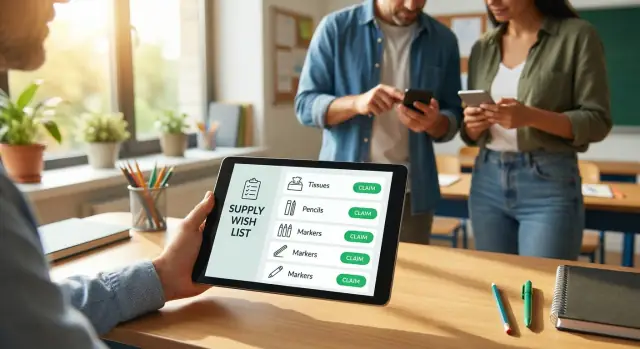
Set up a classroom supplies wish list with claim buttons so parents can reserve items, avoid duplicates, and track what is still needed.
A paper handout and a busy group chat can work, until they don't. The first week of school is already packed with messages, reminders, and last-minute errands. When the supply list lives in five places, it's easy for families to buy the same thing without realizing it.
Duplicates usually happen for simple reasons: someone sees the list late, a message gets buried, or the list is reposted with old info. By the time you notice, you have six packs of dry erase markers and still no tissues.
For parents, that creates an awkward loop. You're trying to help, but you don't want to waste money on something that's already covered. After a couple of "Oh, we already have that" moments, some families stop volunteering. Others keep buying anyway just to avoid the back-and-forth.
For teachers, the work turns into manual tracking. You answer the same questions, update a list late at night, and keep a running tally of what's missing. Even a well-meaning setup becomes a second job.
A classroom supplies wish list with claim buttons fixes the core issue: once a parent claims an item, everyone can see it's taken. That single change prevents:
Claiming also feels more polite. Families can quietly pick something that fits their budget and timing, without calling out who bought what in a group chat. If you ever decide to turn this into a small app for your class, a vibe-coding tool like Koder.ai (koder.ai) can help you build a simple claim-and-hide flow through chat, without going through a traditional development process.
A good wish list is specific enough that families can act fast, but simple enough that it doesn't feel like homework. The goal is to make "what to buy" and "how many" obvious at a glance, especially on a phone.
Each item should answer three questions:
One short note can remove most confusion. That tiny detail prevents the most common follow-up messages.
A practical format looks like this: an item name that matches store labels ("Dry erase markers, low-odor"), a clear quantity ("Need 12 packs"), and an optional note ("fine tip" or "any color"). If priorities matter, add a simple label like "Needed week 1" vs "Nice to have," and clarify whether it's for the classroom or individual students.
Even with claim buttons, families need to trust the numbers. Show a remaining count (for example, "3 of 10 still needed") so parents can tell what's actually open.
It also helps to separate what parents see from what you see. The family view should stay short: item, quantity to claim, and notes. Your view can include details you don't need to broadcast, like where the item will be stored or whether you already have backups.
Keep privacy strict and simple. Parents shouldn't have to share addresses, student details, or payment info to participate. If you collect names, collect only what you need to avoid duplicates, and make it clear who can see it. For example, instead of "Sarah Johnson will buy 3 glue sticks for Liam," show "S.J. claimed 3 glue sticks." That's enough to coordinate without oversharing.
A classroom supplies list with claim buttons is just a normal list with one key action: when a parent claims an item, it becomes reserved. The list updates for everyone right away, so people aren't guessing what is still needed.
A basic flow:
The quantity update is what stops duplicates. If you need 24 glue sticks and one parent claims 6, the list should show 18 left right away.
Some teachers want a name so they can say thank you and follow up if needed. Others prefer anonymous claiming to reduce pressure.
A good middle ground: the teacher can see the name, but other parents can't. For example, a parent claims "1 pack of dry erase markers" and types "Sam's family." Other parents only see that the markers are already covered.
On the teacher side, it should feel like a simple dashboard: what's claimed, what's unclaimed, and what quantities are left. That makes gaps obvious ("still need 8 folders") and makes reminders easier to write without calling anyone out.
Start by making the list itself before you worry about the tech. If you taught this grade last year, copy last year's supply list and adjust it. That keeps the requests realistic and saves time.
Write every item with a clear quantity. Be specific enough that families can shop without guessing ("24-count crayons" instead of "crayons"). If an item needs multiples, include the number in the line so it's obvious at a glance.
To make the list easier to scan, group items into a few buckets: whole-class items (tissues, wipes), per-student items (notebooks, folders), and optional extras (prize box items, seasonal decor). Add short notes only where confusion is likely ("no scented," "any color is fine").
Keep this minimal. You only need enough to coordinate and say thanks. For many classes, a name plus a delivery plan is enough. If you do collect contact info, explain who will see it and why.
Once claim buttons are in place, the remaining quantities should update automatically. Before you send anything, do a quick test: claim one item yourself, confirm it updates, then unclaim it.
When you share the list, use a gentle deadline ("by next Friday") and make it clear that late claims are still welcome if items remain. After the deadline, one short reminder works better than repeated nudges.
If you want a more app-like experience later, Koder.ai can help you turn the list into a small mini-app with claim buttons, a clear view of what's left, and an exportable summary for your records.
A wish list only works when it stays accurate. Plans change, shipping gets delayed, and you may realize you forgot something on day two. The goal is to handle updates without awkward messages or duplicate purchases.
A short note at the top of the list can prevent most problems. For example:
Give families an easy exit. People claim an item and then realize it won't arrive in time, costs more than expected, or simply slips their mind. A "no questions asked" unclaim option avoids guilt and saves you from chasing people.
Treating "claimed" as "done" is a common snag. Two clear statuses keep things honest:
If deadlines are needed, keep them predictable. For many classes, a release deadline 5 to 7 days after sharing works well, with a single reminder the day before.
When you add new items, avoid reshuffling the whole list. Add a small "New this week" label with a date so earlier claims don't feel like they're moving around.
A classroom wish list works best when it feels optional, not like a bill. Families have different budgets, schedules, and comfort levels about being seen. The goal is to make it easy to help without adding pressure.
Offer a mix of price points. Include plenty of small everyday items, a few mid-range picks, and only a couple higher-cost items, clearly marked as optional. Some teachers use friendly labels instead of numbers, such as "Quick wins," "Classroom boosters," and "If you're able."
Also consider non-shopping ways to help. Many families can give time instead of money, especially if the task is concrete and short. A few good options:
To reduce social pressure, allow anonymous claiming. If you still need a delivery plan, let parents leave a private note like "sending with my child on Tuesday" without showing their name to everyone.
A single line at the top sets the tone: "Any help is appreciated, and it's always okay to claim nothing." That permission increases participation more than repeated reminders.
Ms. Rivera teaches 3rd grade and shares a classroom supplies wish list with claim buttons. Her list has 25 items. Some are small (tissues, glue sticks), and a few are bigger (a set of dry erase markers, a pack of headphones). Each item shows how many are needed. Once a family claims something, it no longer looks available to everyone else.
On Monday evening, a few families jump in. Two parents claim common items like tissues and hand sanitizer. Another parent grabs the headphones because they found a sale. By Tuesday, about half the list is claimed.
Midweek is where claim buttons shine. On Wednesday, a parent named Jordan means to claim "1 pack of colored pencils" but taps "1 pack of markers" by mistake. Jordan notices right away, unclaims the markers, and claims the colored pencils instead. The markers instantly return to the list.
By Friday afternoon, Ms. Rivera checks her teacher view before sending a gentle reminder. She can see what's covered, what's in progress, and what's still missing:
Instead of guessing or tracking messages, she shares one short update: what's still needed and when she'd like items to arrive.
The point of a claim-based list is simple: families can help, and nobody wastes money buying the same thing twice. Problems usually show up when the list is unclear or when people keep coordinating "on the side."
Make items shop-ready. Vague lines like "supplies" sound friendly, but parents can't buy them. Write items like a receipt: size, color, pack count, and any must-have notes.
Always show quantities. Duplicates creep back in when people can't see what's needed vs what's already claimed. Each line should show the total needed and update as claims come in.
Keep the list as the source of truth. If someone offers in a group chat, reply with one sentence: "Thank you, please claim it on the list so it disappears for others."
Plan for changes. Needs shift. Set expectations that the list may update, and mark items as "no longer needed" when appropriate.
Avoid too many choices. Ten variations of the same item slows people down. If brand doesn't matter, say so.
Late arrivals and mid-year transfers can still create confusion. A simple plan helps: keep a small buffer section (2 to 3 common items like pencils, glue sticks, tissues) and reopen only that section if a new student joins.
Before you send the list to families, take five minutes to make it easy to read and hard to mess up:
When you share the list, include a single short message with the delivery window, where items should go, and what to do if plans change.
Last check: remove "maybe" items. If you're not sure you need it, move it to an optional section or leave it off. Families feel more comfortable when the list looks confident and complete.
A spreadsheet is a solid start because it's familiar and fast. But once you have more than one class, multiple delivery options, or lots of "is this still needed?" messages, a small web app can save time and reduce confusion.
Keep what already works. Your spreadsheet columns usually map cleanly into an app: item name, quantity needed, quantity claimed, notes, and delivery preference. Then the claim button becomes the only action parents need, and totals update instantly.
You don't need everything on day one. A few upgrades usually deliver most of the value:
If you want to build it without turning it into a big tech project, a chat-built approach can work well. With Koder.ai, you can describe the screens and rules in plain language (for example, "hide the claim button when the last unit is taken" or "show what's left by category") and iterate based on how families actually use it.
A realistic next step is to build a one-class version first, let a handful of families use it for a week, then expand once the flow feels natural.
Claim buttons prevent duplicates because they make the list update for everyone immediately. Once an item (or a quantity of it) is claimed, other families can see it’s no longer available and won’t buy the same thing by accident.
Start with your “week 1” needs and anything that runs out quickly, like tissues, wipes, and glue sticks. Keep each line item shop-ready by adding quantity and a short note about size, pack count, or whether any brand is fine.
A clear setup is “claimed” means someone intends to bring it, and “delivered” means it’s actually in the classroom. This avoids the common problem where an item looks covered but never arrives.
Keep it simple: allow unclaiming anytime, and add a gentle release rule if you need it, such as releasing claims after a certain date if the item hasn’t been delivered. That way the list stays accurate without awkward follow-ups.
Yes, and it usually helps participation. A good middle ground is letting the teacher see who claimed an item for follow-up, while other families only see that the item is taken.
Collect the minimum needed to avoid confusion, often just a name or short label plus an optional delivery note. If you show names, make it clear who can see them, and consider masking them for other families to reduce social pressure.
A quick test is to claim a few units of an item and confirm the remaining count changes instantly, then unclaim and verify it returns. Also test the “zero” state to ensure the item hides or clearly shows it’s fully covered.
Use plain wording that matches store labels, and include one clarifying detail only when it prevents a common mistake. For example, “Dry erase markers, low-odor, fine tip” is usually enough without turning the line into a long description.
Set a single, friendly delivery window and stick to one reminder that summarizes what’s still needed. The list should be the source of truth, so families don’t have to hunt through older messages for updates.
If you’re managing more than one class, multiple delivery options, or constant “is this still needed?” questions, an app can save time. With Koder.ai, you can describe the claim-and-hide rules and views in chat and iterate into a simple mini-app without building everything from scratch.