

May 18, 2025·8 min
Build a Web App to Track Business Assumptions Over Time
Learn how to design and build a web app that records business assumptions, links evidence, tracks changes over time, and prompts teams to review and validate decisions.
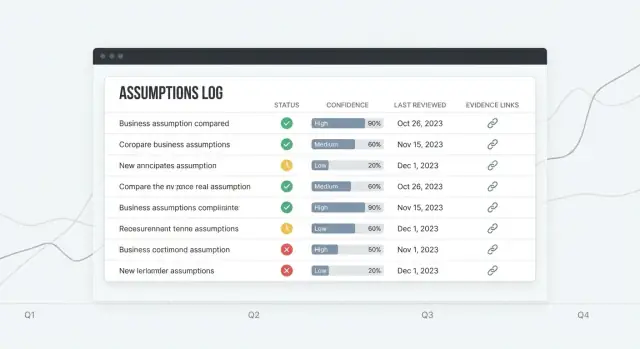
Learn how to design and build a web app that records business assumptions, links evidence, tracks changes over time, and prompts teams to review and validate decisions.
A business assumption is a belief your team is acting on before it’s fully proven. It can be about:
These assumptions show up everywhere—pitch decks, roadmap discussions, sales calls, hallway conversations—and then quietly disappear.
Most teams don’t lose assumptions because they don’t care. They lose them because documentation drifts, people change roles, and knowledge becomes tribal. The “latest truth” ends up split across a doc, a Slack thread, a few tickets, and someone’s memory.
When that happens, teams repeat the same debates, re-run the same experiments, or make decisions without realizing what’s still unproven.
A simple assumption-tracking app gives you:
Product managers, founders, growth teams, researchers, and sales leaders benefit—anyone making bets. Start with a lightweight “assumption log” that’s easy to keep current, then expand features only when usage demands it.
Before you design screens or pick a tech stack, decide what “things” your app will store. A clear data model keeps the product consistent and makes reporting possible later.
Start with five objects that map to how teams validate ideas:
An Assumption record should be fast to create, but rich enough to be actionable:
Add timestamps so the app can drive review workflows:
Model the flow of validation:
Make only the essentials required: statement, category, owner, confidence, status. Let details like tags, impact, and links be optional so people can log assumptions quickly—and improve them later as evidence arrives.
If your assumption log is going to stay useful, every entry needs clear meaning at a glance: where it sits in its lifecycle, how strongly you believe it, and when it should be checked again. These rules also prevent teams from quietly treating guesses as facts.
Use one status flow for every assumption:
Draft → Active → Validated / Invalidated → Archived
Pick a 1–5 scale and define it in plain language:
Make “confidence” about the strength of evidence—not how much someone wants it to be true.
Add Decision impact: Low / Medium / High. High-impact assumptions should be tested earlier because they shape pricing, positioning, go-to-market, or major build decisions.
Write explicit criteria per assumption: what result would count, and what minimum evidence is required (e.g., 30+ survey responses, 10+ sales calls with a consistent pattern, A/B test with a predefined success metric, 3 weeks of retention data).
Set automatic review triggers:
This keeps “validated” from becoming “forever true.”
An assumptions-tracking app succeeds when it feels faster than a spreadsheet. Design around the few actions people repeat every week: add an assumption, update what you believe, attach what you learned, and set the next review date.
Aim for a tight loop:
Assumptions list should be the home base: a readable table with clear columns (Status, Confidence, Owner, Last reviewed, Next review). Add a prominent “Quick add” row so new items don’t require a full form.
Assumption detail is where decisions happen: a short summary at the top, then a timeline of updates (status changes, confidence changes, comments) and a dedicated Evidence panel.
Evidence library helps reuse learning: search by tag, source, and date, then link evidence to multiple assumptions.
Dashboard should answer: “What needs attention?” Show upcoming reviews, recently changed assumptions, and high-impact items with low confidence.
Make filters persistent and fast: category, owner, status, confidence, last reviewed date. Reduce clutter with templates, default values, and progressive disclosure (advanced fields hidden until needed).
Use high-contrast text, clear labels, and keyboard-friendly controls. Tables should support row focus, sortable headers, and readable spacing—especially for status and confidence badges.
An assumptions-tracking app is mostly forms, filtering, search, and an audit trail. That’s good news: you can ship value with a simple, boring stack and spend your energy on the workflow (review rules, evidence, decisions) instead of infrastructure.
A common, practical setup is:
If your team already knows one of these, pick that—consistency beats novelty.
If you want to prototype quickly without wiring everything by hand, a vibe-coding platform like Koder.ai can get you to a working internal tool fast: describe your data model and screens in chat, iterate in Planning Mode, and generate a React UI with a production-ready backend (Go + PostgreSQL) you can later export as source code if you decide to maintain it yourself.
Postgres handles the “connected” nature of assumption management well: assumptions belong to workspaces, have owners, link to evidence, and relate to experiments. A relational database keeps these links reliable.
It’s also index-friendly for the queries you’ll run all the time (by status, confidence, due for review, tag, owner), and it’s audit-friendly when you add version history and change logs. You can store change events in a separate table and keep them queryable for reporting.
Aim for managed services:
This reduces the risk that “keeping it running” consumes your week.
If you don’t want to run the infra early on, Koder.ai can also handle deployment and hosting, plus conveniences like custom domains and snapshots/rollback while you refine workflows with real users.
Start with REST endpoints for CRUD, search, and activity feeds. It’s easy to debug and document. Consider GraphQL only if you truly need complex, client-driven queries across many related objects.
Plan for three environments from day one:
This setup supports business assumptions tracking without overengineering your assumption log web app.
If your assumption log is shared, access control needs to be boring and predictable. People should know exactly who can see, edit, or approve changes—without slowing the team down.
For most teams, email + password is enough to ship and learn. Add Google or Microsoft SSO when you expect larger organizations, strict IT policies, or frequent onboarding/offboarding. If you support both, let admins choose per workspace.
Keep the login surface minimal: sign up, sign in, reset password, and (optionally) enforced MFA later.
Define roles once and make them consistent across the app:
Make permission checks server-side (not just in the UI). If you add “approval” later, treat it as a permission, not a new role.
A workspace is the boundary for data and membership. Each assumption, evidence item, and experiment belongs to exactly one workspace, so agencies, multi-product companies, or startups with multiple initiatives can stay organized and avoid accidental sharing.
Use email-based invites with an expiration window. On offboarding, remove access but keep history intact: past edits should still show the original actor.
At minimum, store an audit trail: who changed what and when (user ID, timestamp, object, and action). This supports trust, accountability, and easier debugging when decisions get questioned later.
CRUD is where your assumption log web app stops being a document and starts being a system. The goal isn’t just creating and editing assumptions—it’s making every change understandable and reversible.
At a minimum, support these actions for assumptions and evidence:
In the UI, keep these actions close to the assumption detail page: a clear “Edit,” a dedicated “Change status,” and an “Archive” action that’s intentionally harder to click.
You have two practical strategies:
Store full revisions (a snapshot per save). This makes “restore previous” straightforward.
Append-only change log (event stream). Each edit writes an event like “statement changed,” “confidence changed,” “evidence attached.” This is great for auditing but requires more work to rebuild older states.
Many teams do a hybrid: snapshots for major edits + events for small actions.
Provide a timeline on each assumption:
Require a short “why” note on meaningful edits (status/confidence changes, archiving). Treat it as a lightweight decision log: what changed, what evidence triggered it, and what you’ll do next.
Add confirmations for destructive actions:
This keeps your assumption version history trustworthy—even when people move fast.
Assumptions get dangerous when they sound “true” but aren’t backed by anything you can point to. Your app should let teams attach evidence and run lightweight experiments so every claim has a trail.
Support common evidence types: interview notes, survey results, product or revenue metrics, documents (PDFs, slide decks), and simple links (e.g., analytics dashboards, support tickets).
When someone attaches evidence, capture a small set of metadata so it stays usable months later:
To avoid duplicate uploads, model evidence as a separate entity and connect it to assumptions many-to-many: one interview note might support three assumptions, and one assumption might have ten pieces of evidence. Store the file once (or store only a link), then relate it where needed.
Add an “Experiment” object that’s easy to fill out:
Link experiments back to the assumptions they test, and optionally auto-attach generated evidence (charts, notes, metric snapshots).
Use a simple rubric (e.g., Weak / Moderate / Strong) with tooltips:
The goal isn’t perfection—it’s making confidence explicit so decisions don’t rely on vibes.
Assumptions get stale quietly. A simple review workflow keeps your log useful by turning “we should revisit this” into a predictable habit.
Tie review frequency to impact and confidence so you’re not treating every assumption the same.
Store the next review date on the assumption, and recalculate it automatically when impact/confidence changes.
Support both email and in-app notifications. Keep defaults conservative: one nudge when overdue, then a gentle follow-up.
Make notifications configurable per user and workspace:
Instead of sending people a long list, create focused digests:
These should be first-class filters in the UI so the same logic powers both the dashboard and notifications.
Escalation should be predictable and lightweight:
Log each reminder and escalation in the assumption’s activity history so teams can see what happened and when.
Dashboards turn your assumption log into something teams actually check. The goal isn’t fancy analytics—it’s quick visibility into what’s risky, what’s stale, and what’s changing.
Start with a small set of tiles that update automatically:
Pair each KPI with a click-through view so people can act, not just observe.
A simple line chart showing validations vs. invalidations over time helps teams spot whether learning is accelerating or stalling. Keep the messaging cautious:
Different roles ask different questions. Provide saved filters like:
Saved views should be shareable via a stable URL (e.g., /assumptions?view=leadership-risk).
Create a “Risk Radar” table that surfaces items where Impact is High but Evidence strength is Low (or confidence is low). This becomes your agenda for planning and pre-mortems.
Make reporting portable:
This keeps the app present in planning without forcing everyone to log in mid-meeting.
A tracking app only works if it fits into how teams already operate. Imports and exports help you start quickly and keep ownership of your data, while lightweight integrations reduce manual copying—without turning your MVP into an integration platform.
Start with CSV export for three tables: assumptions, evidence/experiments, and change logs. Keep the columns predictable (IDs, statement, status, confidence, tags, owner, last reviewed, timestamps).
Add small UX touches:
Most teams begin with a messy Google Sheet. Provide an import flow that supports:
Treat import as a first-class feature: it’s often the fastest way to get adoption. Document the expected format and rules in /help/assumptions.
Keep integrations optional so the core app stays simple. Two practical patterns:
assumption.created, status.changed, review.overdue.For immediate value, support a basic Slack alert integration (via webhook URL) that posts when a high-impact assumption changes status or when reviews are overdue. This gives teams awareness without forcing them to change tools.
Security and privacy are product features for an assumption log. People will paste links, notes from calls, and internal decisions—so design for “safe by default,” even in an early version.
Use TLS everywhere (HTTPS only). Redirect HTTP to HTTPS and set secure cookies (HttpOnly, Secure, SameSite).
Store passwords using a modern hashing algorithm like Argon2id (preferred) or bcrypt with a strong cost factor. Never store plaintext passwords, and don’t log authentication tokens.
Apply least-privilege access throughout:
Most data leaks in multi-tenant apps are authorization bugs. Make workspace isolation a first-class rule:
workspace_id.Define a simple plan you can execute:
Be deliberate about what gets stored. Avoid placing secrets in evidence notes (API keys, passwords, private links). If users might paste them anyway, add warnings and consider automatic redaction for common patterns.
Keep logs minimal: don’t log full request bodies for endpoints that accept notes or attachments. If you need diagnostics, log metadata (workspace ID, record ID, error codes) instead.
Interview notes can include personal data. Provide a way to:
/settings or /help).Shipping an assumptions app is less about “done” and more about getting it into real workflows safely, then learning from usage.
Before you open it to users, run a small, repeatable checklist:
If you have a staging environment, practice the release there first—especially anything that touches version history and change logs.
Start simple: you want visibility without weeks of setup.
Use an error tracker (e.g., Sentry/Rollbar) to capture crashes, failed API calls, and background job errors. Add basic performance monitoring (APM or server metrics) to spot slow pages like dashboards and reports.
Focus tests where mistakes are costly:
Provide templates and sample assumptions so new users aren’t staring at an empty screen. A short guided tour (3–5 steps) should highlight: where to add evidence, how reviews work, and how to read the decision log.
After launch, prioritize enhancements based on real behavior:
If you’re iterating rapidly, consider tooling that reduces turnaround time between “we should add this workflow” and “it’s live for users.” For example, teams often use Koder.ai to draft new screens and backend changes from a chat brief, then rely on snapshots and rollback to ship experiments safely—and export the code once the product direction is clear.
Track a single, testable belief your team is acting on before it’s fully proven (e.g., market demand, pricing willingness, onboarding feasibility). The point is to make it explicit, owned, and reviewable so guesses don’t quietly turn into “facts.”
Because assumptions scatter across docs, tickets, and chat, then drift as people change roles. A dedicated log centralizes the “latest truth,” prevents repeated debates/experiments, and makes what’s still unproven visible.
Start with a lightweight “assumption log” used weekly by product, founders, growth, research, or sales leaders.
Keep the MVP small:
Expand only when real usage demands it.
A practical core is five objects:
This model supports traceability without overcomplicating early builds.
Require only what makes an assumption actionable:
Make everything else optional (tags, impact, links) to reduce friction. Add timestamps like and to drive reminders and workflow.
Use one consistent flow and define it clearly:
Pair it with a confidence scale (e.g., 1–5) tied to evidence strength, not enthusiasm. Add Decision impact (Low/Medium/High) to prioritize what to test first.
Write explicit validation criteria per assumption before testing.
Examples of minimum evidence:
Include:
Optimize for weekly actions: add, update status/confidence, attach evidence, schedule next review.
Use a boring, reliable stack:
Postgres fits relational links (assumptions ↔ evidence/experiments) and supports audit trails and indexed queries (status, owner, due-for-review). Start with REST for CRUD and activity feeds.
Implement the basics early:
workspace_id)If multi-tenant, enforce workspace isolation with database policies (e.g., RLS) or equivalent safeguards.
This prevents “validated” from meaning “someone feels good about it.”