

May 09, 2025·8 min
How to Build a Mobile App for Digital Passes and Access Cards
Learn how to plan, build, and secure a mobile app for digital passes and access cards using QR and NFC, with issuance flows, testing, and rollout tips.
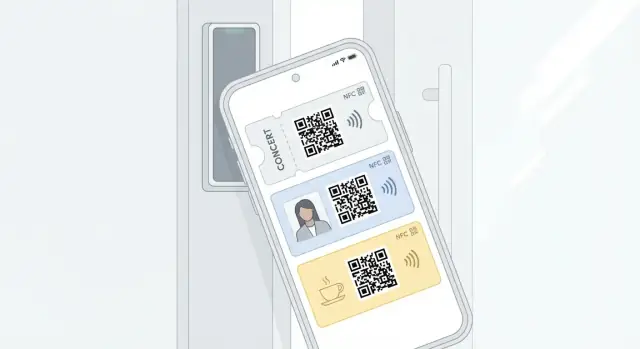
Learn how to plan, build, and secure a mobile app for digital passes and access cards using QR and NFC, with issuance flows, testing, and rollout tips.
Before you pick QR vs. NFC—or Apple Wallet vs. an in-app pass—get precise about what a “digital pass” means in your project. A single app might issue employee access badges, member IDs, event tickets, or time-limited visitor passes, and each has different requirements for identity checks, revocation, and how often the credential changes.
Write down what happens end-to-end, including who approves it and what “success” looks like at the door.
For example:
List the people who touch the system and their goals:
Pick metrics that map to both user experience and operations:
If doors or scanners must work without network connectivity, define how long offline access remains valid (minutes, hours, days) and what happens when a pass is revoked while offline. This choice affects credential design, reader configuration, and your security model later.
Your “digital pass” is only as good as the moment it’s scanned or tapped. Before you build screens, decide what the reader will accept and what users can reliably present under real conditions (crowds, poor connectivity, cold weather, gloves).
QR codes are universal and inexpensive: any camera-based scanner—or even a phone camera for visual verification—can work. They’re slower per person than tap, and they’re easier to copy if you rely on static codes.
NFC (tap) feels like a physical badge replacement. It’s fast and familiar, but it depends on compatible door readers and device support. It also has platform constraints (for example, whether you can emulate a card or must use Wallet-based credentials).
Bluetooth (hands-free) can improve accessibility and speed, but it’s more complex to tune (range, interference) and can create “why didn’t it open?” moments.
One-time links / in-app codes (rotating codes, signed tokens) are strong fallbacks and can reduce cloning risk. They require app logic and, depending on design, may require periodic network access.
Match each method to: existing reader hardware, throughput (people/minute), offline needs, budget, and support burden. Example: high-traffic turnstiles often demand NFC speed; temporary event entrances may tolerate QR.
A practical pattern is NFC primary + QR fallback. NFC handles speed; QR covers older phones, broken NFC, or sites without NFC readers.
Document exactly what happens when:
These decisions shape reader integration, security posture, and the user support playbook later.
Choosing where the credential “lives” is an early decision because it affects reader integration, user experience, and security constraints.
An in-app pass is rendered and managed by your app. This gives you maximum control over UI, authentication, analytics, and custom workflows.
Pros: full branding and custom screens, flexible auth (biometrics, step-up prompts), richer context (site maps, instructions), and easier support for multiple credential types.
Cons: users must open your app (or use a widget/quick action you build), OS-level lock-screen access is limited, and offline behavior is fully your responsibility.
Wallet passes (for example, PKPass on iOS) are familiar and designed for quick presentation.
Pros: high trust and discoverability, lock-screen/quick access, strong OS handling for presentation, and fast “show the code” behavior.
Cons: tighter platform constraints (supported barcode/NFC formats, limited custom UI), updates follow Wallet rules, and you may need Apple/Google-specific setup (certificates, issuer configuration, and sometimes review/approval). Deep telemetry is also harder.
Use Wallet when speed, familiarity, and “always available” presentation matters (visitors, events, simple door/barcode workflows). Use in-app when you need stronger identity checks, richer workflows, or complex credential logic (multi-site staff access, approvals, role-based access).
If you serve multiple organizations, plan for templates per org: logos, colors, instructions, and different data fields. Some teams ship both: a Wallet pass for quick entry plus an in-app credential for administration and support.
Regardless of container, define lifecycle actions you can trigger:
Keep these operations consistent across in-app and Wallet so operations teams can manage access without manual workarounds.
A clean data model makes the rest of your system predictable: issuing a pass, validating it at a reader, revoking it, and investigating incidents should all be straightforward queries—not guesswork.
Start with a small set of “first-class” objects and grow only when needed:
This separation helps when a user changes phones: the pass can remain conceptually the same while credentials rotate and devices change.
Define explicit states and allow only deliberate transitions:
Example transitions: pending → active after verification; active → suspended for policy violations; active → revoked when employment ends; suspended → active after admin restore.
Plan unique IDs at two levels:
Decide how readers map tokens to access rules: direct lookup (token → user → policy) or token → policy group (faster at the edge). Keep identifiers non-guessable (random, not sequential).
Treat audit logs as append-only and separate from “current state” tables. At minimum record:
These events become your source of truth for troubleshooting, compliance, and abuse detection.
A digital pass project succeeds or fails on the “first 5 minutes” experience: how quickly a real person can enroll, receive a credential, and understand what to do next.
Most teams support a mix of these steps, depending on security and deployment size:
A practical pattern is: invite link → verify email/SMS → (optional) SSO → issue pass.
Design issuance so users don’t have to “figure it out”:
Keep copy extremely clear: what the pass is for, where it will appear (app vs. wallet), and what to do at the door.
Plan this early to avoid support tickets:
Write friendly, specific messages for:
Good issuance is not just “create a pass”—it’s a complete, understandable journey with predictable recovery paths.
Digital passes are only as trustworthy as the identity and permissions behind them. Treat authentication (who you are) and authorization (what you can do) as first-class product features, not just plumbing.
Pick the login method that matches your audience and risk level:
If you support multiple tenants (different organizations), decide early whether a user can belong to more than one tenant and how they switch contexts.
Define roles in plain language (for example, Pass Holder, Front Desk, Security Admin, Auditor), then map them to permissions:
Keep authorization checks on the server (not just in the UI), and log every sensitive action with who, what, when, where (IP/device), plus a reason field for manual admin actions.
Use short-lived access tokens with refresh tokens, and support secure re-entry via biometrics (Face ID/Touch ID) for showing the pass.
For higher-security deployments, add device binding so a credential is valid only on the enrolled device(s). This also makes it harder for a copied token to be used elsewhere.
Admin tools need extra guardrails:
Document these policies in an internal runbook and link it from your admin UI (for example, /docs/admin-security) so operations stays consistent.
Security for digital passes is less about “hiding the QR code” and more about deciding what a reader is allowed to trust. The right model depends on connectivity, reader capabilities, and how quickly you need to revoke access.
You typically have three patterns:
Static QR codes are easy to share and screenshot. Prefer rotating or time-limited codes:
If you must support offline QR validation, make the QR time-boxed and signed, and accept that true real-time revocation won’t be possible without syncing readers.
For NFC, plan where secrets live and how they’re used:
Decide upfront how quickly a revoked pass must stop working (seconds, minutes, hours). That requirement drives architecture:
Write this down as a security and operations SLO because it affects reader configuration, backend availability, and incident response.
This is where your digital passes meet the real world: turnstiles, door controllers, elevator readers, and front-desk scanners. Integration choices here affect reliability, speed, and what happens when the network is down.
Common integration paths include:
Define targets early (for example, “unlock decision in under 300–500 ms”). Also document what “offline” means for each site:
Write down the systems and data you must align:
A simple “source of truth” diagram in your internal docs saves weeks later.
Treat readers like production infrastructure. Track:
Make these visible in an ops dashboard and route critical issues to on-call. A fast “why was I denied?” workflow reduces support load during rollout.
A digital pass system lives or dies by its backend: it issues credentials, controls validity, and records what happened—quickly and reliably—when people are standing at a door.
Start with a small set of endpoints you can evolve:
POST /v1/passes/issue — create a pass for a user, return an activation link or pass payloadPOST /v1/passes/refresh — rotate identifiers / update entitlements, return latest pass dataPOST /v1/passes/validate — verify a QR/NFC token presented at a reader (online readers)POST /v1/passes/revoke — immediately invalidate a pass (lost phone, terminated access)POST /v1/events — log entry attempts and outcomes (accepted/denied/error)Even if some validations happen on-device or on the reader, keep a server-side validation API for audit, remote revocation, and “break glass” operations.
If you support Apple Wallet (PKPass) or other signed payloads, treat signing keys like production secrets:
A practical pattern is a dedicated “signing service” with a narrow interface (for example, “sign pass payload”), isolated from the rest of your application.
Entry spikes are predictable (9:00 AM, event start). Plan for bursty reads:
Use caching for revocation lists and entitlement lookups, add retries with idempotency keys for issuance, and queue non-critical work (analytics, notifications) so validation stays fast. If readers go online, keep validation latency low by avoiding chatty dependencies.
Minimize stored personal data: prefer internal user IDs over names/emails in pass records and events. Define retention up front (for example, keep entry logs 30–90 days unless required longer), and separate operational logs from security/audit logs with stricter access controls.
If you’re iterating quickly—admin portal, issuance APIs, and an initial mobile experience—tools like Koder.ai can help you prototype and ship an end-to-end pass system via chat while still keeping an engineering-grade stack under the hood (React for web, Go + PostgreSQL for backend, Flutter for mobile). It’s especially useful for creating a working pilot (including deployment/hosting, custom domains, and snapshots with rollback) and then exporting the source code when you’re ready to integrate with a specific ACS or on-prem gateway.
A digital pass succeeds or fails on the screen people see at the door. Optimize for three moments: first-time setup, “show my pass now,” and “something went wrong—help me recover fast.”
If you support Apple Wallet / Google Wallet, make it clear whether the app is required after provisioning. Many users prefer “add to wallet and forget.”
Design the “present pass” screen like a boarding pass: immediate, bright, and hard to misread.
Avoid burying the pass behind menus. A persistent home-screen card or a single primary button reduces door delays.
Support Large Text, Dynamic Type, screen reader labels (“Access pass QR code”), and high-contrast themes. Treat error states as part of the UX: camera blocked, NFC off, pass expired, or reader not responding. Each should include a plain-language fix (“Enable Camera in Settings”) and a fallback action.
Time zones and device clock drift can make time-based passes look “wrong,” so display times with the venue’s time zone and add a subtle “Last synced” indicator.
Also plan for: airplane mode, flaky reception in lobbies, revoked permissions (camera/NFC), and low-battery accessibility modes. A small “Troubleshoot” link to /help/mobile-pass can prevent support queues at peak entry times.
Testing a mobile access card app is less about “does it open” and more about “does it open every time, under pressure.” Treat testing as a product requirement, not a final checklist.
Start with a matrix that reflects what users actually carry and what your doors actually use:
Include both in-app credentials and wallet flows (Apple Wallet pass / Google Wallet pass), because PKPass behavior and system UI timing can differ from your app.
Lab-perfect scans won’t match real entry lines. Run “rush tests” where 20–50 people present passes quickly, back-to-back, with:
Measure median time-to-entry, failure rate, and recovery time (what the user does next).
Actively test:
Maintain a staging environment with test readers and synthetic traffic that simulates peak events. Verify pass issuance, updates, and revocations at load, and ensure logging lets you trace “tap/scan → decision → door result” end-to-end.
A successful launch is less about a big release and more about predictable entry at every door, every day. Plan for a controlled rollout, clear support paths, and metrics that tell you where friction is hiding.
Most organizations do best with a phased rollout:
Create simple, repeatable workflows for your help desk and admins:
Keep these playbooks in one place and link them from your admin console and internal docs.
Add analytics that reflect real entry performance, not just installs:
Use these metrics to prioritize reader tuning and user education.
/contact)/pricing)A digital pass is the user-facing “card” a person presents to enter or verify entitlement (badge, member ID, ticket, visitor pass). Under the hood, it’s backed by one or more credentials (QR payloads, NFC tokens) that readers validate, and a lifecycle (issue, update, suspend, revoke, re-issue) you can manage operationally.
Start by writing the end-to-end workflow (request → approval → issuance → entry → audit), then pick measurable metrics:
These metrics keep “it works” grounded in real operations.
Use QR when you need broad compatibility and low hardware cost (camera scanners, visual checks), and can tolerate slower throughput. Use NFC when you need fast, familiar “tap-to-enter” experiences and have compatible readers.
A common, practical setup is:
Decide (and document) three things:
If you need near-immediate revocation, you’ll typically require online validation or very frequent reader/gateway syncs.
Choose Wallet when fast presentation and lock-screen availability matter (visitors, events, simple badge flows). Choose in-app when you need richer workflows and stronger identity controls (approvals, multi-site access, step-up auth).
Many teams ship both:
Model at least these entities:
Make states explicit and transitions deliberate:
pending → user is enrollingactive → usablesuspended → temporarily blockedexpired → time window endedBuild for the “first 5 minutes”:
Avoid static codes. Prefer:
If you must validate offline, accept that revocation won’t be real-time and compensate with short validity windows and periodic reader updates.
Pick one of three patterns:
Set targets (e.g., 300–500 ms decision time), define offline behavior, and monitor p95 latency, failure rates, and denial reasons by door/reader model.
Separating pass from credential makes device changes and credential rotation straightforward without “losing” the identity or history.
revoked → permanently invalidDefine who can trigger transitions (user vs admin vs automated policy) and log every change with actor, timestamp, and reason.
Also plan self-serve re-enrollment for new phones and instant remote revoke for lost devices.