

Dec 09, 2025·6 min
Balanced potluck signup sheet: categories and duplicate limits
Use a balanced potluck signup sheet to set clear categories, cap duplicates, and keep mains, sides, desserts, and drinks evenly covered.
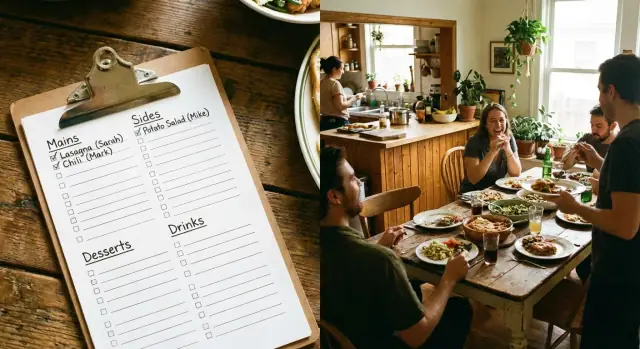
Use a balanced potluck signup sheet to set clear categories, cap duplicates, and keep mains, sides, desserts, and drinks evenly covered.
Potlucks start with good intentions and end up with four pans of brownies because everyone reaches for the same safe choice. People bring what they like to cook, what travels well, or what feels low-risk. Desserts and snacks win that contest, while mains and the boring essentials (salad, bread, ice, serving tools) get skipped.
The default approach, first come, first served, makes it worse. Early signups set the tone, and later guests copy what they see. If the first three people write cookies, the next person assumes desserts are wide open and adds cupcakes. Meanwhile, no one wants to be the only person responsible for the chicken, or guess how much food is enough, so duplicates pile up.
A balanced potluck signup sheet isn’t about being strict or fancy. It’s just a plan that covers the basics, matches the group size, and keeps repeats under control so you get variety without waste.
Here’s the common failure pattern: 18 people are invited. Ten bring dessert, five bring chips, and three bring drinks. Everyone snacks, but nobody feels full, and you go home with a mountain of sweets.
If the stakes are higher or the group is bigger, you need clearer structure. Work events, school functions, and any gathering with 20+ people benefit from defined categories and simple caps. The goal is to remove guesswork and social pressure so someone can sign up for a main dish without feeling like they’re taking on the whole meal.
Before you build your signup sheet, take five minutes to capture what the event actually requires. That small step prevents the classic outcome: ten bags of chips and no real meal.
Start with headcount, timing, and length. Lunch potlucks usually need lighter portions and more grab-and-go food. Dinner needs more center-of-the-plate options and bigger servings. A 45-minute break favors ready-to-serve dishes, while a 3-hour hangout can handle reheating.
Then check what the venue can support. No oven means nothing that needs baking on-site. Limited outlets means you shouldn’t invite five slow cookers. No fridge means you should steer away from mayo-heavy dishes and anything that must stay cold for safety.
Diet notes matter, but they don’t need to turn into a complicated form. Collect the practical basics: vegetarian needs, halal rules, common allergies (nuts, dairy, gluten), and whether you need a few kid-friendly options.
Finally, decide the serving style. Buffets work well with big trays and shared dishes. Individual servings reduce mess and help with portions, but can create more trash. Shared plates feel social, but they require serving utensils and table space.
If you want a quick checklist, keep it to the essentials:
Once you have this snapshot, your categories and caps become much easier to set.
A balanced potluck signup sheet works best when the categories fit your crowd. Coworkers at lunch need different options than a family gathering with kids, or a friends-only dinner where people like to cook.
Keep the core categories small and clear so people don’t get stuck choosing between 12 nearly identical buckets. When there are too many options, signups scatter and you still miss the basics.
For most events, these five categories cover what you need:
Add extra categories only when they’re genuinely useful. Appetizers make sense for a long hangout, but not for a quick office lunch. Salads help if you know you need lighter options. Condiments can be a category if the venue won’t provide basics.
One simple move that helps a lot: explicitly allow store-bought contributions. Some people want to help but don’t have time or kitchen access. Naming that lane removes awkwardness and still fills important gaps like soda, fruit trays, rolls, or chips.
For diet needs, avoid creating a separate category for every restriction. Instead, add a short tag field people can mark (GF, vegan, vegetarian, nut-free, dairy-free). That keeps the sheet readable while helping guests scan for safe options.
If your group includes two gluten-free guests, make the GF tag visible and encourage at least one main and one dessert to be tagged GF. That keeps the potluck welcoming without turning the signup into homework.
Potlucks stay pleasant when you treat the menu like a simple puzzle: enough food for the group, plus enough variety that people aren’t choosing between five pasta salads.
Start with headcount and set rough slot targets. You’re not estimating exact ounces. You’re making sure each category gets attention.
A practical starting point for a balanced potluck signup sheet:
Adjust for your crowd. Lunch usually needs more mains and sides. Holiday parties can handle more desserts and drinks.
Then add clear duplicate caps in plain language. Instead of banning repeats, set limits that match reality: max 2 pasta salads, max 2 chip-and-dip, max 3 cookie trays, max 1 store-bought cake. People still get freedom, but the table stays varied.
It also helps to reserve a couple of flex slots for late signups. Flex slots are pre-approved wildcards that can become whatever’s missing later. Aim for about 10% to 20% of your total dish slots.
Decide this upfront so you don’t end up negotiating in group chat. When someone tries to claim a full category, you can:
For 24 people, one workable plan is 5 mains, 6 sides, 4 desserts, 3 drinks, plus 2 flex. If cookies hit the max, the next cookie volunteer can switch to fruit, a veggie tray, plates and napkins, or take a flex slot if you still need it.
A signup works best when people can decide quickly and you can scan the list in seconds. Keep the layout tight, use plain labels, and make each row answer two questions: what are you bringing, and what does it need?
A single table (paper or digital) is usually enough. Avoid free-form text boxes that invite essays. Require a category selection so the structure holds.
These columns do the most work without feeling fussy:
Two checkboxes prevent a lot of day-of stress:
If outlets or fridge space are limited, you’ll spot problems early and ask someone to adjust before it’s awkward.
A backup choice field is a quiet problem-solver. If someone’s first pick hits a duplicate cap, you can switch them without a scramble.
Keep it short and in the same row: “Backup dish (same category): ____”.
Also make your category labels hard to misread. Use clear words and consistent casing, like Main dish, Side, Dessert, Drinks. Avoid near-duplicates like Sweets and Dessert that people will treat as different.
You don’t need a fancy tool. You need clear categories, a fixed number of slots, and rules people can follow.
When you set slot counts, you’re doing portion control without policing anyone. If desserts fill first, that’s fine as long as the sheet stops at the number you actually want.
A few rules prevent most chaos:
If three people try to claim brownies, your duplicate cap makes the third person pick another dessert or switch to drinks, and the menu stays balanced without back-and-forth.
Signup sheets fail for simple reasons: people don’t know what you mean, don’t know how much to bring, or default to what’s easiest.
One big trap is using too many categories. If you offer 10 to 12 options (salads, sides, breads, dips, finger foods, snacks, sweets), most guests stop reading and pick the first thing that sounds safe. Fewer, clearer buckets get better results.
Serving guidance is another common miss. Without it, someone may claim a main and show up with a small plate of sliders for four people. A note like “feeds 8 to 10” removes guesswork.
Vague entries also break planning. “Dessert” looks fine on the sheet, but it hides duplicates until it’s too late. Ask for specifics so guests can spread out naturally.
Also, don’t ignore venue limits. If there’s one outlet, three slow cookers create a bottleneck. If there’s no fridge, mayo-based food becomes stressful. One line at the top like “no reheating available” or “limited fridge space” nudges better choices.
Before you share the signup, do a two-minute scan.
Make sure your mains roughly match your headcount (about 1 main per 4 to 6 people is a solid rule). Confirm there’s at least one filling vegetarian main, not just salad. Check that someone has drinks and the unglamorous extras (ice, cups, plates, napkins, serving tools). Finally, look at your usual repeat offenders (cookies, chips, soda) and close a slot once it hits the cap.
If anything looks thin, fix it before it goes out. The easiest tweak is renaming a category to guide choices. If you already have three brownie entries, change “Dessert” to “Fruit or lighter dessert” for the remaining slot.
Add one short note explaining what happens when a category fills up: “If your pick is full, choose the closest open category.” That sentence prevents a lot of last-minute friction.
Picture an office lunch for 18 people. There’s limited fridge space, one small counter, and not many outlets for warmers. The goal is a menu that feels like a meal, not a table full of cookies.
You set a simple plan: 2 mains, 4 sides, 3 desserts, and 3 drinks. Everything else is optional and can be handled by the organizer.
Once it fills, it might look like this:
Two mains is enough because people will also eat sides. Desserts are capped at three, so you get something sweet without crowding out real food. Drinks are limited so the fridge doesn’t become a wall of bottles.
If three people sign up early and all pick dessert, you don’t have to accept the imbalance and hope it works out. Swap one dessert slot to a main slot while there’s still time. Thank the third dessert volunteer and ask if they’ll switch to fruit, a side, or paper goods. Most people will when the plan is clear.
Late signups are easier if you keep a few menu-safe options ready: bread or tortillas (no fridge needed), unrefrigerated drinks (tea bags, juice boxes), paper goods, or a store-bought add-on like guacamole or salsa.
The signup is only half the job. The other half is keeping it tidy after people change their minds, arrive late, or forget the serving spoon.
A day or two before the event, send one short reminder focused on gaps, not a repost of the entire list. “We still need 1 dessert, 2 sides, and 1 kid-friendly option. If you can switch, reply here and I’ll update it.”
If a category is still empty, offer easy choices so nobody has to think too hard: a store-bought salad kit or fruit tray, chips and salsa, or bakery brownies.
On the day, confirm the details that quietly make or break the table: arrival time, where food goes, and which dishes need serving tools. A pasta salad without tongs or a cake with no knife turns into a scramble five minutes before eating.
If you want something more automated than a shared doc, Koder.ai (koder.ai) can be used to build a simple category-capped signup app where categories lock once they hit your limit. When you’re happy with it, you can export the source code and keep using it for future events.
Use 5 clear buckets: Mains, Sides, Desserts, Drinks, Extras. These cover the whole table without forcing people to guess where something fits, and they make gaps obvious fast.
A simple default is 1 main per 4–6 people, 1 side per 3–5, 1 dessert per 4–6, and 1 drink per 6–8, plus 2–4 extras total. It’s not perfect math; it just prevents the “all snacks, no meal” outcome.
Set duplicate caps in plain language, like “max 2 chip-and-dip” or “max 3 cookie trays.” People still get choice, but the table stays varied and you avoid waste from accidental pileups.
Add a simple rule on the sheet: when a slot is full, choose an open slot or join a waitlist. If you also ask for a specific dish name (not just “dessert”), guests can see duplicates early and self-correct.
Ask for dish name, category, servings, and a short notes field for allergens and diet tags like GF or vegan. If you can, add two logistics checkboxes: “needs power” and “needs fridge.”
Keep restrictions as tags, not separate categories, so the sheet stays readable. A good default is to ensure at least one filling vegetarian main and to label common allergens clearly on both the sheet and the dish.
Make store-bought explicitly allowed so people with limited time can still fill real needs like fruit trays, rolls, drinks, ice, plates, or a salad kit. This usually fixes missing essentials faster than asking everyone to cook.
Yes, reserve 10%–20% of slots as flex so you can patch gaps later without renegotiating the whole menu. Flex slots become “whatever we still need” a day or two before the event.
If there’s no oven, avoid dishes that need baking on-site. With limited outlets, cap slow cookers and hot plates, and with little fridge space, steer away from foods that must stay cold for safety.
Send one short message that names the gaps: “We still need 1 main and 2 sides; desserts are full.” Then ask a few people directly to switch with a specific suggestion like fruit, drinks, or paper goods, which makes it easy to say yes.