

Dec 22, 2025·7 min
Allowance and Chore Points App for Families: Easy Setup
Set up an allowance and chore points app that kids can use daily, parents can approve in seconds, and points can convert to allowance without arguments.
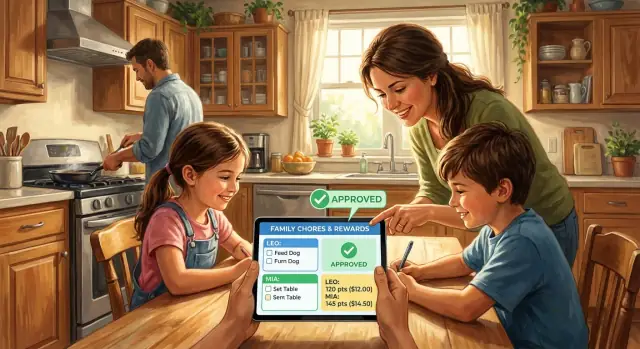
Set up an allowance and chore points app that kids can use daily, parents can approve in seconds, and points can convert to allowance without arguments.
Chores and allowance sound simple until they turn into daily arguments. Kids feel like they’re doing more than their siblings. Parents feel like they’re repeating themselves. By the time money gets mentioned, everyone’s already irritated.
What usually breaks first isn’t the chore. It’s the follow-through. Reminders get missed, approvals happen days later, and kids start asking, “Did you see that I did it?” When one child gets credit faster than another, the system feels unfair even if the chores were similar.
A chores-and-allowance setup works better when it keeps three steps in one flow: the kid marks the task done, the parent approves it, and the points update right away. That shared record cuts down on “he said, she said” because everyone can see the same history.
Points make effort visible, but they don’t fix everything. If chores are unclear, if approvals rarely happen, or if rewards change without warning, complaints will come back fast. The app supports your rules. It can’t replace them.
This approach fits families who want structure without turning one parent into a full-time “chore manager.” It tends to work best for ages 6 to 16, homes with two or more kids (where fairness matters more), and busy weeks where parents need quick approvals instead of long negotiations.
Example: a parent approves “feed the dog” during a lunch break, points post instantly, and the kid sees progress toward Friday’s allowance. No bargaining at bedtime, and no paper chart that disappears under homework.
If your family has ever said, “We need one place for chores, approvals, and rewards,” you’re usually trying to reduce friction, not add another task.
A good allowance and chore points app makes chores feel simple for kids and predictable for parents. If it creates arguments, adds steps, or hides the math, it won’t last.
For kids, the essentials are straightforward: a clear list of chores, a big obvious way to mark something as done, and a quick view of progress. They should be able to see what’s left today, what’s coming up, and how many points they’ve earned.
For parents, the goal is control without micromanaging. When a child marks a task done, it should move into a clear “needs approval” state. Approving or rejecting should take one tap, and there should be room for a short note like “Great job” or “Please wipe the counter again.” That note matters because it teaches the standard, not just the outcome.
Points also need to be understandable at a glance. Each chore should show its point value before anyone starts, and totals should update right after approval. If points are buried in menus or mixed with unrelated badges, kids stop trusting the system.
Allowance conversion should be just as plain. A family allowance tracker works best when it shows the cash-out schedule (for example, “every Friday”) and the exchange rate (like 10 points = $1) in the same place kids see their points.
Before you commit, check for a few basics: a kid-friendly check-off flow, parent approval with a reject option and a quick note, clear points per chore, simple points-to-money conversion on a schedule, and a fast history view.
History is the quiet hero. When you can pull up last week in seconds, you spend less time debating and more time helping kids build steady habits.
A kids chores rewards system works best when it matches the habits you want, not just the chores you want done. Before you set anything up, agree on the main goal. Is it responsibility, time management, helping the household, or learning to finish what you start? Pick one or two goals so kids hear a clear message.
Start small. Aim for 8 to 12 chores total across the family, not 30. A huge list feels like a never-ending checklist, and both kids and parents stop using it. Choose a mix of daily basics (small wins) and weekly tasks (bigger wins).
Write what “done” means in one simple sentence for each chore. This prevents arguments and makes approvals faster. Example: “Clean room = clothes in hamper, toys in bin, bed made.” Not “clean your room.”
Decide how you’ll handle the messy moments before they happen. Keep it simple and predictable: whether re-dos are allowed (and the time window), what “late” means, whether partial credit exists in your house, and when approvals stop for the day so no one’s approving chores at bedtime.
Finally, pick a payout rhythm that fits your family. Weekly works well for younger kids who need quick feedback. Biweekly or monthly can work for older kids, but it still helps to do a quick weekly point review so motivation doesn’t fade.
Start by setting up the people, not the chores. Create a profile for each child (name and age is enough), then add the parent accounts that can approve tasks. If two adults share approvals, agree on who approves what so kids don’t get mixed signals.
Next, add a few chores with titles that are obvious to a kid. “Clean room” is vague. “Put clothes in hamper” is clear. Keep each chore to a small, checkable result. If your app allows notes, add 1 to 2 simple steps like “trash in bin” and “toys on shelf.”
A simple setup that works for many families looks like this: add kid profiles and parent approvers, create 5 to 8 core chores (daily and weekly), set points and due days, turn on approval where it matters, and make sure there’s a single family view everyone can understand.
For points, start with a few ranges based on time and effort, then adjust after one week. Quick tasks might be 1 to 2 points (feed pet, put dishes in sink). Medium tasks might be 3 to 5 (wipe table, tidy living room). Bigger jobs might be 6 to 10 (vacuum, clean bathroom sink).
Set due times that match your real routine. If mornings are rushed, make most daily chores due after school or before dinner. Keep reminders light. One reminder at a predictable time beats five notifications everyone ignores.
Finally, decide which chores need approval. Approval helps with tasks that affect the whole house (trash out, bathroom, homework check). For low-stakes habits (make bed), auto-complete can reduce arguing. Whatever you choose, keep the dashboard simple: what’s due today, what’s waiting for approval, and how many points each kid has right now.
Points work best when they feel predictable. If point values change every week, kids bargain and parents feel stuck. Use a small set of numbers and reuse them. Think of points as a simple score, not a perfect measurement of effort.
Group chores by time and difficulty and keep the math easy. Quick chores (2 to 5 minutes) can be 1 point. Medium chores (10 to 15 minutes) can be 2 or 3. Bigger weekly chores (20 to 40 minutes) can be 4 or 5. Ongoing habits can be 1 point per day only if “done” is clear. For one-off projects, agree on a range ahead of time (like 5 to 8 points) so no one argues later.
Keep bonuses rare and specific. Extra points should be for extra effort, not for doing the basic job. If taking out the trash is 2 points, cleaning the sticky bin without being asked might earn a 1-point bonus. If bonuses become common, they stop feeling special and your system turns into constant negotiations.
Shared chores stay fair when you define each person’s part. For “clean the living room,” either split it into clear chunks or use a team score you divide evenly after approval. If kids do different amounts of work, assign points by role (vacuuming vs tidying toys vs dusting).
When a chore becomes too easy or too hard, adjust without drama. Keep the point value the same and change the chore definition first. Only change points on a set schedule, like the first weekend of the month.
If you’re using an allowance and chore points app, write these rules once and stick to them for a full month before you tweak anything.
The fastest way to break a points system is to keep changing what points are worth. Pick one conversion rate and keep it steady for a few months, even if it’s not perfect.
Most families understand these options right away: 10 points = $1, 1 point = $0.10, or 100 points = $5 (useful if your system uses bigger numbers).
After you choose the rate, set two limits so payouts don’t creep up: a maximum payout per week (or per payday), and a maximum points-per-day cap so one motivated Saturday doesn’t blow the budget. This keeps the system consistent for everyone.
Make missed chores predictable. Decide in advance what happens when chores aren’t done or aren’t approved. “No points earned” is the simplest rule. If you allow re-dos, define the window (for example, within 24 hours) to avoid debates like “I was going to do it later.”
If you want to teach money habits, add a basic split: spend, save, and give. Many families start with something like 70/20/10 and adjust later.
Then decide how you’ll actually pay: cash (simple but easy to lose), bank transfer or prepaid card (clean record), or store credit at home (points buy screen time, snacks, or small toys).
Example: if “empty dishwasher” is 5 points and “tidy bedroom” is 10, a kid who earns 120 points in a week at 10 points = $1 gets $12. If your weekly cap is $10, the extra 20 points roll over so the rules stay consistent.
Most family systems don’t fail because the idea is bad. They fail because rules feel random, feedback is slow, or the workload feels unfair. Even the best parent approval chores app can’t fix that by itself.
A fast way to lose buy-in is starting with a huge list. Kids see a wall of tasks, miss a day, and decide they already “failed.” Start smaller than you think, then add chores only after the routine sticks.
Another motivation killer is changing point values all the time. If “take out trash” is 5 points this week and 2 next week, points stop meaning anything. Review values on a set schedule, like once a month.
Approval timing matters more than people expect. When a child marks something done and approval shows up two days later, the reward feels disconnected. Try to approve the same day, even if it’s a quick check and tap.
The biggest sources of arguing tend to be predictable: points getting taken away for unrelated behavior, vague “done” standards, one child consistently getting easier tasks, chores that are hard to verify, and too many one-off exceptions.
Watch for hidden imbalance. If one child always has “feed the pet” and another always has “deep clean bathroom,” resentment builds. Rotate unpopular jobs weekly, or split big chores into smaller parts so effort matches points.
The best system is the one you can run when you’re tired. Treat your chore chart app for kids like a tiny household habit, not a big project. If it takes more than a few minutes, people stop using it.
Pick a fixed time that already happens, like right after dinner or right before screen time. Kids mark chores done. A parent checks and approves fast. If a chore isn’t done, reject it with one calm line, then move on.
Keep rejection notes short and specific. “Bathroom sink still has toothpaste. Please wipe and resubmit.” works better than “You did it wrong.” The goal is clarity, not a debate.
A rhythm that fits most families:
Make progress visible in one shared place. That might be the app dashboard on a kitchen tablet, or a quick daily screenshot on the fridge. When kids can see the goal, they nag less and plan more.
Example: On weeknights, Maya (9) checks off “feed pet” and “set table.” Ben (12) checks off “trash” and “dishwasher.” Mom approves while wiping counters. If the trash is still half full, she rejects it with one sentence. On Sunday night, they review points, notice the dishwasher is taking longer, and bump it by 1 point. Once a month they swap “vacuum” and “laundry fold” so no one gets stuck with the same job.
If you ever decide your family needs something more custom than an off-the-shelf app, Koder.ai (koder.ai) is a chat-based platform that can help you build a simple chores and allowance app around your exact rules.
Picture a family with two parents, an 8-year-old, and a 12-year-old. They use one app so kids check off chores, parents approve, and points convert to allowance on Sunday.
They keep a small set of repeating chores with clear points: the 8-year-old tidies their room daily (2 points), feeds the pet daily (1 point), and sets the table at dinner (1 point). The 12-year-old handles dishes after dinner (3 points), takes out the trash twice a week (2 points each time), and helps with the lawn once (2 points).
On busy nights, the kids tap “done” right after the chore. A parent does a quick check while walking by. If it looks right, they approve in seconds. If it’s half-done, they tap “needs redo” and add a short note like “clothes in the basket, not on the chair.”
When a chore is missed, they don’t argue about it. The rule is simple: redo the same day to get the points, or it becomes zero points and the chore still must be finished.
On Sunday, they convert points at a fixed rate (10 points = $1) and talk for five minutes:
That short review is where the system stays fair, not perfect.
Before you move your whole family into an app, do a 5-minute test run. Pick two chores, assign points, and try it on real phones (not just the admin screen). The goal is simple: kids can act, parents can approve, and nobody argues later.
Deal-breakers to check:
Then lock in two rules that prevent most fights. First, what happens when a chore is missed (“If it’s not checked off by bedtime, it’s zero points”). Second, what happens when a chore is done poorly (“Redo is allowed once, and the second try must be done within 24 hours”). If the tool can’t support a clean redo flow, you’ll end up negotiating every time.
If you try an app and realize you need extra fields (photos for proof, different rules per kid, custom categories), write that down now. You can look for a tool that supports it, or build a simple custom version later.
If it passes these checks with minimal friction for three days, it’s a safe commit.
Start with a 2-week trial, even if you’re excited to get everything perfect. Choose a small set of chores that happen every week, and resist changing the system daily. After two weeks, adjust once based on what actually caused arguments or confusion.
Write down your house rules in plain language and keep them consistent: when chores can be done, what “done” means, how approvals work, and what happens if a chore is missed. Consistency matters more than the exact point values.
If you’re using an allowance and chore points app and it still feels awkward, the app may not match your family’s rules. Before you build anything custom, list your must-haves so you don’t end up with features you never use.
A practical must-have set is: a kids screen with today’s chores and one-tap “mark done,” a parent screen to approve or reject with a quick note, clear points rules (including optional bonuses), scheduled payouts with history, and settings for profiles and deadlines.
If you want a custom version, you can build a tailored chores and allowance app with Koder.ai by describing it in chat: kids view, parent approvals, points, and payouts. It’s especially helpful when you have a specific rule like “no points count until a parent approves.” If you’re experimenting with changes, saving snapshots and rolling back can also help you test a new setup without getting stuck with it.
Most families do best when chores, approvals, and points happen in one clear flow: the child marks a task done, a parent approves it, and points update immediately. That shared record reduces arguments because everyone sees the same history.
It tends to work best for kids around ages 6 to 16, because they can understand simple rules, check off tasks, and track progress toward a reward. For younger kids, keep chores very small and approvals very quick so the system doesn’t feel like homework.
Start smaller than you think: about 8 to 12 total chores across the whole family is usually enough to build a habit. Once everyone is using it daily without stress, add more chores slowly.
Write a one-sentence definition of “done” for each chore so approvals don’t turn into debates. For example, “Clean room” becomes a simple checklist sentence like clothes in the hamper, toys put away, and bed made.
Approve the same day whenever possible, because delayed approvals make the reward feel random. If you’re busy, pick one predictable time—like after dinner—and do a fast check-and-approve pass.
Use a small, consistent point scale based on time and effort, and reuse the same numbers across chores. If something feels unfair, change the chore description first and only change point values on a set schedule, like monthly.
Pick one simple rate and keep it steady for a few months so points don’t lose meaning. Many families use something easy like 10 points equals $1, then add a weekly cap if you want tighter control.
Keep bonuses rare and tied to clearly extra effort, not the basic job. If bonuses become common, kids start negotiating every task and the system turns into constant bargaining.
The cleanest rule is that missed chores earn no points, and poorly done chores get one redo within a set time window. The key is deciding those rules in advance so you’re not negotiating at bedtime.
Use the app to support your rules, not to create them, and consider going custom only if you consistently need features like different rules per child, special approval logic, or extra proof fields. If you build a custom version with Koder.ai, describe your exact flow in chat—kids mark done, parents approve, points update, and payouts run on your schedule.