

Oct 29, 2025·8 min
AI app builder plan comparison: solo, team, enterprise
AI app builder plan comparison for solo, team, and enterprise: a buyer checklist for collaboration, governance, portability, and deployment.
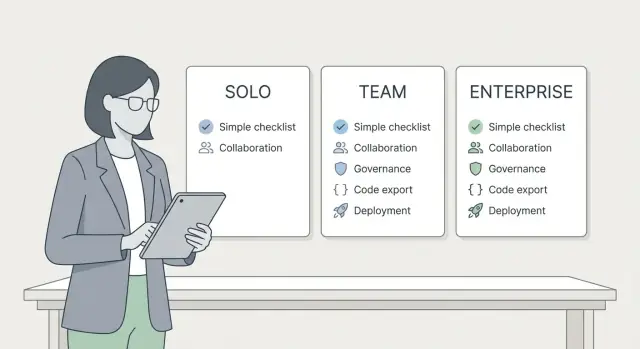
AI app builder plan comparison for solo, team, and enterprise: a buyer checklist for collaboration, governance, portability, and deployment.
Choosing an AI app builder plan sounds like “more features vs fewer features,” but the real difference is risk: how fast you can ship, how safely you can change things later, and how costly mistakes become.
What usually does not change: you can often build an app in any tier. Platforms like Koder.ai can generate real apps from chat and let you export source code, so the basic “can I make it?” is often yes.
What does change is everything around running the app for real people. Building is screens, data, and logic. Production is uptime, safe releases, clear ownership, and predictable deployment.
The plan details people forget until it hurts are simple:
If you’re non-technical, treat trials like a risk check. Ask: “How do we release safely?”, “Who has access?”, “Where does it run?”, and “Can we take the code with us?” If the answers are vague, you’re not buying a plan. You’re buying uncertainty.
Plan choice matters most when your app stops being “mine” and becomes “ours.” Before comparing prices, map how work will move from idea to release in your day-to-day routine.
Count editors, not viewers. If more than one person will change the app in the same week, you need clearer ownership and a way to avoid overwriting each other’s work. Many solo tiers assume one primary builder making most decisions.
Decide who can ship changes. A tiny app can survive “I build it, I deploy it.” But once a coworker, client, or manager needs to approve updates, you need a review step that’s easy to follow. Without it, releases turn into last-minute tweaks, unclear responsibility, and surprise bugs.
Also decide where decisions live. When someone says “we agreed to add a discount field” or “legal asked for a consent checkbox,” that needs a home. If it stays buried in chat threads, it disappears the moment the team grows.
Finally, pick your environments early. If the app affects customers or payments, you typically want separate spaces:
On Koder.ai, planning mode, snapshots, and rollback are most useful when you treat releases as a repeatable process, not a one-off publish button.
A solo plan is usually enough when one person builds and maintains the app, requirements are stable, and releases aren’t high risk. For an internal tool, a personal MVP, or a single-client prototype, the simplest setup often wins.
Even in a solo tier, don’t skip safety basics. You want a way to undo mistakes, not just “hope nothing breaks.” Look for version history, backups, and rollback. On Koder.ai, snapshots and rollback cover that “oops” moment when a small change breaks login or wipes out a table.
Treat code export as insurance, even if you don’t plan to hand-code. Exporting source code helps if you later need a custom integration, want a different hosting setup, or must keep a copy for legal or client reasons.
A quick solo-fit check:
You’re about to outgrow solo when someone else needs to edit the app, approvals matter, you start separating dev and prod, or you’re shipping often and want safer releases.
A team plan makes sense when you stop being the only person touching the app. This is also where shared logins stop being “good enough.” You need clear ownership, review, and a clean way to undo mistakes.
Real collaboration means people can work in parallel without stepping on each other. Look for task ownership, visible change history, and a simple handoff from “draft” to “ready to ship.” If every change behaves like a live change, small edits can turn into production surprises.
Even in a 2-5 person team, a few roles prevent confusion:
To keep releases boring (in a good way), set a basic routine: use a staging environment, require review, and limit who can deploy to production. Features like snapshots and rollback help when a “quick fix” triggers a chain reaction.
Shared prompts, specs, and assets also need structure. Keep one agreed spec for what the app should do, one shared source for prompts and behavior rules, and a small asset library for logos and copy. If this lives in private notes, the app becomes inconsistent and debugging takes longer than building.
Governance sounds like paperwork, but it’s mostly a few rules that prevent accidents: who can ship changes, who can see sensitive data, and who controls billing and ownership.
Start with permissions. Even in a small team, you usually want different access levels for building, deploying, and managing billing. A common failure mode is giving everyone full access “for speed,” then discovering someone deployed a test version or changed a key without telling anyone.
Next is auditability. You don’t need heavy compliance to benefit from an activity history. During a bug or outage, the first questions are always: who changed what, and when? Snapshots and rollback reduce the blast radius, but you still want to understand what triggered the rollback.
Finally, define ownership. Decide who owns the app, the account, and the source code. If you might switch tools later, make sure source code export is included and that exports are usable without the original workspace.
Questions worth asking during demos:
Example: you add a contractor for two weeks. The safer setup is build access in a non-production environment, no billing rights, and a clear offboarding checklist: remove access, rotate credentials, and confirm ownership of the app and code stays with the company.
If your app is more than a personal project, you need places to change it safely.
Dev is for building and experiments. Staging is the dress rehearsal, ideally matching production settings. Production is the real app your users depend on.
Good teams avoid “testing in production” by using a separate copy before release. Some platforms do this with branches. Koder.ai’s snapshots and rollback support the same goal: try changes, review them, and get back to a known-good version quickly.
When a release fails, rollback should be boring. You want a clear “go back to the last working version” action, plus a record of what changed. If rollback means rebuilding from memory or re-prompting the AI and hoping it matches, you lose time and trust.
As soon as two people touch the app, deployment rules matter. Simple rules are enough:
If your plan can’t separate environments (or can’t control who deploys), moving up a tier is often cheaper than the first serious production incident.
Even if you love a builder today, portability is your insurance policy. Plans change, teams grow, and you may need to move hosting, add a custom integration, or hand the project to another developer.
Start by verifying what “export” really means. Koder.ai supports source code export, but you still want to confirm the export is complete and usable outside the platform.
Checks to run during a trial:
Match the exported stack to what your team expects. If you need React for web, Go for APIs, PostgreSQL for data, or Flutter for mobile, confirm the export follows common conventions so a developer can run it without guesswork.
Keep lightweight notes alongside each export: how to run it, required environment variables, deployment notes, and a short architecture summary. That one page saves hours later.
Deployment is where plan limits show up fast. Two teams can build the same app, but the one that can ship safely and repeatedly will look far more “done.”
First, decide where the app will run. Platform hosting is simplest because deployment, updates, and rollback stay in one place. Using your own setup can make sense if you need an existing cloud account or strict internal controls, but then you own more of the work. If you might switch later, confirm you can export the full source code and deploy it yourself.
Custom domains are another common tripwire. It’s not only “can I use mydomain.com.” You also need SSL certificates, and someone who can manage DNS when things change. If your team is non-technical, choose a plan where custom domains and certificate handling are built in. Koder.ai supports custom domains on hosted deployments.
Regional requirements matter even for small apps. If a customer or policy says data must stay in a specific country, confirm you can deploy in that region. Koder.ai runs on AWS globally and can run applications in specific countries to help with data residency needs.
Keep monitoring simple. At minimum, make sure you can see recent errors, track basic uptime or health, set simple outage alerts, and roll back to a known-good version.
Enterprise plans aren’t just “more seats.” They usually add tighter control over who can do what, clearer ownership of apps and data, and support that fits risk-averse teams. The enterprise question is straightforward: do you need proof, not promises?
Security is the first filter. Security teams will ask how access is managed, how data is protected, and what happens when something goes wrong. If your company requires single sign-on, strict access rules, or detailed logs, confirm the platform supports those needs and get it documented. Also ask how incidents are handled: when you’re notified and what support you get during an outage.
Compliance and legal reviews move faster if you prepare a small review packet before the trial ends:
Procurement is the part many teams overlook. If you need invoices, purchase orders, net terms, or a named support contact, a self-serve plan can stall even after the tool is approved.
If you’re evaluating Koder.ai for enterprise use, confirm region requirements early, since it runs on AWS globally and supports running apps in specific countries to match data transfer rules.
Decide what’s non-negotiable before you look at pricing.
Write a one-paragraph scope for the first release: core screens, must-have integrations, and a realistic date. If the goal is “ship a working MVP in 2 weeks,” optimize for speed and safety, not perfect process.
List everyone who needs access in the next 60 days and what they must be allowed to do. Separate “can edit” from “can approve releases” and “can view billing.” This alone often pushes you from solo to team.
Decide how you’ll release safely. If you need dev and staging before production, write that down. If you need snapshots and rollback, make it a hard requirement.
Confirm portability and deployment needs. Do you need source code export? Do you need to self-host later, or is managed hosting fine? Do you need a custom domain, specific regions for data rules, or multiple deployments (web plus mobile)? With Koder.ai, it’s reasonable to verify what each tier includes across Free, Pro, Business, and Enterprise.
Pick the smallest plan that meets every hard requirement, then add one buffer for the next 3 months (often one more teammate or one more environment).
If you can’t explain a step in plain language, you probably need more governance, not more features.
The biggest trap is paying for “future you” and never using what you bought. If a feature won’t matter for the next 6 months, record it as a later requirement, not a reason to upgrade today.
Another common mistake is skipping portability checks. Teams build a working app, then realize they need to move it into their own repo or hand it to a dev team. Avoid the panic by testing code export early and confirming you can run and maintain the output.
Deployment permissions cause real headaches. Teams let everyone push to production because it feels faster, until a small tweak breaks signups. A simple rule helps: one person owns production releases, everyone else ships to a safe environment first.
The mistakes that show up most often, with simple fixes:
Bring this into every demo so you stay focused on what will help (or hurt) after week two, not day one.
Ask the vendor to show these in the product, not just confirm verbally. If you’re looking at Koder.ai, that means checking items like planning mode, source code export, hosted deployment, custom domains, and snapshots/rollback, then confirming what changes across Free, Pro, Business, and Enterprise.
If you can only test one thing hands-on, test the “oops” path: a teammate ships a mistake, you roll back, and you confirm the permissions and history match your rules.
Maya is a solo founder building a simple customer portal in Koder.ai. For the first month, she ships fast because it’s one app, one deployment, and decisions live in her head.
Then she hires two contractors: one to polish the UI, another to add backend features. What breaks first isn’t “coding.” It’s coordination. The fastest way to create a mess is sharing one login, changing the same screens at the same time, and pushing updates without a clear release moment.
A practical upgrade point is the moment more than one person is making changes. That’s when collaboration features matter more than raw build speed.
Boundaries that keep shipping fast:
With these rules, Maya can still ship weekly, but changes are less surprising and “who changed what” stops becoming a daily argument.
Write down what must be true for your project to ship. Keep it short. Separate non-negotiables (must have) from nice-to-haves.
A practical set of non-negotiables often includes:
Then run a 3 to 7 day pilot on one real workflow, not a toy app. For example: one small CRM screen, one backend endpoint, and basic login, deployed the same way you’d deploy in production. The goal is to find where collaboration and governance break, not to build everything.
Before you pick a plan, test the “point of no return” moments:
If you’re evaluating Koder.ai, compare Free, Pro, Business, and Enterprise using that pilot. Pay closest attention to roles and permissions, planning mode, source code export, hosting and deployment options, custom domains, and snapshots with rollback.
Pick the smallest plan that clears every non-negotiable today, with a clean upgrade path for the next 3 to 6 months. You’ll avoid paying for features you won’t use, while staying safe as your app and team grow.
Start with the smallest plan that meets your non-negotiables for releasing safely: who can deploy to production, whether you can test changes away from users, and how fast you can undo mistakes. If those safety and ownership basics aren’t covered, a cheaper plan usually becomes expensive after the first incident.
Usually the biggest change is operational risk, not whether you can build something at all. Higher tiers tend to improve collaboration, access control, safer release workflows, and clearer ownership, which matters once real users depend on the app.
Move up when more than one person will edit the app in the same week, or when you need approvals before releases. The moment you stop being “the only builder,” you need separate logins, clearer permissions, and a predictable way to ship without surprises.
At minimum, teams need someone who can edit, someone who can review, and someone who can manage access and billing. The practical goal is simple: not everyone should be able to deploy to production, and it should be obvious who owns a release when something goes wrong.
Use separate environments when changes can impact customers, payments, or important data. A basic setup is dev for fast iteration, a safe preview space for testing, and production for what users rely on, so you’re not using real users as testers.
Snapshots and rollback are your safety net when a “small change” breaks something important like login or data flows. You want the ability to return to a known-good version quickly, without trying to recreate a working state from memory or redoing prompts under pressure.
Treat export like insurance: even if you never plan to hand-code, you may later need custom integrations, different hosting, or a clean handoff to developers. During a trial, export early and check that the project is complete enough to run outside the platform, not just partial snippets.
Pick hosted deployment if you want the simplest path to shipping and maintaining uptime with fewer moving parts. Consider self-hosting only if you already have strong internal infrastructure needs, and confirm your plan supports a usable source export so you can actually run the app elsewhere.
A custom domain is more than pointing a name at an app; it includes certificate handling and DNS changes when things evolve. If your team is non-technical, choose a plan where custom domains are supported and the operational steps are straightforward, so launches don’t stall on setup details.
If you have data residency or country-specific requirements, verify you can deploy where you need before you commit. Koder.ai runs on AWS globally and can run applications in specific countries, which can help with data transfer rules, but you still want the chosen region and responsibilities clearly confirmed.