

Dec 16, 2025·7 min
Agent roles for chat-built apps: planner to reviewer workflow
Agent roles for chat-built apps: define clear personas, handoff prompts, and quick checks so your team ships more reliable web and mobile apps from chat.
Why reliability breaks when you build apps by chat
Chat helps you move fast, but it’s bad at holding a whole product in its head. Most failures aren’t “bad code.” They’re gaps between what you meant, what the assistant assumed, and what actually shipped.
The first crack is missing requirements. You ask for “a simple signup flow,” but nobody writes down edge cases like password reset, email already used, or what happens if the user closes the tab mid-step. The assistant fills in the blanks, and those guesses become your product.
The second crack is inconsistent decisions. One message picks a data model, the next adds a shortcut, and a third changes naming or validation rules. Each choice can be reasonable on its own. Together, they create a fragile app that breaks when you add the next feature.
The third crack is the lack of proof. Without basic tests and clear acceptance checks, you only discover problems after you click around. That’s when “it works on my screen” turns into late nights, hot fixes, and random regressions.
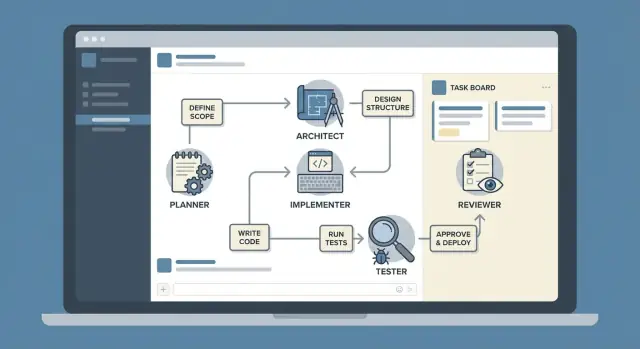
A simple fix is to use reusable personas: a Planner who makes the work concrete, an Architect who sets the shape, an Implementer who builds in small steps, a Tester who tries to break it, and a Reviewer who catches the last 10% that causes 90% of pain. This isn’t a heavy process. It’s a repeatable way to keep decisions consistent.
This approach works for solo founders, small teams, and non-technical builders using chat tools like Koder.ai. You can still move fast, but you stop relying on luck.
These roles don’t magically guarantee quality. You still need clear inputs (what success looks like, constraints, and priority), and you still need to read the outputs. Think of roles as guardrails: they reduce avoidable mistakes, but you’re still the driver.
The core idea: separate responsibilities, then hand off cleanly
Reliability drops when one chat tries to do everything at once: decide what to build, design it, code it, test it, and judge it. Mixing those jobs makes it easy to miss edge cases, change requirements mid-build, or “fix” bugs by adding more confusion.
A practical way to prevent that is to keep the roles consistent and narrow. Each role owns one job, and it’s not allowed to “help” outside that job. That keeps decisions traceable and makes mistakes easier to spot.
Use this sequence for almost any feature:
- Planner: define the goal, users, acceptance checks, and what is out of scope
- Architect: propose the simplest design that can support the goal
- Implementer: build exactly what was planned, in small steps
- Tester: try to break it and report failures clearly
- Reviewer: check last-mile details (naming, security basics, UX gaps, risky shortcuts)
Clean handoffs matter as much as the roles. Each handoff should include what was decided, what assumptions were made, and what “done” means. If you use Koder.ai, treat each role as a separate chat turn or snapshot so you can roll back when a decision turns out wrong.
Loop back on purpose, not by accident. If tests fail, go back to Implementer with a minimal bug report. If the design can’t support a new requirement, go back to Architect. If the requirement is unclear or keeps changing, pause and return to Planner.
Keep the same roles and order across features. After a few runs, you build muscle memory: you ask better questions early, and you stop redoing work late.
Persona 1: Planner (make the work clear before anyone builds)
The Planner’s job is to turn a fuzzy idea into something you can build and verify. This isn’t “writing docs.” It’s agreeing on what “done” means before the first screen or API endpoint exists.
A good Planner output stays small and testable: a clear problem statement, a few user stories, simple acceptance criteria, and a short list of edge cases. It also states what you are not doing yet, so the Implementer doesn’t accidentally build a bigger feature than you wanted.
Planner prompt template (small, prioritized plan)
Use this when you have a feature idea and want a tight plan the rest of the roles can follow.
You are the Planner. Turn the feature idea below into a buildable plan.

Feature idea:
<PASTE IDEA>

Context:
- App type:
- Target users:
- Current behavior (if any):
- Constraints (time, data, compliance, devices):

Output (keep it short):
1) Problem statement (1-2 sentences)
2) Assumptions (3-6 bullets)
3) Questions to confirm (max 6, prioritized)
4) User stories (2-5)
5) Acceptance criteria (5-10, testable, specific)
6) Edge cases & failure modes (3-8)
7) Out of scope (3-6 bullets)
8) Small milestone plan (2-4 steps, highest value first)
Planner to Architect handoff (structured and short)
Send this message as-is (filled in) to reduce back-and-forth.
PLANNER HANDOFF
Feature: <name>
Problem: <1-2 sentences>
Users: <who>
Must-haves (AC): <5-10 acceptance criteria>
Key edge cases: <3-6>
Out of scope: <3-6>
Open questions (need Architect input): <1-4>
Constraints: <tech, data, privacy, deadlines>
Success signal: <how we’ll know it worked>
If you do only one thing as Planner, make the acceptance criteria measurable. For example: “User can reset password and receives an email within 60 seconds” beats “Password reset works.”
Persona 2: Architect (choose a shape the app can actually support)
The Architect turns a good plan into a buildable shape. The job isn’t to invent fancy patterns. It’s to pick the simplest structure that still works when real users click around, data grows, and errors happen.
This is where reliability starts to feel real: clear boundaries, clear data, and clear failure paths.
A practical Architect output usually covers:
- Screens (React or Flutter) or API endpoints (Go)
- A small data model (PostgreSQL tables and key fields)
- One or two core flows (happy path plus what can go wrong)
- Non-functional basics that matter now (auth, privacy, performance, logging)
- Tradeoffs (what you’re not building yet)
Keep it concrete. Instead of “notifications system,” say “POST /api/alerts, table alerts(user_id, type, status), show unread count in header.” Instead of “secure,” say “JWT session, role checks on admin endpoints, protect PII fields.”
Prompt template: Architect handoff (forces tradeoffs)
Use this when the Planner hands work to the Architect, or when you want to reset a feature that feels messy.
You are the Architect.
Goal: design the simplest buildable structure for this feature.
Context:
- App type: [web/mobile/both]
- Stack: React UI, Go API, PostgreSQL DB (Flutter screens if mobile)
- Existing constraints: [auth method, existing tables, deadlines]

Input (from Planner):
- User story:
- Acceptance criteria:
- Out of scope:

Deliverables (keep it short and specific):
1) UI map: list screens/components with 1-line purpose each.
2) API map: list endpoints with method, path, request/response fields.
3) Data model: tables + key columns + relationships.
4) Key flows: happy path + 2 failure cases and how UI should respond.
5) Non-functional needs: security, performance, audit/logging (only what matters now).
6) Tradeoffs: 3 decisions you made (and what you avoided) to prevent over-design.

Rules:
- Prefer the smallest option that meets acceptance criteria.
- If something is unclear, ask up to 3 questions, otherwise make a reasonable assumption and write it down.
If you’re building in Koder.ai, this kind of handoff makes implementation faster because the Implementer can follow a clear map instead of guessing the shape mid-build.
Persona 3: Implementer (build in small steps, keep scope tight)
The Implementer turns a clear plan into working code, without changing the plan. This is where most reliability is won or lost. The goal is straightforward: build exactly what was agreed, in small steps you can undo.
Treat every change like it might be rolled back. Work in thin slices and stop when the acceptance criteria are met. If something is unclear, ask. Guessing is how small features become surprise rewrites.
A good Implementer leaves a short trail of evidence: the build order, what changed, what didn’t change (to avoid hidden scope creep), and how to verify.
Here’s a prompt template you can paste when handing work to the Implementer:
You are the Implementer.

Context:
- Feature: <name>
- Current behavior: <what happens today>
- Desired behavior: <what should happen>
- Acceptance criteria: <bullets>
- Constraints: <tech choices, performance, security, no schema change, etc.>

Before writing code:
1) Ask up to 5 questions if anything is unclear.
2) Propose a step-by-step build plan (max 6 steps). Each step must be reversible.
3) For each step, list the exact files/modules you expect to touch.

Then implement:
- Execute steps one by one.
- After each step, summarize what changed and how to verify.
- Do not add extras. If you notice a better idea, stop and ask first.
Example: if the Planner asked for “Add a password reset email flow,” the Implementer shouldn’t also redesign the login screen. Build the email request endpoint, then the token handling, then the UI, with a short verification note after each step. If your tool supports snapshots and rollback (Koder.ai does), small steps become much safer.
Persona 4: Tester (prove it works, and show how it fails)
Run the full persona chain
Turn Planner to Reviewer into a repeatable workflow inside one Koder.ai project.
The Tester’s job is to break the feature before users do. They don’t trust the happy path. They look for unclear states, missing validation, and edge cases that show up on day one.
A good Tester output is usable by someone else: a test matrix tied to acceptance criteria, a short manual script, and bug reports with exact steps (expected vs actual).
What to test (UI, API, and data)
Aim for coverage, not volume. Focus on where failures are most expensive: validation, permissions, and error states.
- UI: empty states, error messages, loading states, disabled buttons, keyboard-only flow
- API: missing fields, wrong types, auth failures, rate/timeout behavior
- Data validation: duplicates, max lengths, invalid formats, server-side checks (not only UI)
- Permissions: what a normal user can do vs an admin
- Regression: one or two “did we break existing behavior?” checks
Example: if you added “Create invoice,” try a negative amount, a 10,000-character note, a missing customer, and a double-submit click.
Prompt template: generate a test matrix from acceptance criteria
Use this when handing off from Implementer to Tester. Paste the acceptance criteria and any relevant UI/API notes.
ROLE: Tester
GOAL: Produce a test matrix tied to acceptance criteria, including negative tests.
CONTEXT:
- Feature: <name>
- Acceptance criteria:
  1) <AC1>
  2) <AC2>
- Surfaces: UI screens: <list>; API endpoints: <list>; DB changes: <notes>
OUTPUT FORMAT:
1) Test matrix table with columns: AC, Test case, Steps, Expected result, Notes
2) Negative tests (at least 5) that try to break validation and permissions
3) Manual test script (10 minutes max) for a non-technical person
4) Bug ticket template entries for any failures you predict (Title, Steps, Expected, Actual, Severity)
CONSTRAINTS:
- Keep steps precise and reproducible.
- Include at least one test for loading/error states.
Persona 5: Reviewer (catch the last 10% that causes 90% of pain)
The Reviewer is the final quality pass. Not to rewrite everything, but to spot the small issues that later turn into long bugs: confusing names, missing edge cases, weak error messages, and risky shortcuts that make the next change harder.
A good review produces clear outputs: what was checked, what must change, what is risky but acceptable, and what decision was made (so you don’t relitigate it next week).
What the Reviewer looks for
Keep the pass short and repeatable. Focus on the things that most often break reliability:
- Consistency: naming, patterns, folder structure, and UI behavior match the existing app
- Security basics: input validation, auth checks, no sensitive data in logs
- Errors: user-facing messages are clear; server errors are actionable; no silent failures
- Maintainability: small functions, obvious intent, no duplicated logic without a reason
- Future changes: what will be hard to modify later, and how to reduce that cost now
Structured review prompt (approve or changes requested)
Use this handoff when the Implementer says the feature is done:
You are the Reviewer. Do a final review for correctness, clarity, and maintainability.

Context
- Feature goal:
- User flows:
- Key files changed:
- Data model/migrations:

Review checklist
1) Correctness: does it meet the goal and handle edge cases?
2) Security basics: auth, validation, safe logging.
3) Errors: clear messages, consistent status codes.
4) Consistency: naming, patterns, UI text.
5) Maintainability: complexity, duplication, TODOs.

Output format
- Findings (bulleted): include file/function references and severity (high/medium/low)
- Requested changes (must-fix before merge)
- Risk notes (acceptable with reason)
- Decision log updates (what we decided and why)

Finish with exactly one:
APPROVE
CHANGES REQUESTED
If the Reviewer requests changes, they should be small and specific. The goal is fewer surprises in production, not a second development cycle.
Handoff templates that prevent rework
Most rework happens because the next person starts with a fuzzy goal, missing inputs, or hidden constraints. A simple handoff template fixes that by making every transfer predictable.
Use one shared header every time, even for small tasks:
- Context + Goal: what you’re building and why, in one paragraph.
- Inputs: screens, API notes, data fields, sample records, related code areas.
- Constraints: tech choices, deadlines, performance, security, must-keep behaviors.
- Definition of Done: measurable checks (what must pass, what must exist).
- Assumptions / Open questions / Decisions made: what you assumed, what is unknown, and what you locked in.
Here is a single handoff example (Architect -> Implementer):
ROLE HANDOFF: Architect -> Implementer
Context: Add “Invite team member” to the admin area.
Goal: Admin can send an invite email; invited user can accept and set a password.
Inputs: Existing Users table; auth uses JWT; email provider already configured.
Constraints: Go backend + PostgreSQL; React UI; audit log required; no breaking auth changes.
Definition of Done:
- UI: invite modal + success state
- API: POST /invites, POST /invites/accept
- DB: invites table with expiry; audit event on create/accept
- Tests: happy path + expired invite + reused token
Assumptions: Email templates can reuse “reset password” styling.
Open questions: Should invites be single-use per email?
Decisions made: 72h expiry; tokens stored hashed.
If you want this to stick, store your templates somewhere everyone can copy from. If you’re building in Koder.ai, you can keep these prompts in Planning Mode and take a snapshot before implementation so a rollback is painless if scope shifts.
Step-by-step workflow you can follow for every feature
Make roles work for teams
Bring teammates in so Planner, Implementer, Tester, and Reviewer work stays consistent.
Reliability improves when you treat each feature like a mini release, with clean handoffs between roles. Start with one user story, not a pile of ideas. Write it in plain language, then add acceptance criteria someone can check without guessing.
Design only the minimum shape needed to support that story. The goal isn’t a perfect system. It’s a simple plan that won’t collapse when you add the next feature.
A practical flow looks like this:
- Planner: Confirm the user story, edge cases, and acceptance criteria (success, failure, and “what if the user does X”).
- Architect: Propose the smallest data model and API surface (tables/fields, endpoints, auth rules), plus a short note on what you’re not building.
- Implementer: Build one thin slice end-to-end (UI to API to DB) that meets the acceptance criteria, even if the UI is plain.
- Tester: Run a repeatable test script, log failures with steps to reproduce, and note any unclear behavior.
- Reviewer: Do a final pass for security basics and product polish, then record decisions.
Keep each step’s output small and explicit. One handoff message per role is usually enough: inputs, decisions made, and what you need next.
Finish by writing a one-paragraph change note: what was added, what was removed, and what to watch for in the next release. This “memory” prevents the same arguments and bugs from coming back later.
A realistic example: one feature from idea to reviewed release
Feature: a simple CRM screen where users can add contacts, apply tags (like “Lead” or “Vendor”), and search by name or tag. Constraint: you have 90 minutes, and you must reuse the existing contacts table (no breaking migrations). Mobile needs a single “Add Contact” screen that fits on one page.
Here’s what the handoff looks like when you use this persona chain. Each role produces a small artifact the next person can trust.
Planner output (definition + acceptance)
- Goal: Add contacts with tags and fast search.
- Must: Create, edit, list contacts; add/remove tags.
- Search: matches name OR any tag; results update in under 300ms.
- Constraint: keep existing contacts table; tags can be new table.
- Done when: 5 test cases pass; mobile screen has no scroll on common devices.

Architect output (shape + data)
- Tables: contacts (existing), tags (id, name), contact_tags (contact_id, tag_id).
- API: POST /contacts, PATCH /contacts/:id, GET /contacts?query=.
- Search: SQL ILIKE on contact name + join on tags.
- UI: Contact list with search bar; contact form with tag picker.
- Risk: duplicate tags (“lead” vs “Lead”) - enforce lowercase unique.

Implementer output (small steps)
- Step 1: Add tags + join table migrations.
- Step 2: Update backend handlers and query.
- Step 3: Build React UI list + form; wire to API.
- Step 4: Add basic validation (name required, tag length).
- Step 5: Add loading/error states; keep UI responsive.

Tester output (proof + failure)
- Case: search “lea” returns contacts tagged “lead”. FAIL: returns none.
- Case: adding tag “Lead” then “lead” should not create two tags. PASS.
- Case: empty name rejected. PASS.
- Bug note: backend search only checks contact name, not tags.

Loop-back (Planner update)
- Update acceptance: search must match tags via join; include a test for it.
- Add edge case: searching by tag should return even if name doesn’t match.

Reviewer output (last 10%)
- Check: query uses indexes; add index on tags.name and contact_tags.tag_id.
- Check: error messages are clear; avoid raw SQL errors.
- Check: mobile form spacing and tap targets.
- Confirm: snapshots/rollback point created before release.
That single failed test forces a clean loop-back: the plan gets sharper, the Implementer changes one query, and the Reviewer validates performance and polish before release.
Common traps (and simple fixes)
Go from plan to architecture
Generate a clear React, Go, and PostgreSQL shape from your handoff, then implement it.
The fastest way to lose trust in chat-built software is to let everyone do everything. Clear roles and clean handoffs keep work predictable, even when you move fast.
- Personas blur together (building before requirements are stable). Fix: lock the Planner output before any code changes. Template tweak: “Implementer: do not write code until the Planner’s Scope, Assumptions, and Acceptance Criteria are present. If missing, ask 3 questions max.”
- No Definition of Done, so work never finishes. Fix: every handoff must include a Done line. Example: “Done means: acceptance criteria met, no new TODOs, and changes documented in 5 bullets.”
- Tester only checks the happy path. Fix: require an invalid-input case and an edge case every time. Template tweak: “Tester: provide (1) happy path, (2) one invalid input case, (3) one edge case. If you can’t run it, describe exact steps and expected output.”
- Reviewer debates style instead of product risk. Fix: force the Reviewer to focus on risk first. Template tweak: “Reviewer: list the top 3 risks (security, data loss, broken UX, performance). Mention style only if it blocks readability or causes bugs.”
- Handoffs miss context, so the next role guesses. Fix: require a short Handoff Block every time: “Goal, What changed, How to verify, Known gaps.” Keep it under 8 lines.
A small habit that helps: when the Implementer finishes, paste the acceptance criteria again and tick them off one by one.
Quick checklist for reliable chat-built releases
Run this checklist before you build, before you merge, and right after you ship.
Pre-build (before anyone writes code)
- Write the goal in one sentence and list 2-3 acceptance checks (what “done” looks like).
- Name what is out of scope (so the Implementer doesn’t guess).
- List the exact data fields and rules (types, required/optional, defaults).
- Note the main error cases (bad input, missing permissions, empty states, timeouts).
- Decide how you will verify it quickly (a screen, an API response, a log line).
A small example: “Add invite-by-email.” Include fields (email, role), what happens if the email is invalid, and whether you allow re-invites.
Pre-merge and post-release (reduce fear of change)
- Pre-merge: confirm tests ran (or at least a short manual script) and record what was checked.
- Pre-merge: cover 2-3 edge cases explicitly, not “should work.”
- Pre-merge: note a rollback plan and what change would trigger it.
- Post-release: watch 1-2 signals (errors, slow pages, failed jobs) for the first hour/day.
- Post-release: capture user feedback and write down known limits so support isn’t guessing.
If your platform supports it (Koder.ai does), take a snapshot before risky edits. Knowing you can roll back makes it easier to ship small, safe changes.
Next steps: make this your default workflow
Pick one small feature and run the full persona chain once. Choose something real but contained, like “add password reset,” “create an admin-only page,” or “export invoices to CSV.” The point is to see what changes when you force clean handoffs from Planner to Reviewer.
If you’re using Koder.ai (koder.ai), Planning Mode is a practical place to lock scope and acceptance checks before you build. Then snapshots and rollback give you a safe escape hatch when a decision turns out wrong, without turning the whole project into a debate.
To make the workflow repeatable, save your persona prompts as templates your team can reuse. Keep them short, keep the output formats consistent, and you’ll spend less time re-explaining the same context on every feature.